New post
Avatar
0

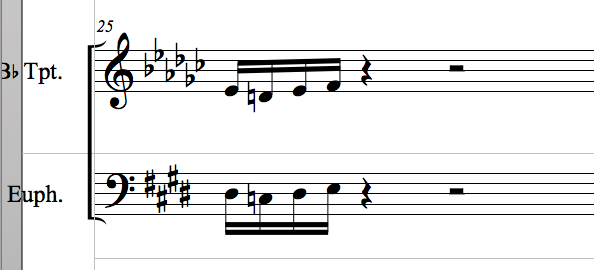
I am running Finale 2014.5 on a Mac.  In my score I have a section where the key is E Major/C# minor, and I want the Bb trumpet part to display as Gb Major.
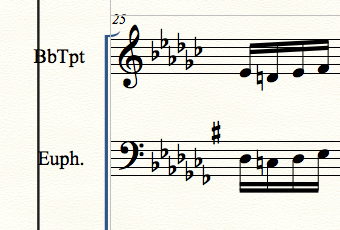


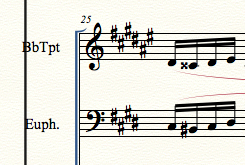
However, when I do that, the parts for euphonium and tuba are being displayed with seven flats and a sharp (Fb Major) as the key signature, instead of E Major.  If I change the euphonium part to E, the trumpet key signature changes to F# instead of Gb.


How can I configure Finale to display Gb Major for the Bb trumpet and E Major for the bass clef parts when the concert key is set to E?  Note that I am using the Finale defined transpositions for the parts in the score, so euphonium automatically displays as bass clef down an octave from trumpet.

6 comments

Date Votes
Avatar
0

Hello David,

So there are a couple ways to go about this, but the easiest way (for what you describe your needs in this piece are) will be to make a staff style.

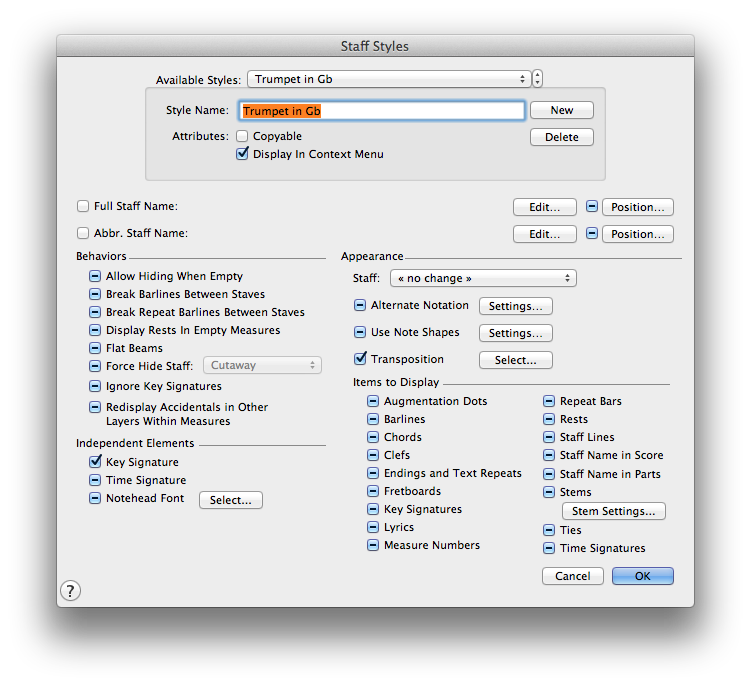
  • To do this, select the Staff Tool, right click (control + click) and select "Define Staff Style"
  • Then Press "New" and Name the Staff Style whatever you'd like (I called mine, Trumpet Gb)
  • The only boxes that need to be modified so that the check mark is showing is the "Key Signature" box in the bottom left near "Independent Elements" and then "Transposition" near "Appearance"
  • Then, next to Transposition, press "Select"
  • For your particular case, what you are going to want to do is select "Other" from the pull-down and type "1" near "Interval" and then type "-10" near "Key Alter." This is what will make the Gb key signature show while maintaining the Trumpet transposition.
  • Press "OK" to save the changes you made to the transposition, and then Press "OK" to save the new staff style.
  • Still using the Staff Tool, highlight the section of the music you want to change in the Trumpet staff and then right click (control click) and select your newly created staff style.

Voila! It should display as you are needing.


Hopefully that works for you!

Comment actions Permalink
Avatar
0

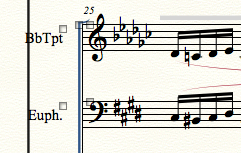
CJ. thanks for the detailed reply.  It was crystal clear, and it worked all except for one thing.  When I applied the Trumpet in Gb staff style, it changed the key signature as desired, but it did not keep the pitch of the notes, i.e. it left the notes where they had been in the F# key signature.  It went from 


to


Compare the trumpet part above to the first screen shot in the first posting.  How do I get it to apply the correct transposition?

Comment actions Permalink
Avatar
0

Hello David,

Yes, my apologies. Instead of typing "1" into the "Interval," change it to "2." That is what will keep the trumpet transposition. Please let me know if that works.

Comment actions Permalink
Avatar
1

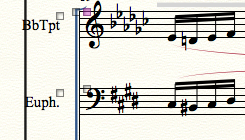
I figured it out.  The interval should be 2 not 1.  With interval set to 2 and key alter. set to -10, it does the right thing:

Comment actions Permalink
Avatar
1

We posted at the same time.  Thanks again for your help.

-Dave

Comment actions Permalink
Avatar
0

I had a similar problem with my composition (with "triumphiant" moment in E Major). All Bb-instruments (clarinets, tenor sax & trumpets) were shown in F# Major instead of Gb Major.

My Finale 2014.5 version is for Windows and CJ's instructions  solved the problem.

Cheers,

Klaus


Comment actions Permalink

Please sign in to leave a comment.