New post
Avatar
0

My issue arises whenever I make manual adjustments using the note position tool to existing notes in layer 2. I go on to input new notes (in both layers 1 and 2) using speedy entry. Although these new notes are in a different measure entirely, my note position adjustments return to default. This happens every time I use speedy entry. Is there a way for me to freeze note position adjustments? 

In other words, this:

becomes this:
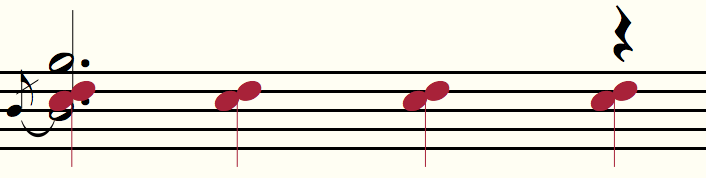
- the moment that I exit Speedy Entry anywhere on the page.


Many thanks!


Finale 2014.5

Mac OS X 10.11

3 comments

Date Votes
Avatar
0

After testing the issue further, I realized that the note positions are affected only when I use speedy entry in another staff on the same measure. That makes the issue slightly more specific, but I still need help!

Comment actions Permalink
Avatar
0

Hi Isaac

First off, do you have "Avoid Collision Of" "Notes and accidentals" enabled in document options?

That setting can be found in the "Music Spacing" section of Document Options (Document->Document Options)

There is also another setting further down in the same section, "Manual Positioning" which you can set to "Incorporate"


Cheers...


Daz :o)


Comment actions Permalink
Avatar
0

Hi Darrin,


My settings matched both of your recommendations before the issue arose, but your suggestion led me to investigate Document Options -- Layers. I unchecked "affects music spacing" under layer 2, and it may just be the answer I'm looking for. As long as it doesn't lead to different issues down the road!


Thanks for your help!

Comment actions Permalink

Please sign in to leave a comment.