New post
Avatar
0

Windows 10

Finale 25

My orchestra piece uses 26 instruments = 26 tracks. It appears that the mixer handles only 16 tracks, the first 16 listed in the score manager window of Aria Bank 1. How do I view the mixer for the other 10 instruments that are listed in Aria Bank 2?

Charles

4 comments

Date Votes
Avatar
0

Hi Charles.

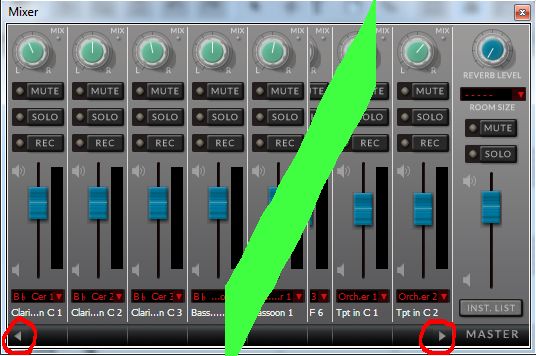
If you look to the bottom of the mixer window, you will see a little arrow at the left and right of the window.
Below is an image (merged) of the left and right sides of the mixer. Note the red circles
Clicking on those arrows will scroll one instrument to the left/right.

I've always found that the mixer is a pita to use.
Instead I set the levels numrically in the Instrument list.


Open the score manager/instrument list.
If the "Vol" and "Pan" levels are not listed, use the "Custom View" button and select "Mix" to bring them into view


Cheers...


Daz :o)

Comment actions Permalink
Avatar
0

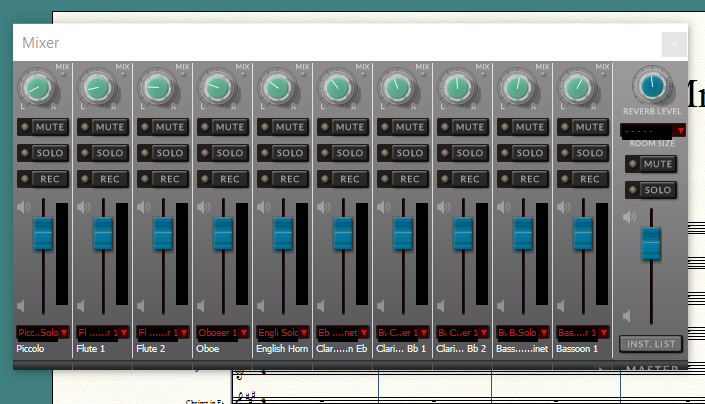
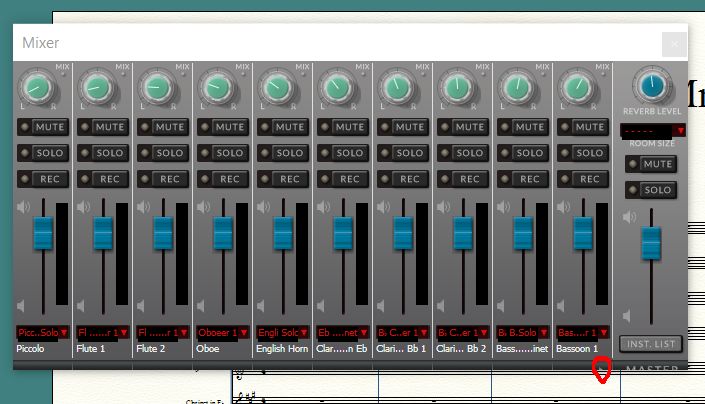
Thanks. I hate to say this, but I'm stuck just getting the bottom of the mixer window properly set. The image shows that it's cut off. I try to enlarge the window in the typical windows way - bring the mouse to the edge till the 2-headed arrow pops ups, then drag to the desired window size to include hidden items, such as the bar at the bottom of the mixer. But my mouse does not give me the 2-headed arrow. Any suggestions for that?


Comment actions Permalink
Avatar
0

Hi Charles


It looks like that this is a Windows 10 issue and, unfortunately, I cannot help much there, being limited to Windows 7.

I would suggest opening a support ticket with MM over this. (scroll to the top of this page, and next to your name is "Submit a request". click on that)

They may be able to help with that, but more likely it will have to wait until a maintenance release as it look to be a UI bug.


I do note that I can see just the very top of the arrow on the right hand side of the image you posted.

Have you tried clicking on that to see if the instruments scroll?


Cheers...


Daz :o)

Comment actions Permalink
Avatar
0

Thank you again Darren,

I did notice the dot of the arrow, and I was able to click on it and got to the other tracks. I'll submit a request. 

Comment actions Permalink

Please sign in to leave a comment.