New post
Avatar
0

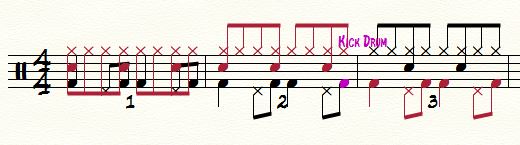
Percussion professor Paul Kreibich from Cal State Fullerton created this typical bossa nova drum pattern in Sibelius.  He said it was easy.  Note that the ride & snare stems point up, while the bass drum & hi hat stems point down.

I just spent half an hour trying to duplicate the pattern in Windows Finale 2014.5 and encountered nothing but frustration.  I tried voice 1/ voice 2, alternate layers, the "flip stem" option, and the "join beams" option.  Nothing worked.  Voice 2 would put the note on the wrong beat or jump to the next measure.  Layer 2 would not enter the note at all.  Flip stem was totally ineffective.  And the 1/8 notes in the ride symbol are not beamed in groups of 4.  Any suggestions would be appreciated.

10 comments

Date Votes
Avatar
0

Hi Craig


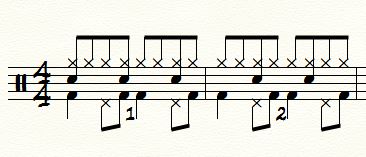
I was able to enter the notation very easily using simple entry The only difference being the notehead used for the snare. The example shows a cross notehead. Finale uses a standard notehead. This can be changed in the percussion map very easily


Essentially I used the Drum Set Percussion Map (Just added the instrument as "Drum Set" when I created the document)

Used Simple Entry. My first attempt I entered the Bass/Kick and HiHat pedal on layer 1, then entered the HiHat and Snare on layer 2

As you can see, the stem directions are wierd. So I just flipped stems to get the correct look.

My second attempt I entered The Kick/Bass and HiHat Pedal on layer 2 and then the rest on layer 1.

So the attached screen shot shows the two measures. Measure 1 is entered twice, showing me flipping stems.

Measure 2 (from the example) was entered just the once (measure 3 on my screenshot)

Cheers...


Daz :o)


Comment actions Permalink
Avatar
0

Hi Craig


Just an update.

I've tried this using speedy entry and again encountered no issues.

I entered the up stem notes while in layer 1, then switched to layer 2 and entered the down stem notes.


How exactly are you setting your instrument up? Are you using one of the pre-defined instruments from the wizard, or are you creating a drum staff from scratch?


As to the beaming issue, what time sig are you using?


If you're still facing issues, upload a demo score somewhere and post a link here


Cheers...


Comment actions Permalink
Avatar
0

I started with NEW / DOCUMENT FROM TEMPLATE  /   BAND TEMPLATE   /   JAZZ BAND (HAND WRITTEN).  

This template already has the drum staff set up.  Speedy entry is a breeze, until you start worrying about stem direction.  It also plays back very well.   To use 1 or 2 measure repeats, you first copy&paste the notes onto all measures and then change the staff style to "2-bar repeat."   

Comment actions Permalink
Avatar
0

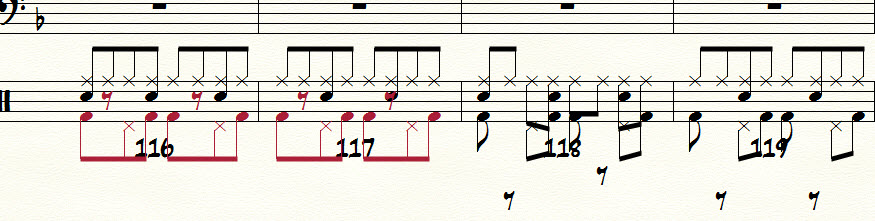
With Speedy Entry and Layers, i figured out how to do it  (FIRST 2 MEASURES IN THE ATTACHED SCREEN SHOT).  The problem before was that i was failing to enter the 1/8 note rests between the b.d., hi-hat, and snare notes.    So now, the vertical placement and stem directions are correct.  However, i cannot figure out how to avoid showing the rests.

With Speedy Entry and Voices, nothing comes out correctly (SECOND 2 BARS IN ATTACHED SHOT).

I could not figure out how to do any of this in Simple Entry, since i rarely use that tool.


Comment actions Permalink
Avatar
0

Hi Craig


The BD in the examples show, beats 1 and 3 use a 1/4 note, not an 1/8th

I tend to avoid using voice 1/2 because of the problems with stgem directions etc. Use Layers instead.

As I said, change the BD on beats 1 and 3 to quarter notes and everything fits.


Cheers...


Daz :o)


Comment actions Permalink
Avatar
0

Perfect!   Thank you so much.  Looking back at Paul Kreibich's original example, you are totally correct.  He did use quarter notes for the first & third beat bass drum notes.   

Comment actions Permalink
Avatar
0

Hi Craig


Final update....


I've tried this using speedy and voice1/2

First I entered the Bass and HH pedal

Next went back to the start of the measure and switched to voice 2

Next I entered the HH and snare (on every 3rd eigth IU had to jump back one note and press "/" to connect the beam)

Then I went back to the start of the measure again, and switched back to voice 1 and used "L" to flip the stems of the lower line.


Cheers...


Daz :o)

Comment actions Permalink
Avatar
0

Craig,

Glad you got your problem solved. Please do not put your subject line in all Caps.

Comment actions Permalink
Avatar
0

How do I turn off the " voice over"?

Comment actions Permalink
Avatar
0
Comment actions Permalink

Please sign in to leave a comment.