New post
Avatar
0

I'm writing a song in which I want the singer to speak some of the lines. I would like to approximate the rhythms but not have any pitches. I seem to remember doing this long, long ago in a galaxy far, far away [it seems like it really was before STAR WARS] but I can't find the information any longer. I've checked the forums and I know how to create notes with an "x" in place of the notehead, but the pitches still play. Suggestions?

Thank you

Finale version 25
21.5 iMac OS X El Capitan 10.11.6 (15G31)
2.7 GHz Intel Core i5
16 GB 1333 MHz DDR3

4 comments

Date Votes
Avatar
0

I'd use the MIDI Tool. Select the MIDI Tool and highlight the passage you want muted. In the MIDI Tool Menu, make sure "Key Velocities" is checked, then go down to "Set To…" and type 0 (zero).

Comment actions Permalink
Avatar
0

I'm having a similar problem. I've use the Tie Tool to create ties between nonadjacent notes, and the note on the right-hand side of the tie is sounding - which doesn't surprise me. However, when I use the MIDI Tool, select this note, and set its velocity to zero, it continues to sound.

Comment actions Permalink
Avatar
1

Some sounds--Garritan sustaining instruments among them--do not use Velocity to control volume. You could use an expression to change the MIDI channel of the "silent" notes to an empty slot in the Aria player (and then change it back when finished).


Possibly explained (in a different context) at

https://makemusic.zendesk.com/hc/en-us/community/posts/213702988-Tacit-on-Playback- 


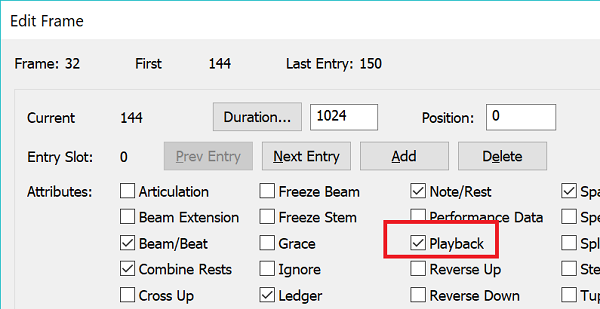
You could also use the Speedy Entry Edit Frame (after clicking on a non-staff area of the page to remove the Speedy Entry selection box, CTRL+Click on a target measure) to set the appropriate notes not to play back.

Comment actions Permalink
Avatar
0

I had no idea there was an edit frame! Thank you; worked like a charm. 

Comment actions Permalink

Please sign in to leave a comment.