New post
Avatar
0

Hi there,

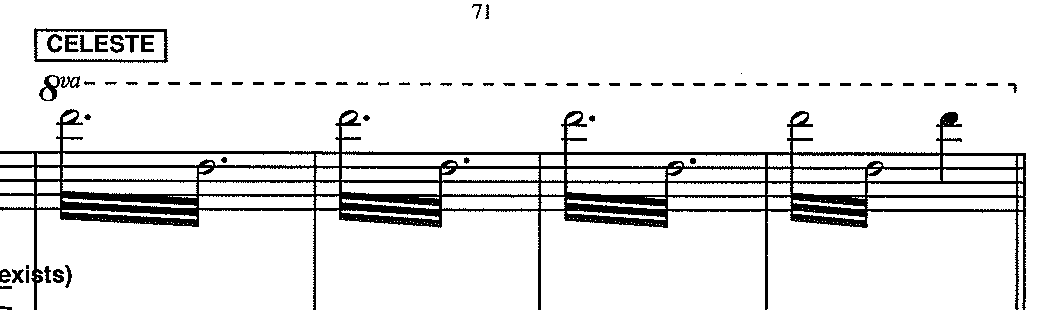
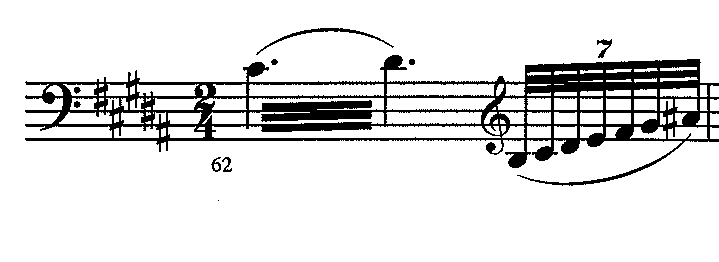
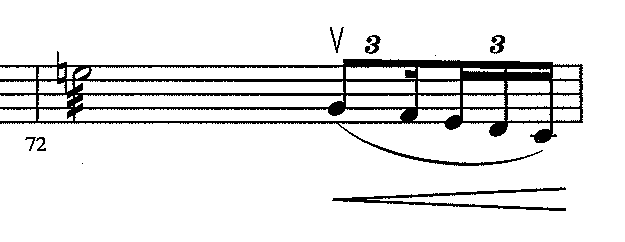
I'm writing (copying a score) to make some backing tracks and I have some problems connected some notes.

How can I write the notes and tuples in the attached images?

My OS is Windows 10 and I'm using Finale 2014


Thanks for your help!

6 comments

Date Votes
Avatar
0

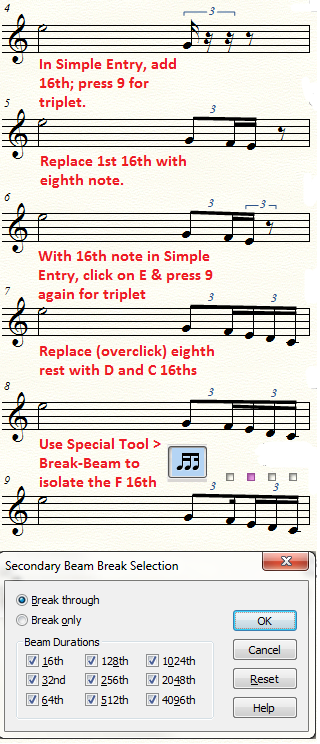
Let's say you already know how to enter the triplets. The problem is then that your first sixteenth faces the wrong direction. Use the Special Tools (Wrench icon) and the Break Beam sub-tool to click, first on the measure, and second on the first sixteenth of the second triplet. Tell the tool to break at the sixteenth level.
 

Comment actions Permalink
Avatar
0

Thanks!

Instead, for the second image, how can I do?


Comment actions Permalink
Avatar
0

What do you mean by "second image"?

(It was all one composite image.)

I should mention that I have "Check for Extra Notes" turned off in Simple Entry Options, if you are asking about the second line of the illustration.

Comment actions Permalink
Avatar
0

The notes Inferno the Celeste.... i cannot write them

Comment actions Permalink
Avatar
0

Same problem with this beat
how can I do the dotted notes with the line?

Comment actions Permalink
Avatar
0

In Finale 2014.5 (or 2014) you can use Plug-ins > TG Tools > Easy tremolos...

Comment actions Permalink

Please sign in to leave a comment.