New post
Avatar
0

Friends

I want to create my personal staff and save it as a template for future use. I went this far: The Stuff tool/Define Staff Style/Staff Style/New (renamed)/Others/Custom ... (created but cannot saved)


It should look like this

(2 lines – 2 spaces – 3 lines)


--------------------------------------------------------------.

-------------------------------------------------------------.

-------------------------------------------------------------.


-------------------------------------------------------------.

---------------------------------------------------------------.


9 comments

Date Votes
Avatar
0

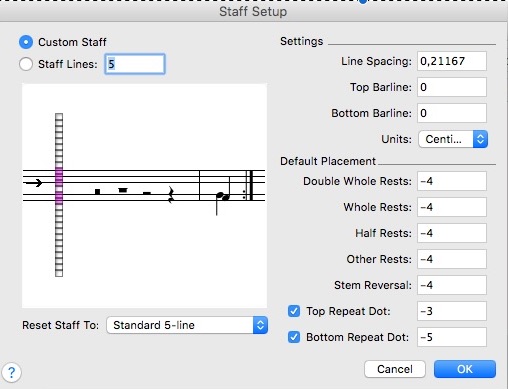
To create it : it looks like you are almost there. It can be done in the Score Manager or in a new Staff Style :  -> Staff -> Other. In the Staff Setup window, select Custom. Then click on the boxes left of the staff to add or to delete staff lines.

To save it : you can make a template including this staff, or if it is a staff style, save a Library (of staff styles) via the File menu to reload it into other documents. To avoid duplicates, make a library which only has that staff style, because when you load it into another file, it will be added to the existing ones.

Comment actions Permalink
Avatar
0

Michel,

Thank you for helping me.

Any staff style I create in the Custom Stuff will be rejected by the Reset Staff To at the bottom. I could not Save it neither to put in a library.

I will go the Score Manager to see if it works.

Barat

Comment actions Permalink
Avatar
0

I tried to create a staff style, in Finale 2012 and v.25, and it works without a problem. "Reset Staff To" doesn't seem to have an effect as long as Custom is selected. Here is what I see : 

Comment actions Permalink
Avatar
0

I checked the Custom Staff as you did, see no result by clicking OK

Comment actions Permalink
Avatar
0

Somehow it did work through ScoreManager. Now I have my own custom staff. Thank you Michel.

Comment actions Permalink
Avatar
0

I was able to do it in the Score Manager as you did (this applies to the whole staff) and as a staff style, locally, too (Staff Menu, Define Staff Style etc...). I was going to attach a couple of files here, but at first sight, I can't attach .mus files !

Here is a screenshot, at least...(staff style)

Comment actions Permalink
Avatar
0

Michel,

After I created a desired custom staff, I found the notes are not the same anymore. Can we change the pitch/sound of original C to D?

Comment actions Permalink
Avatar
0

Please explain more precisely what you want to achieve. Is this a playback issue ? I have no idea what notes such a staff will produce, with the double spaces etc... Is this for a single or for multiple instruments ? Please draw a sketch with where the notes actually are and how you want things...

Comment actions Permalink
Avatar
0

Michel,

I found this is a separate issue. Let me do more study to come up with clearer idea.

Comment actions Permalink

Please sign in to leave a comment.