New post
Avatar
0

Windows 11

Finale Version 27.4.1.110

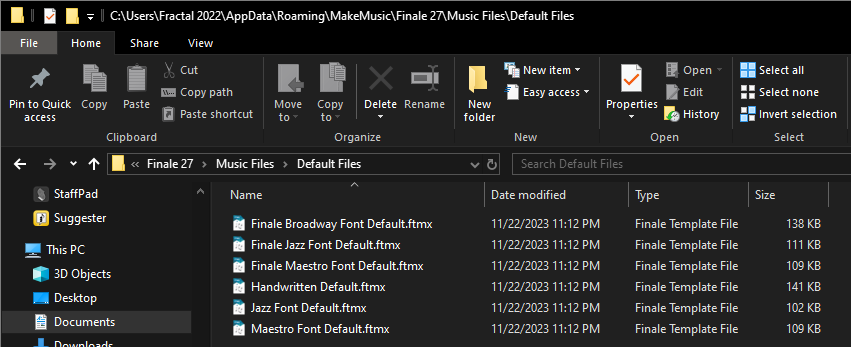
The Finale User Manual indicates that default document are stored in Finale/Music Files/Default Files. However, no Default Files folder (nor .musx files of any kind) exist in the Music Files folder. So the steps indicated for modifying the existing Maestro Font default file are fruitless, because there is no existing "Maestro Font Default.FTMX" to modify. Nor is one found anywhere else on the PC. Help?

On a related note, is there any way for me to take an existing document and use its settings as default, but without all the parts/notes?

5 comments

Date Votes
Avatar
0

What can be confusing, is that there are two similar sets (hierarchies) of Finale folders.

One (= the one you need) resides in your user account, the other (= the one Finale uses as a backup) resides at System level (root level).

Possibly the one in your user account is hidden.


My guess is that you looked in the wrong folder for Finale/Music Files/Default Files.

Try this:

Preferences > Folders

In the pane

Preferences - Folders

you can see the exact path to each and every folder.

My guess is that most of the folders are in your user account, possibly inside a hidden folder.

Comment actions Permalink
Avatar
0

Thank you.

I referenced Preferences > Folders via the method you suggested, and identified the Default Files path inside my user account folder.

However, navigating there, that folder also contains no Default Files folder, nor default files, nor .musx files of any kind... only a Document Styles folder.

Comment actions Permalink
Avatar
0

… However, navigating there, that folder also contains no Default Files folder, nor default files, nor .musx files of any kind... only a Document Styles folder …


If I understand you correctly, there is no Maestro Font default file, neither in the Default Files folder at system level, nor in the Default Files folder in your user account - right?

That sounds like you need to re-install Finale, to get the missing files/folders.

As a test (not as a solution), try this:

File menu > New > Default Document

If you get an error message (= could not be found), then it confirms my suspicion that you need to re-install Finale.


… On a related note, is there any way for me to take an existing document and use its settings as default, but without all the parts/notes? …
 

If I understand you correctly, you are talking about creating new, empty Finale documents that use the settings of a specific, already existing document - right?

Make a duplicate copy of the Finale document.

In the duplicate copy, delete all the parts/notes.

Then use the - now empty - document as a template for new documents.


If you have questions about this, let us know.

Comment actions Permalink
Avatar
0

Don't know about Windows 11, but the folder in %appdata% has files in it on my PC.


Comment actions Permalink
Avatar
0

... creating new, empty Finale documents that use the settings of a specific, already existing document - right?

Make a duplicate copy of the Finale document.

In the duplicate copy, delete all the parts/notes.

Then use the - now empty - document as a template for new documents.


I do that all the time. Works great when you want things a certain way and the specified document is already set up.

Comment actions Permalink

Please sign in to leave a comment.