New post
Avatar
0

I've used Finale for years; I've always noticed the big black "Score" in the left corner, and then the subsequent part names in all the parts. On a recent composition I just completed, NONE of the parts or score say what they are, which can be quite confusing when you print them out. How do I get this back? This was automatic until recent updates. 

11 comments

Date Votes
Avatar
0

I'm on Windows, by the way, and it's v. 27 as I mentioned. 

Comment actions Permalink
Avatar
0

… This was automatic until recent updates …


It is not “automatic”, but rather a document specific setting = a matter of which template you use for creating a new document.

It has nothing to do with program updates; it is not a program specific setting, but rather a document feature that has been available for many Finale versions.

And the feature is still available with v27.


Obviously you have come across a document or template that does not use the feature.

Fortunately the fix is simple:


Text Tool.


Double-click where you need the text block.


Text menu > Inserts > Part/Score Name


To get the text block in all new documents, edit the template you use for new documents.

Comment actions Permalink
Avatar
0

I've always used "new document from setup wizard" because it's pretty quick and easy to get straight to work typesetting; I've never altered the default template. That's why I meant it was automatic. And it's not ancient history; I see a part set from autumn 2022 I made from scratch that worked just fine with no fussing around on my part. Thus my surprise at this change. 

If I'm going to alter anything, it's going to be what the setup wizard pulls from. Where is THAT file setting so I can make sure it's adjusted? 

Comment actions Permalink
Avatar
0

… I've always used "new document from setup wizard" …


In the Document Setup Wizard, in the very first window, you have the option of choosing between different Document Styles.

The important info is that each Document Style is a separate template.

Are you using all the Document Styles? - Or only, always, one specific Document Style?


Anyway, you can edit the templates - they are located in a folder called Document Styles.

What can be confusing, is that there are two copies of the Finale {folder hierarchy}, containing folders with the very same folder names.


I am using Mac Finale, and the following info may not be entirely correct:


One folder hierarchy resides at the system level (in the directory ProgramData - If I Recall Correctly). This is Finale’s “backup” for restoring missing program folders or program files.


The other is in your user account (in the directory AppData - If I Recall Correctly). This is the place where you should look for a folder called Document Styles. The directory may be hidden, but you can un-hide it.

To find the exact path to the Finale folder Document Styles, look here:

Preferences - Folders

Comment actions Permalink
Avatar
0

Michael,

I believe Peter may have not been real clear so lets see if this is what you see and start with.

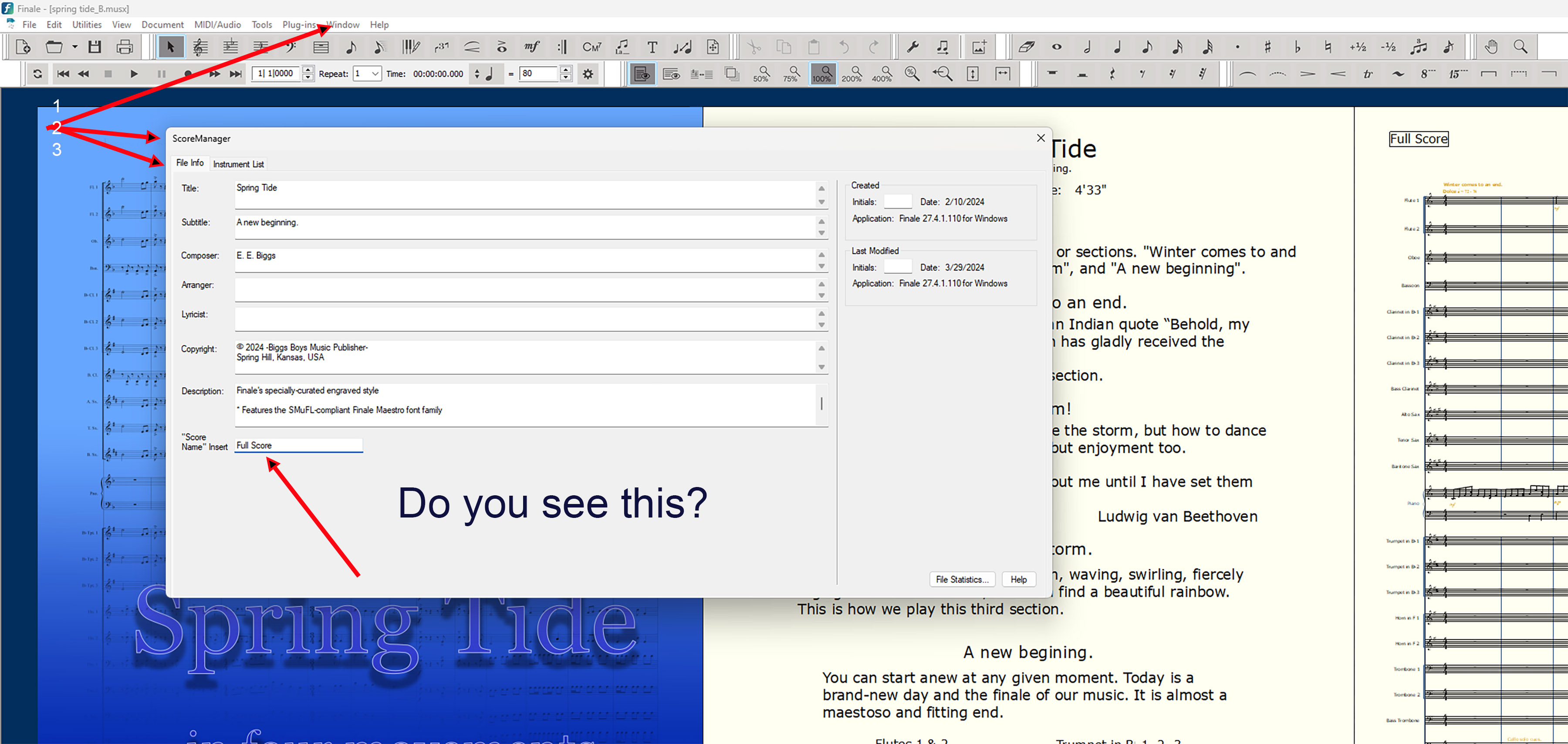
If you start your scores from scratch each time, I usually select Finale Maestro which is selected as default the "Score" name will be there as the default. I usually change mine to "Full Score" in the Score Manage as shown.

I don't know about many of the Finale templates as I never use them preferring to either make my own or better yet a saved musx file that I particularly like. Simply delete the music and keep the rest.

Comment actions Permalink
Avatar
0

To answer the first question, I could never find anything helpful with the "document styles" offered, so I've always just picked "create new ensemble" since it's always a hodgepodge of instruments and types, anyway. As a side note I didn't realize you can both "create a new ensemble" AND select a document style; I thought those choices were made for you based on the first decision. It's possible that's how it used to be at some point in the past, as I learned Finale on Mac Classics back when it was 3.X in the 90's at conservatory, so I've gone through a lot of changes of the program over time.  

To answer the second question, on my choral piece since I added the insert, that particular box now says "Score" (as you mentioned is the default setting) But thanks for pointing out that Finale Maestro should create the default I'm used to, I'll make a point to select that even if I create a new ensemble. 

Comment actions Permalink
Avatar
0

… I didn't realize you can both "create a new ensemble" AND select a document style; I thought those choices were made for you based on the first decision …


As a matter of fact, in the Document Setup Wizard there is no way to, not select a Document Style.

You can’t avoid it.

If you do not select a Document Style, then the Wizard will automatically select the Document Style at the top of the list.

Comment actions Permalink
Avatar
0

If you do not select a Document Style, then the Wizard will automatically select the Document Style at the top of the list.

...and you will see in the Score Manager (screen shot above) the word Score. In my case I renamed it "Full Score" as you can put any word(s) there you desire.

Comment actions Permalink
Avatar
0

"...and you will see in the Score Manager (screen shot above) the word Score. In my case I renamed it "Full Score" as you can put any word(s) there you desire."


And that's exactly what I thought it was supposed to do. Last week I went and created another blank template thinking, fine, I'll just copy and paste the music and I created a whole new file ALSO missing the score and instrument titles.

And NOW, today, it's doing exactly as you all said. Like magic. As though I never had to even ask the question to begin with! Look, I don't waste time putting up questions for my own edification. I really tried and was at my wits' end. So now I'll go back quietly to my work. Thank you. At least now I know where it appears in the text tool to modify when I need to. 

Comment actions Permalink
Avatar
0

Well good everything is as it should be that’s the important thing. Why it didn’t, who knows but all’s good to go now.. thanx for coming back and letting us know.

Comment actions Permalink
Avatar
0

… At least now I know where it appears in the text tool to modify when I need to …


Actually, no.

You should not modify the {Score Name insert} in the Text Tool, but rather in

ScoreManager > File Info

(as shown in the screen shot in the post from Ernest Biggs)


When you use the File Info to modify the {Score Name insert}, then the Score Name will display correctly everywhere in the score (= in all text blocks where you have the Score Name text insert).


If you use the Text Tool to {clear the text block, and type another name}, then the new name will only display in that particular text block.

Comment actions Permalink

Please sign in to leave a comment.