New post
Avatar
0

FINALE 25.2.0.92

WINDOWS 7

Sound Blaster X-Fi Xtreme Audio


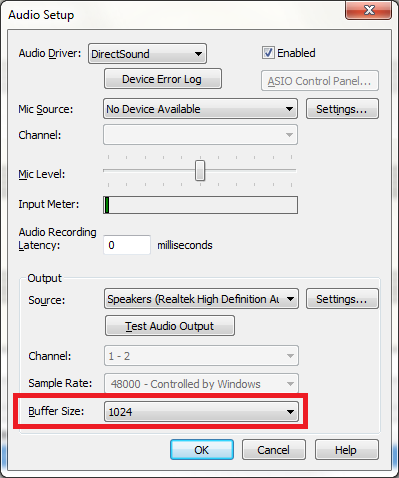
Hello!  I just upgraded to Finale 25 and can't get the sound to work.  MIDI or VST - either results in static and clipping playback.  Even the "Test Audio Output" tone is unbearable.  Finale 2012 is still installed and sounds great so I made sure the setting were identical as best I could (as shown in below screenshot).  Any ideas?  


thanks!

-bb

8 comments

Date Votes
Avatar
0

Sometimes the audio buffer size affects the VST sounds. See if making it larger helps. It is under Device Setup in the MIDI/Audio menu.


Comment actions Permalink
Avatar
0

Still no luck....I've set the buffer size to 8192 which is the largest choice it gives me.  Still works great either MIDI or VST in Finale 2012.  In Finale 25 the playback is barely audible, cracking/skipping, and is playing back very slowly no matter what tempo playback I choose.

Anybody else have any ideas? 

Comment actions Permalink
Avatar
0

Are you using Direct Sound as your driver, or are you using something like ASIO. What is your sample rate set to? If it is 48K, try changing it to 44.1 (CD sample rate) and see if that helps. (It is certainly necessary if exporting to a WAV file for burning an audio CD.)

Comment actions Permalink
Avatar
0

Okay, I've updated the system BIOS and every driver I could (most notably the sound card driver).  I've checked to see that the sample rate is set to 44.1.  MIDI playback results in correct sound but painfully slow and unsteady tempo no matter if the playback is one of my files, a template, a tutorial file, or a repertoire file.

VST sound is also painfully slow with the skipping/popping effect.  Even the "Test Audio Output" tone on the Audio Setup box produces the skipping and popping.

I think I need to escalate things to Support Ticket status.  

thanks for your assistance!

Comment actions Permalink
Avatar
0

P.S.  Direct Sound is what I'm using.  My only other listed option is WASAPI and that doesn't work at all.

Comment actions Permalink
Avatar
0

I'm having the same problem in version 25. It was working perfectly one day and the next day crackling popping and lagging it's a battle over the noise and I can hardly work on my Opera composition.

Comment actions Permalink
Avatar
0

If you have tried everything above, how old are your speakers? I had to have the cones replaced on mine (after many years). Also double check your wiring connections if the speakers are external.

Comment actions Permalink
Avatar
0

Thanks my computer is not the problem. This new version has a clunky mixer window. I finally got all the other issues resolved and right now I am doing a full reinstall.

Comment actions Permalink

Please sign in to leave a comment.