New post
Avatar
0

I'm using Finale 2014.5.7098 - MacOS 10.12.1

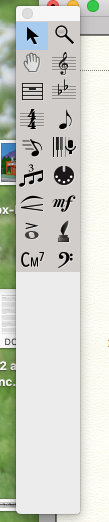
Suddenly about half my main tool palette is gone. Beyond Preferences and the View->ToolSets-> Master Tool Set setting, I don't know where else something could have happened. What else can I check? Beyond this, the program seems to be working normally. (screen shot below)


Rory Cooney

Lake Zurich IL
5 comments

Date Votes
Avatar
0

Known issue with older versions of Finale in Sierra, If you reset the toolbars to default the icons will display.


You can customize the toolbar size/position in Finale 25.1. 

Comment actions Permalink
Avatar
0

Actually, I've tried that. And I'm using the latest version of Finale.

Comment actions Permalink
Avatar
0

2014.5.7098 is not the most recent version.


25.1.0232 is. Log into your user account, download it and run the updater. This should fix you up.

Comment actions Permalink
Avatar
0

Ok duh. My bad. I have installed the new version and ASSUMED it had opened when I started on this file, but the previous version must have launched instead. Lesson here: uninstall. Thank you for being so observant (and patient).

Comment actions Permalink
Avatar
0

I wouldn't uninstall 2014.5. If you use scanning, this is not supported in 25.1 but works in the older version—you can then import the results into 25.1. F-25 files also open in 2014.5.


If you're going to have both versions installed, make sure that 2014.5 is labeled as such and that any shortcuts are also labeled correctly—the current version should just be named Finale while the other is named Finale 2014.5.


Comment actions Permalink

Please sign in to leave a comment.