New post
Avatar
0

Windows 10, Finale 27, HP Slim Desktop 290

I know how to reset the measure number font size and position **per document**. What I want to do is to reset the default font size for measure numbers from microscopic 8 pt font to 14 pt font, every time I open a new doc with the setup wizard.
Whether it's a one-staff default page or a document with the setup wizard, I'd like the document to open up with the font size larger than 8 point.  
Can this be done?

4 comments

Date Votes
Avatar
1

Welcome to the forum!


There are several ways to create a new Finale document:

- Document Setup Wizard,

- Default Document,

- Template


A new document is always created from a template.

The new document will be created as a copy of the template - the copy containing the same settings as the template.


If you use the Setup Wizard, then the document will be created from one of the templates in the folder Document Styles.

You can edit the Document Style template(s) - and get the settings you need - such as e. g. the measure number font - in all new documents.

Comment actions Permalink
Avatar
1

What I want to do is to reset the default font size for measure numbers from microscopic 8 pt font to 14 pt font, every time I open a new doc with the setup wizard.

Can this be done?

Mark I am not sure Peter's reply is exactly what you are asking for or wanting. Can it be done, the answer with anything in Finale is, yes, if you can if only you can figure out how. However editing the Finale "default" document settings may not be the best choice. And that's where Peter's reply is spot on, IMHO. You can make a template or a 'master' Finale file with all the setting defaults you like. Open it each time and rename it to you new document and add or remove instrumentation as needed. It is probably best to leave the Finale "default" document setting alone as they are.


Comment actions Permalink
Avatar
0

Peter and Ernest -- thank you for the advice. Unfortunately, Finale 27 will not let me "update" the template. Once I am in the Document style folder, when I click on Finale Maestro (for ex.), it creates a copy of the template. I can adjust this file, Finale will not allow me to save and replace the original template with my updated, customized version. No matter what permutation of the file name I use, it will not save. "File name not valid" and "Error ID renaming file 's' to 's'" are the error messages I receive. 
I tried creating a doc saved with my other Finale files. However, Finale will not let me Create New Staff with Setup Wizard. (That feature does not exist, but I can add blank staves and then change instruments and adjust the sound for playback in Score Manager). That means I have to add each attribute (instrument, sound, clef, etc.) manually. To say that adding a two staff piano part {bleep}s is an understatement.
I think my options here are:
1. Continue using the setup wizard to create all attributes quickly and efficiently but waste time setting up the measure size to correct the 8 point microscopic measure numbers
OR
2. Use a file with my preferred fonts and then waste even more time setting up all attributes for each staff manually and if piano is needed, I can create/add/bracket a group and assign the desired sounds (such as piano, may the universe help me if I ever need to do an organ part this way).
Anyway, thanks for your help and advice. It is much appreciated. ☺

Comment actions Permalink
Avatar
0

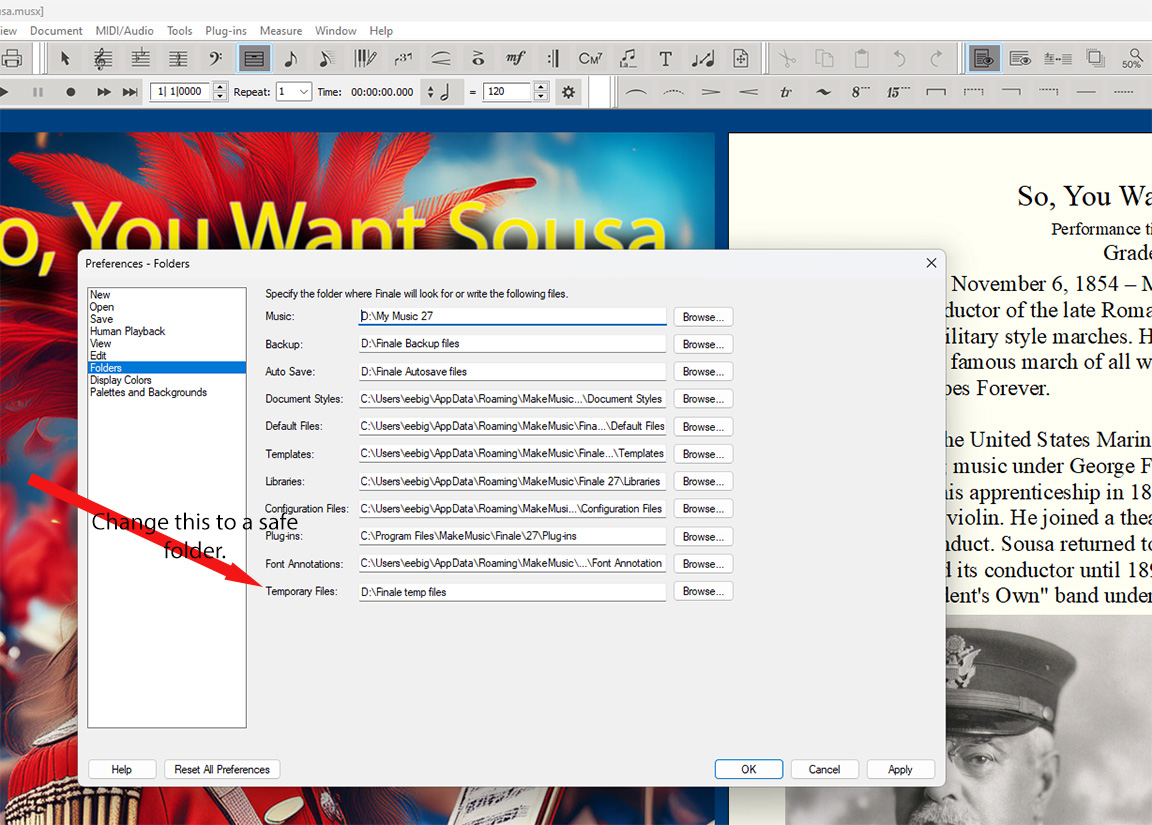
Mark I am not sure I am following your steps exactly but first off I would like for you to secure the Finale temp folder. 

I set mine up on a separate D:/ drive but you can set the temp folder where ever just in a place where Windows won't trash it periodically.  This might be the reason you are having problems saving your files. Edit>Preference>Folders


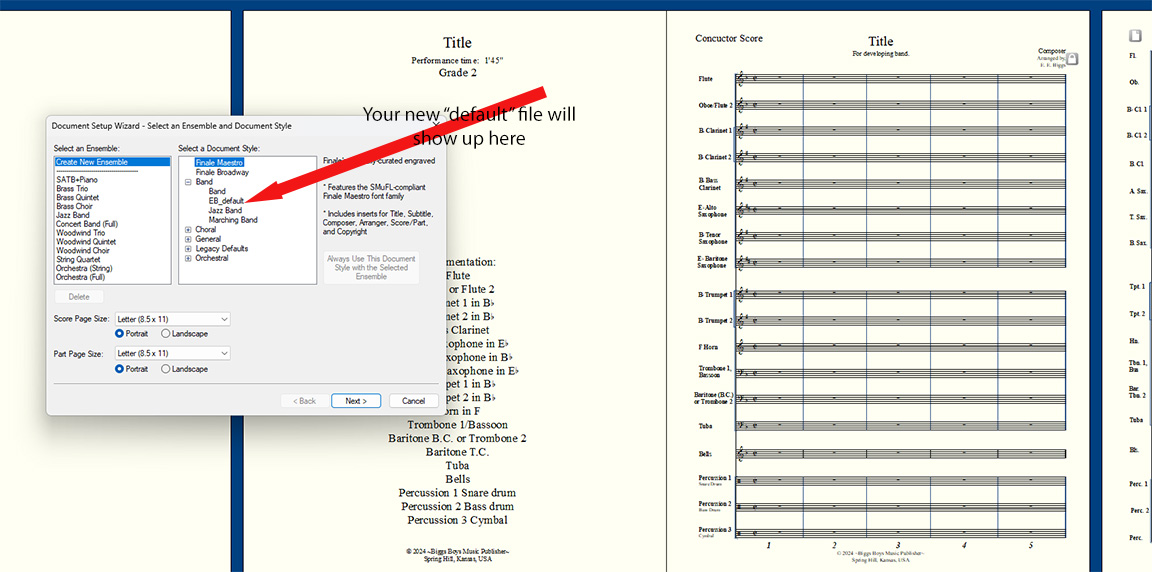
I have several default templates I use. This one is for beginning and developing band. Create it however you want and save it. It will show up here. Yes you may have to delete or add instrument but all the basic settings will be there every time.

You must make sure you save it in the correct folder for it to show up in the Setup Wizard.


Comment actions Permalink

Please sign in to leave a comment.