New post
Avatar
0

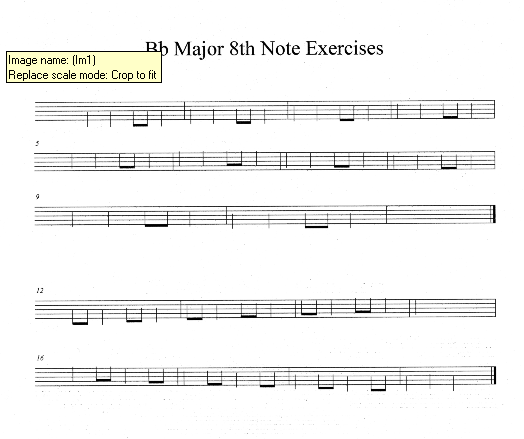
Ever since I updated to Finale 27 from v 26 on my current computer, (windows 11 operating system) my scores will not print properly with my Brother MFC 6700 DW. (See image below for what happens.) They print fine on all of my other printers, just not this one, which is unfortunately my highest quality printer-very frustrating! Does anyone have suggestions for fixes? TIA!
2 comments

Date Votes
Avatar
0

Missing fonts. Also you have the latest Finale 27.4, if not d/l that.

Go to Brother and d/l the latest update for your printer. I use a Brother MFC-J6545DW Business Smart large format printer and I print 9"x12" scores that turn out beautifully.

https://youtu.be/O-1mofwMLNM 

Comment actions Permalink
Avatar
0

I don't see an MFC 6700 DW on the Brother site. Is yours the Brother MFCL6700DW laser printer? Here are the latest drivers for Win11

https://support.brother.com/g/b/downloadlist.aspx?c=us&lang=en&prod=mfcl6700dw_us_as&os=10068 

and the documentation

https://www.brother-usa.com/support/mfcl6700dw 


Like Ernie, I use a high quality Brother inkjet and couldn't be happier. I agree that it's a font issue but I do suspect that the issue is your printer. Many laser printers work best if the fonts are downloaded to that printer. I don't know the Brother lasers but I do know the HPs since the earliest days (1982). I found this on the Brother site but don't know if it applies to yours:


Printing Using Fonts Transferred to the Printer

https://support.brother.com/g/s/es/dev/en/specific/font_manager/index.html?c=eu_ot&lang=en&navi=offall&comple=on&redirect=on 


Comment actions Permalink

Please sign in to leave a comment.