New post
Avatar
0

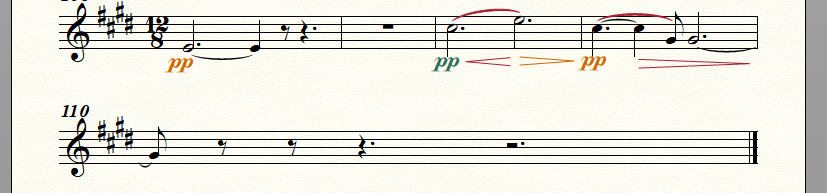
I couldn't find an answer in older community posts about this item. Is there a way preventing Finale filling out (is that the correct English term?) measures from left to right margin? This is usually a good thing, however in some cases this leads to final measures looking like this, which I don't like:
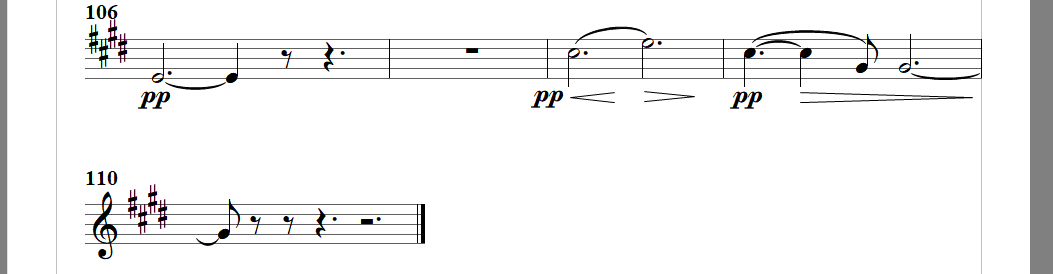
Is there a way preventing Finale doing this fill out and make a final bar (110) look like this?:
I know I could move the final measure to the previous staff but that doesn't always lead to a satisfying result.

Thanks!

4 comments

Date Votes
Avatar
1

Page Layout Tool.

Click-select the final system, and go to

Page Layout menu > Systems > Edit Margins…

(or work smarter, and use the context menu)

By default the Right Margin is zero, but you can change it to what ever value you prefer.

In your example it looks like you should try a Right Margin value of something like 300pt.


If “precision layout” is not important, consider, instead dragging the system handle.

Dragging is faster, but not as precise as typing values in a dialog box.

Comment actions Permalink
Avatar
0

@Peter: I was expecting a 'one click' solution in Finale with which you can switch between 'filled out' and 'not filled out' but this will do. Thanks!

Comment actions Permalink
Avatar
0

For a one-click solution, you need Dorico; but Dorico is not yet competitive with Finale on other fronts, so I'd recommend Peter's solution.


(And I have to say--whether it is Finale or Dorico or even Sibelius--what is it with this fascination with/demand for "one-click solutions"? You'd think the entire music community was being victimized by arthritis.)

Comment actions Permalink
Avatar
0

Hi Adrian. I think the answer to your question about the demand for 'one click solutions' is *time*. I'm still new to Finale and I didn't came across anything yet that Finale can *not* do, which is excellent. At the other hand I have the feeling that you need to be a real expert user to get things done *fast*, like I was used to with another notation program (which was not Dorico nor Sibelius, by the way). A notation program that would only be 10% faster to work with would save me - and many others I guess - many hours of work.

Comment actions Permalink

Please sign in to leave a comment.