New post
Avatar
0

Hello! When I change margins in the page layout menu (I'm looking to change the score, but the "parts" menu seems to have the same problem) nothing happens. Changing page size, margins, and other settings have no effect on the score before or after clicking "okay." The changed settings are persistent in the menu, but the score itself looks identical to before.

I have restarted Finale and restarted my computer to be sure the problem wasn't a temporary glitch. I initially wanted to change the left margin, but I've also tested setting margins to zero and changing paper sizes from letter to legal, tabloid, and A4 sizes just to try things out. This problem exists even after I've created a new document.

I'm using Finale 25.5.0.290 on both Windows 10 version 1709 and macos High Sierra (whatever the most recent build is).

tl;dr - The page format menu has no effect on pages in my document.

3 comments

Date Votes
Avatar
2

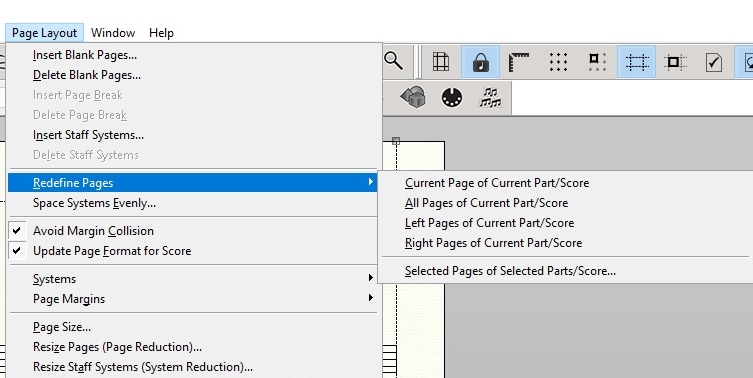
Ok, I think it might be that you'd need to "Redefine Pages" using the Page Layout Tool. The document doesn't update when you change the settings in the "Page Format" menu because it could ruin the layout you've been working on. Instead, you are able to choose which pages and on which parts you want updated to match the "Page Format" parameters (although, new pages automatically update according to those settings).


Comment actions Permalink
Avatar
0

My word, George, that did it! I'm fairly new to Finale, and I was completely at the end of my knowledge trying to get it to work.

Thanks so much!

Comment actions Permalink
Avatar
0

No problem.


If you want to change things on the fly, try adjusting the "Page Size" and "Page Margins" from the Page Layout Menu. And if you have "Update Page Format for Score" checked, as it says, the Page Format settings will be updated so that new pages will match the current layout. Unfortunately, there isn't an "Update Page Format for Parts" yet. A bit of an oversight on part of the developers I guess, but I believe if you delete the pre-generated parts and regenerate them after updating the "Page Format > Parts", that should create parts with your desired settings.

Comment actions Permalink

Please sign in to leave a comment.