New post
Avatar
0

Finale Printmusic 2014.5

MacOS High Sierra

 I'd like to implode...as apposed to explode...four layers of music on four staffs down to two staffs.
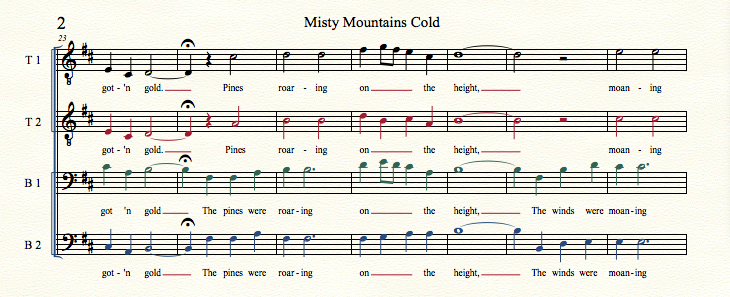
So that T1 and T2 share a staff, B1 and B2 share another staff.

Id also like to create a piano rehearsal staff.

Any suggestions?


Gillian Wilson

5 comments

Date Votes
Avatar
1

Disclaimer:

I do not know PrintMusic.

The following instructions are for the “full Finale”.


The colours in your screen shot seem to indicate that

- the T1 part is in Layer 1,

- the T2 part is in Layer 2,

- the B1 part is in Layer 3,

- the B2 part is in Layer 4,

right?


Generally it is not necessary to use the Layers in that way.

I would enter everything in Layer 1, and only use Layer 2 where two parts share the same staff.


To make the changes you describe:

T1 in Layer 1 (already done)

T2 in Layer 2 (already done)

B1 in Layer 1 (Edit menu > Move/Copy Layers…)

B2 in Layer 2 (Edit menu > …)


Switch to Layer 2.

Document menu > Show Active Layer Only (this also means Edit Active Layer Only).

Cut the T2 notes out, and paste them into the T1 staff.

When you de-select Show Active Layer Only, you can see both Tenor parts in the top staff.

At this point you may like to rename the top staff to e. g. T1/T2.


Also, you may like to rename the T2 staff to B1/B2, and change the staff’s clef to Bass clef.

Then move the parts B1 and B2 into this staff.


Now the two bottom staves are empty.

You can use them as a Grand Staff for a piano rehearsal part.


I hope that this is clear?

If not, ask again.

Comment actions Permalink
Avatar
0

Gillian,

You are lucky PrintMusic works in High Sierra. You probably know it is being phased out.

Best wishes for your project.

Comment actions Permalink
Avatar
0

Thank you Peter Thomson, your instructions were easy to understand and got the job done. 

Now if only I could figure out how to attach the lyrics to each staff so that they appear in the appropriate place on the system. They all move together as a unit with the baseline edit tool.... In the end, I kept the four staff arrangement since it was easier to read that two staffs.

J Adrian Verkouteren...print music is being phased out?! I didn’t know. What does this mean? Is print music no longer supported? What does this mean for print music users?

Comment actions Permalink
Avatar
0

… Now if only I could figure out how to attach the lyrics to each staff so that they appear in the appropriate place on the system. They all move together as a unit with the baseline edit tool …


In the “full Finale” you can distribute lyrics to multiple “containers”, with a separate vertical baseline setting for each “container”.

The “container types” are called Verse, Chorus, and Section. There is no difference between the three types; they are just there to help you keeping the lyrics organized.

You could e. g. put

- T1 lyrics in Verse 1

- T2 lyrics in Verse 2

- B1 lyrics in Verse 3

- B2 lyrics in Verse 4


Take a look in the window Lyrics.

Is there an area where you can switch between the “containers” (= Verse 3, Chorus 4, Section 2, &c.)?

Comment actions Permalink
Avatar
0

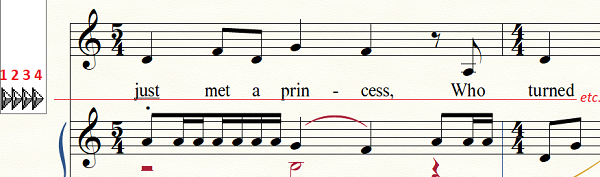
You can adjust the baseline(s) for your lyrics, if that is the problem you are facing, using the four arrowheads to the left of each staff (in "Type Into Score" mode).

  1. The first/leftmost arrowhead adjusts the lyric baseline for all staves of the entire score.
  2. The second arrowhead adjusts the baseline for the staff to its right for the entire score.
  3. The third arrowhead adjusts the lyric baseline for the staff to its right for just the one system selected.
  4. The fourth/rightmost arrowhead adjusts the baseline for the next syllable of the staff selected (not very useful).

The arrowheads work this way for each staff and for each verse of lyrics.


Comment actions Permalink

Please sign in to leave a comment.