New post
Avatar
0

Okay, Mac OSX the latest version, Finale 25.05.xxxx  

I have tried the  remedies of expression tool and cannot find a way to modify the playback speed.  I don't see a place to modify the recorded midi value for tempo, and there is no tempo tool ! (BOO!)   I even set the playback from 1/8 at 64 to 1/2 at 200 and no change in playback occurs.    Weird it is so difficult to change tempo and playback. 


Any ideas? 

3 comments

Date Votes
Avatar
0

Three things control the tempo in Finale:


MIDI Tool (= the recorded tempo changes)

Expression Tool (= the expression tempo changes)

Playback Controls


And they work in a hierarchical fashion.


The tempo in the Playback Controls is overridden by an Expression that sets a tempo.

This is overridden by the MIDI Tool, which is at the top of the "Tempo Hierarchy".


From your description it sounds like you need to modify the playback speed, in any way, right?


I would use

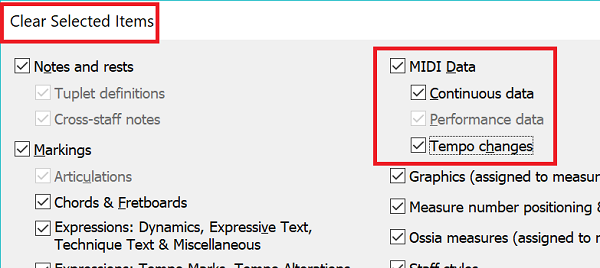
Edit menu > Clear Selected Items…

to clear the Tempo Changes.


When the Tempo Changes are cleared, you can modify the playback tempo with an expression.


If you also clear all expressions with playback effect “Tempo” (or disable their playback effect), then you can modify the playback tempo via the Playback Controls.

Comment actions Permalink
Avatar
0

Edit menu > Select All

Edit Menu > Clear Selected Items


(Time to stop whining about the Tempo Tool. Either Finale's anticipated solution will be an improvement or not.)

Comment actions Permalink
Avatar
0

thanks


Comment actions Permalink

Please sign in to leave a comment.