New post
Avatar
0

Finale 25.5

OSX 10.13.4

Greetings and thank you for any help in this matter.

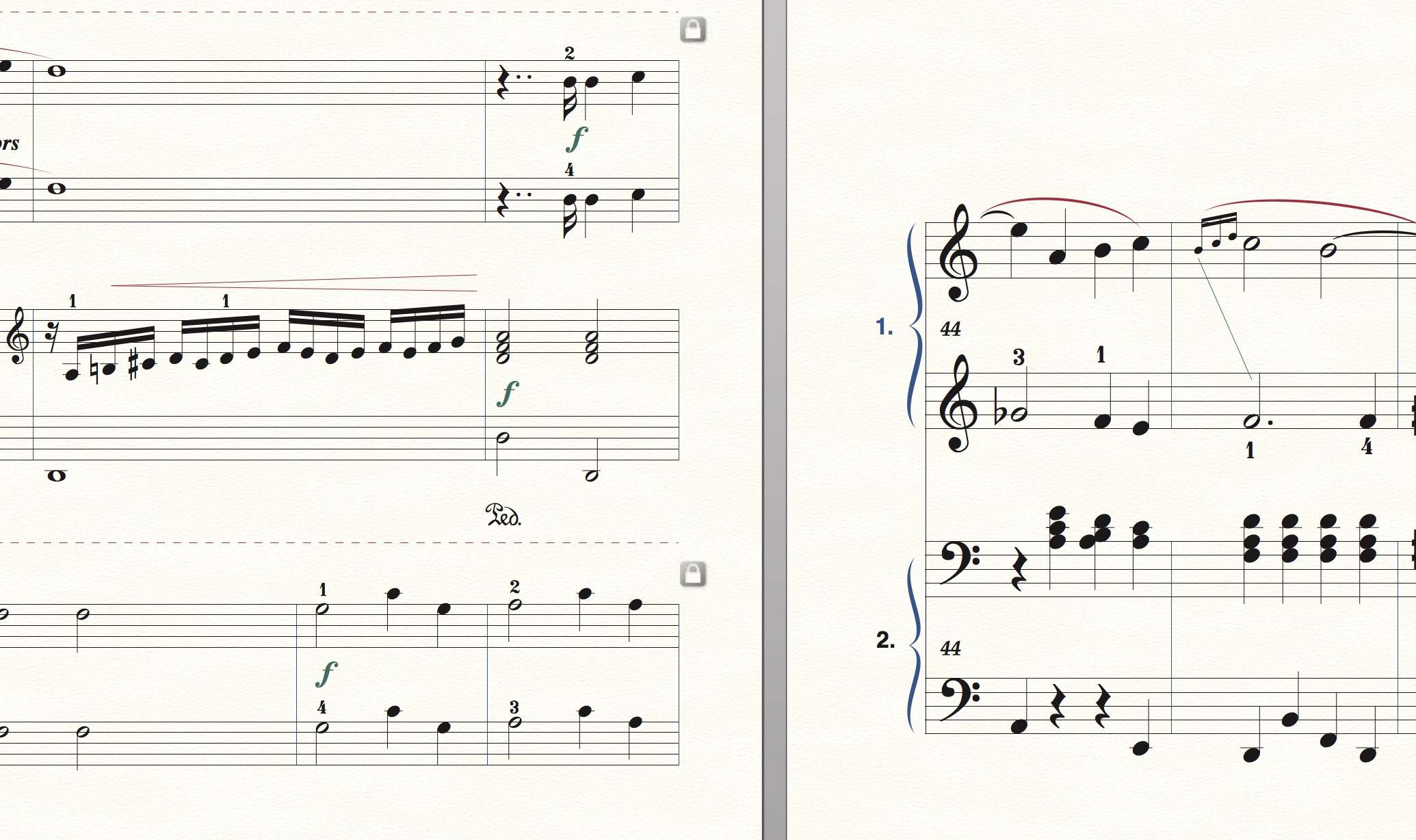
Not sure how to describe this new problem : after fitting measures for more space per measure, on the resulting new pages Finale has changed the appearance of the music (larger font, staff, different system margins etc.).  

Here is a picture covering two pages :
15 comments

Date Votes
Avatar
0

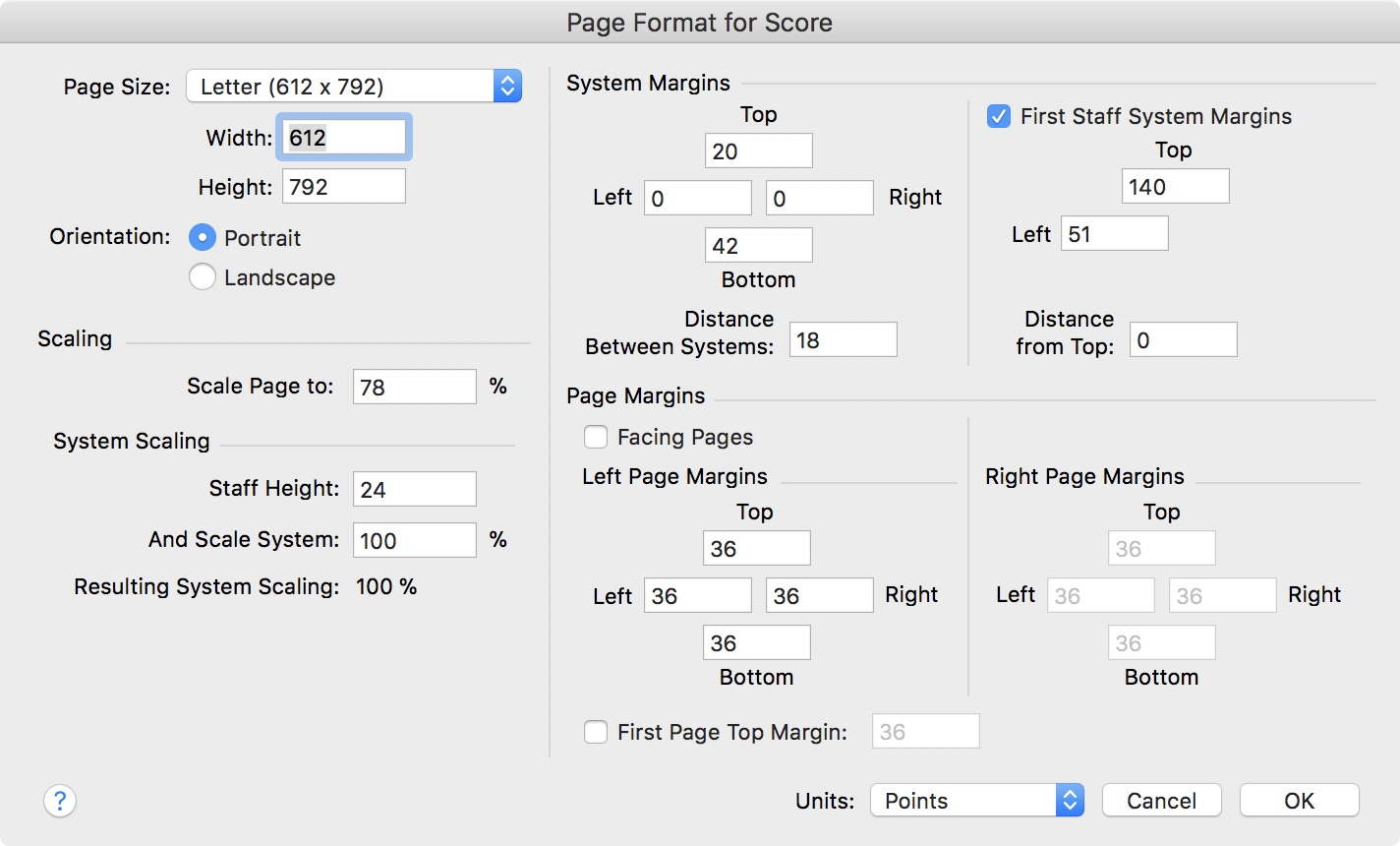
When creating new systems/pages in the score Finale uses the formatting settings in

Document menu > Page Format > Score…


Obviously you need to correct these settings so that they are in accordance with the formatting settings on the first pages.


My guess is that you should first look at the settings for scaling.

Comment actions Permalink
Avatar
0

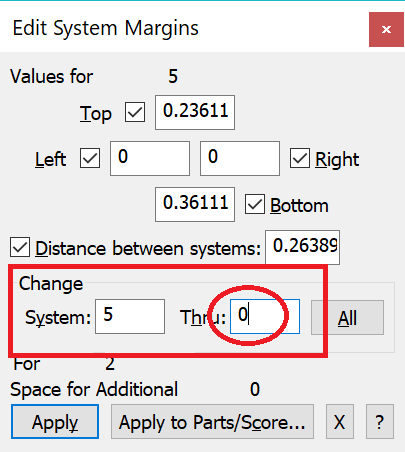
A quick and dirty solution (if the systems on your last "good" page are all the same) is--after locking all your systems--to use Page Layout Tool's Page Layout menu > Edit System Margins. Choose a system on your "good" page and then apply it to that system to 0 (zero), which means all the rest of the systems. That usually cleans things up for the present.


If you are nervous (or realistically cautious) about this, try it on a copy of your file.


Needless to say, Peter's suggestion is the best long-term solution, best checked when you start a new piece.

Comment actions Permalink
Avatar
0

Thank you Peter and Adrian (his comment is not visible here).

I have tried your suggestions without any luck. There appears to be no reaction to any changes I make to the page format—score. I have tried with locked and unlocked systems. Bizarre.

However I did have a small result by resizing staff system (system reduction)... although the result is still far from satisfactory.

Any further suggestions most welcome.

Many thanks. 

Comment actions Permalink
Avatar
0

… There appears to be no reaction to any changes I make to the page format—score. I have tried with locked and unlocked systems …


This is a misunderstanding.

When creating new systems/pages in the score Finale uses the formatting settings in

Document menu > Page Format > Score…


Already existing systems/pages are not affected.


To update already existing pages, switch to the Page Layout Tool, and use the command

Page Layout menu > Redefine Pages > …


… However I did have a small result by resizing staff system (system reduction)... although the result is still far from satisfactory …


You do not know, what page formatting settings you have on the first pages, right?

And you do not know, how to find out, right?


… Any further suggestions most welcome …


If we could see a (small) Finale sample document, then I am sure we can solve your problem.

Unfortunately you can not upload a Finale document here in this forum (only graphics formats are allowed).

But you can upload a Finale document elsewhere, and add a hyperlink here.

One option is this other Finale forum which allows upload of Finale documents:

http://www.finaleforum.com/index.php 

Comment actions Permalink
Avatar
0

Hi Peter,

I have sent a short sample to the Finale Forum.

Many thanks for your help.

Ray

Comment actions Permalink
Avatar
0

Ray Alston,


In the document you uploaded, there is only one page.

Is that page showing the layout you need - or the “wrong” layout you do not need?


We need to know the layout you need:

- the page margins,

- how many systems on a page,

- the system scaling,

- the system margins.


The better we understand, the better we can help.

Comment actions Permalink
Avatar
0

Yes, Peter, this is the layout I need with 3 systems of 4 staves each.

Comment actions Permalink
Avatar
0

… this is the layout I need with 3 systems of 4 staves each …


Then you uploaded the wrong document.


In the document you uploaded, there are 2 systems of 4 staves.

Comment actions Permalink
Avatar
0

Sorry... I have sent a better example — page 2...

Comment actions Permalink
Avatar
0

Ray Alston,


Try this document.


http://www.finaleforum.com/download/file.php?id=5129 


I believe that new pages/systems get the same formatting as Page 2.


Warning:
You can try a Redefine Pages (look in the Page Layout menu) for Page 2 and onwards, but do not Redefine Page 1, since Page 1 has different system margins.

Comment actions Permalink
Avatar
0

By The Way,


Here is a screen shot of the settings:


PS

You might consider the Page Margins.

The copyright notice at the bottom is quite close to the bottom edge.

I would use a bigger Bottom Margin.


Also, I would use a bigger Left Margin - since the left side of the systems goes beyond the left page margin.

Comment actions Permalink
Avatar
0

Many thanks, Peter. I have managed to develop your new document by copying and pasting the remainder successfully.

I still cannot quite work out how to re-format an old document, however.

Perhaps c & p is the answer here.

Anyway, your input is most appreciated.

Ray

By the way, for PDF use with an iPad, is it best to keep to the "letter" page size ?  

Comment actions Permalink
Avatar
0

… for PDF use with an iPad, is it best to keep to the "letter" page size ? …


In the "Letter" format the Height/Width ratio is 1.294 - what is the Height/Width ratio on your iPad screen ?

Comment actions Permalink
Avatar
0

9.7 inches (250 mm) 2,048 × 1,536 = 4:3 aspect ratio.

Comment actions Permalink
Avatar
0

4:3 = 1.333…

When you view a document in "Letter" format, you will get (a little) empty screen space outside the document window since the "Letter" format’s 1.294 ratio is slightly less than the iPad screen’s 1.333… ratio.

I would not worry.

But it is definitely a matter of taste.

Comment actions Permalink

Please sign in to leave a comment.