New post
Avatar
0

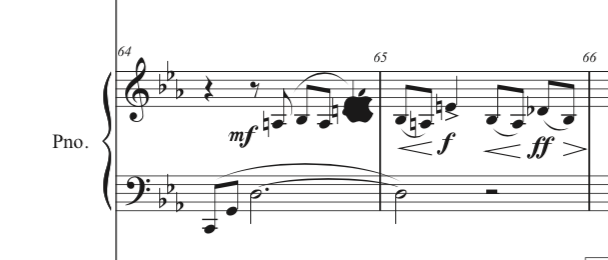
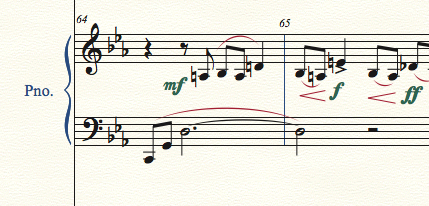
I'm a long time Finale user and have seen a lot of weird things but this one is really strange. I'm notating a full orchestra opera score. Upon printing, there is an Apple logo that displays on the printout and on the PDF file. It does NOT display on the Finale file itself. I have no idea how it got there or how to remove since it is invisible within Finale.  I'm attaching a screen shot from Finale along with a screenshot from the PDF file of the same. Any help or suggestions is much appreciated

Thanks,

Andy


Finale version 25.5.0.259

Mac version 10.13.2
 

2 comments

Date Votes
Avatar
0

At least one of the fonts did not install properly. Begin here:


https://makemusic.zendesk.com/hc/en-us/articles/217585418-Music-fonts-display-incorrectly


>I'm a long time Finale user and...<


Yep. This doesn't happen to first time users on the Mac—if old enough, the installer doesn't always overwrite outdated fonts. If the above article doesn't get you going, I'll give you another way. It takes extra steps as you have to manually clean out the old Finale fonts but it will fix you up.

Comment actions Permalink
Avatar
1

Ok, after some sleuthing I was able to find the culprit. I double clicked on the Apple logo and Finale went to the Articulation tool. Now I knew it was an articulation that was causing the issue. While there was no articulation visible, the handle was there. I double clicked on the handle, opening the Articulation Designer dialog box. It revealed Articulation number 64, which strangely was blank. I closed the Articulation Designer box and then clicked on the handle and pressed delete. That took care of it. Don't know how it got there in the first place but at least I was able to delete it. 

-Andy

Comment actions Permalink

Please sign in to leave a comment.