New post
Avatar
0

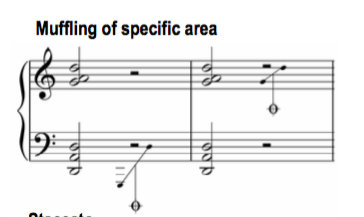
I'm trying to make a type of harp Muffle symbol in the Shape Designer, which involves the muffle symbol (it looks like the coda symbol, a bezeled circle with a cross through it) connected with lines and noteheads to show the specific range to be muffled. (See the attached screen shot.) However the Text Tool within the Shape Designer box is unable to insert the coda symbol in either the Maestro or Engraver font. They are supposed to appear with the key combination option-shift-5. Any suggestions for a work-around? Is this a known bug in the Shape Designer?
3 comments

Date Votes
Avatar
0

Oh sorry, I'm using Finale 25.1 (but also tried in Finale 2014.5), Mac OS 10.11.6.

Comment actions Permalink
Avatar
0

This is a known bug in the Shape Designer’s Text Tool.

If you type a character located in a font slot with number above #127, then the Text Tool enters - incorrectly - another font character than the character you type.

Unfortunately you can not copy a font character, and then paste it into a Shape Designer text block.


If I Recall Correctly, you can enter the Coda character via Unicode Hex input.

Go to the Mac OS control panel Keyboard, and enable Unicode Hex input.

You may have to quit Finale, and launch it again.

Alt-FB01 should enter the Coda symbol.


You can switch back to “normal” keyboard input when you are done.

Comment actions Permalink
Avatar
0

Thank you. I tried it, without success, but found another workaround with a bit of copy & paste from the Bravura font. I hope the next iteration of Finale includes an update of the Shape Designer!

Comment actions Permalink

Please sign in to leave a comment.