New post
Avatar
0

Hi All,

I can't get key switches to work. I'm using the Solo Cello 1 KS.

I have added the F1 note below the note I want it to switch to Pizz, which is in bar 15, but it is changing every note, even the ones before it to Pizz.

Can you tell me what I am doing wrong?

Cheers

rob

Windows 7 DAW Mixcraft 8


11 comments

Date Votes
Avatar
0

With MixCraft I'd recommend setting up a separate MIDI track for your key-switches.  You can keep them in the same track with your cello part, but I find it can make the score view come out funny without extra hassle that can be avoided.  Make sure your Key Switch track is connected to the same ARIA instance, and has the same channel set as your Cello is using.


Use the piano scroll MIDI Edit mode on a fresh Cello-Key-Switch Track to make sure your key-switch's "Note On" event is a tick or two on the timeline before the Pizzicato articulation change should take effect.  It doesn't matter how long the key-switch note is held, so it's NOT necessary to hold it out over the entire value of your pizz. section.


I.E.  In your case you say you want it to change to pizz. on Bar 15.  So:

1.  Start a fresh track that is all connected to ARIA, on the same channel as your cello.

2.  Open the MIDI Editor and enter your key-switch on the last MIDI tick or so of Bar 14.  It can be a short duration event such as a 16th, 32nd, or 64th, or even shorter.  I'd personally use the piano scroll style editor for this task, because it is easy to place events on the exact beat or MIDI clock tick you like.  It's also easy to grab and drag the precise duration of notes from here.


It doesn't have to be exactly on the last tick of beat 14.  Just make sure it is somewhere between the beginning of last note you wanted arco, and the beginning of the note(s) that should be pizz.

3.  When you want to change the cello articulation again, go back to your KeySwitching Track and add your next key-switch a tick or two before the change should occur.


Garritan Libraries use sticky style key-switches that stay in place until you choose a new key-switch.  This means that when you are ready to go back to arco, or change to some other articulation, you simply go to your key-switching track and enter it a tick or two before the change should take place. 

With Garritan libraries, a key-switch will NOT effect 'currently sounding' notes.  I.E.  If you are holding a sustained whole note (4/4 meter), and send a pizz. change on beat 3, the sustained note that began on beat 1 will keep sounding until the end of beat 4, and the next note-on event(s) played after beat 2 will all be pizz.


Note, key-switches should envoke as long as they are before, or on the exact same MIDI clock tick as the note-on event of any note(s).  In your example, things should change to pizz. even if you were to put the event on the first tick of bar 15.  I've just gotten in a habit of putting such keyswitches one MIDI clock tick before the first note that should get the new articulation...just in case I decide to use some other library at some point that 'requires' a tick in time before changing over. 

I've also gotten in a habit of stretching the duration of the key-switch event to be the same length as the section of music using the articulation.  Again, this is not necessary for the 'sticky' type of switching Garritan libraries use, but I do sometimes use other libraries that require one to 'hold down' the keyswitch, or they pop back to some default articulation.  So, I've gotten in a habit of streteching the key-switch duration to match just in case.  Such practices help make it a bit easier to mix and match different orchestra libraries with my projects.

Comment actions Permalink
Avatar
0

Hi Brian,

Thanks for the reply. I'll give that a go and see what happens. I can link the two tracks in Mixcraft by simply highlighting both tracks, right click and apply link.

Just so I'm clear, one will have the notes and the other the key switch notes?

I guess as I did not have a legato key switch indicated at the beginning of the first bar, that is why when I applied that pizz switch in bar 15 it changed everything.

I don't ever print out my music from Mixcraft, it's not good for that. I write everything in Sibelius, then export the midi files into Mixcraft to get better sounds and greater dynamics and the right articulations.

I've been talking to the Mixcraft and Sibelius people about why the midi tracks don't export or bring in the articulations marks correctly, but no one has an answer. It looks like it can't be done, that would solve a lot of this mucking around I have to do to get the correct articulation sound.

Music XML does not work either for articulations, I've tried in several DAWs.

I'll let you know how I go.

Cheers

Rob


Comment actions Permalink
Avatar
0

If you don't need scoring in MixCraft, you can keep the key-switches in the same track.   No biggie.  Just use the MIDI Editor to make sure they fall in good places on the sequence time-line.


As for exporting from Sibelius...


When exporting a MIDI file, Sibelius will go through the soundworld system and export every event it plays internally.  In essence it more or less 'renders' the file as if it were playing it back...but to a file instead of to your plugins/devices.


I.E.  If you want it to export a GM file, then you should load a General MIDI soundset. 

I.E.  If you have an ARIA soundset loaded, it will export every event as it plays it for ARIA.


Example:

Say I want to do a 1 to 1 MIDI export of a score using GPO5 form Sibelius to my CuBase DAW.


1.  I'd open my instances of ARIA in Sibelius and save the setups there as ARIA Presets.


2.  I'd export as MIDI from Sibelius as Type I MIDI.  This file performance will have all of the key-switches, dynamics, etc. as they are defined in the GPO5 soundset.  Type I MIDI preserves the independent track/stave designations, Where type 0 MIDI more or less makes the entire sequence a one track operation (of course with the proper MIDI channels preserved...but this can be a problem if you're using more than one ARIA instance...so go for Type I).


3.  I'll go into my DAW, load the same number of ARIA instances, and load the Presets I made in step 1.


4.  I'll import the MIDI created by Sibelius file into my DAW.  At this point I will need to make sure each track connects to the proper instance of ARIA.  I might also discover that some tracks have multiple channels on them (common if one uses the 'instrument change' feature of Sibelius on a stave).  In some cases it might be better to expand those multi-channel tracks out into separate tracks, while in others I might just leave it as is, and set the track output of my DAW to a mode that doesn't redirect everything to a single channel.


You should find that any key-switches, and other events that you might have built into the Sibelius interpretation system are present in the MIDI export.  If you specifically want a more universal General MIDI method of score play-back interpretation, then you should swap over to a General MIDI soundset in Sibelius before exporting.


As for XML exporting/importing....I find this to be kind of hit and miss with a number of Apps I like to use.  I'm into Finale, Sibelius, Dorico, CuBase Score, MuseScore, and more....and they all have some things they don't export/import all that well.  When it comes to moving things to a tracking DAW for tweaking the sound quality....MIDI is most certainly better than XML. 


XML does not preserve any type of playback information such as key-switches, CC events, etc.  It would be up to the app importing it to 'interpret' any markings for playback from scratch.  For score 'playback interpretation' Sibelius uses soundworld/soundsets.  Finale uses Human Playback.  Dorico uses 'expression maps', etc.

I'm not an expert on MixCraft, so I'm not sure, but I don't think it currently has playback interpretation built in for XML imports.  CuBase Pro is the only tracking DAW I'm aware of that can pull in a score via XML, and somewhat know what to do if a note is marked staccato, or tenuendo, or has an accent over it, etc.  Even so, you have to go in and build the interpretive expression maps by hand, and so many people who don't import tons of scores on a regular basis find it easier to just dot the controller lanes by hand anyway.

Comment actions Permalink
Avatar
0

P.S.  I'm not aware of an official Sibelius Soundset for GPO5.

I did make a personal one for myself, which you can download here:

https://makemusic.zendesk.com/hc/en-us/community/posts/115000169548-GPO5-Sibelius-Soundset-Version-22- 


It's not perfect, but it's a good start, and you can tweak it to make it your own.  I'm not very happy with the way I have implemented the new Garritan Orchestral Strings as the defaults, but you can easily use the Mixer in Sibelius to swap back to the GPO4 legacy strings.

Comment actions Permalink
Avatar
0

Hi Brian,

What I just tried was to export as a midi 1 file from Sibelius using general midi sounds, Sibelius Sounds and Note Performer sounds. None of these will export pizz, arco, crescendo or decrescendo as midi information into Mixcraft, and Mixcraft is not the issue, I have tried the same thing in Logic and Cubase, none will bring in the articulations marks as midi data. unless I'm doing something wrong that is.


The only way I can get the articulations from my Sibelius score to sound correct is to apply key switches in whatever library I am using, and for a large orchestral score, that is many days of work.


The best method I have found to achieve a realistic performance is to turn off all reverb, chorus and panning in Sibelius and they export each stave as a separate audio file, (from Note Performer as this gives the best sound) and then do the mixing in a DAW.


Back in the day, when I first used midi, in the early 80, programs use to recognise articulation marks. I used Roland gear and it had a function called something like midi dump, what it would do is apply all articulation to the midi file before you started it in your DAW, which was C-LAB's Notator scoring program that I used back then on an Atari.


But today, it's just not working, there must be a solution to this!


Cheers and thanks for all your help.


Rob


Comment actions Permalink
Avatar
0

OK, here's the thing with MIDI exports.

Accents are typically a simple increase in key velocity.  For many Garritan sounds, the CC1 event (expression volume) might also be increased a bit.  Staccato is typically dividing the duration of a note by 50% (or whatever you set in Sibelius), and this is done by Sibelius before the score is played back (or rendered to MIDI).


For GM files, dynamic changes (sfz, crescendo, etc.) are done over CC11, CC7, or both.  My GPO5 soundset does this  over CC1.


For legato, GM files use 'overlapping' notes (the note off of the first note is not sent until after the note on of the next note has been sent).  You can set the overlap amount in the Sibelius playback options.  For my GPO5 soundset, a CC68 (legato pedal) event is sent when slur marks are encountered instead of doing the overlapping.


Some GPO5 instruments offer special articulations for things like martele, spiccato, etc.  I.E.  It is possible to tell Sibelius that you'd like to use spiccato anytime there is an accent on a note (via playback dictionary).  In these cases, a key-switch is inserted if the soundset and playback options are taught to do this.  My GPO5 soundset's default tutti string sections even try to get fancy and automatically interpret passages with staccato note living under a slur as martele/sautellie/spiccato, or whatever, depending on a keyword you can drop into the score.  So...as long as this soundset is active when exporting the MIDI file, all those key-switches and stuff will be in the resulting MIDI file.


The Legacy GPO5 strings in my soundset do a lot of swapping around between the lush sustained and short bow articulations (while also sometimes adjusting various knobs in ARIA via CC events).  Again, if you have the GPO5 soundset active when you Export to MIDI, all of the key-switches CC events triggered by my soundset will be in the resulting MIDI file.


In either case...no matter what soundset you have loaded when you export from Sibelius, all of the playback information is rendered into the MIDI file.  So, if you had a note marked with an accent in the score...chances are if you look at that score in a MIDI editor, you'll see that the 'key velocity' got bumped up a bit during the rendering.  If there were crescendo hairpins, you'll see a lot of CC events rising over the timeline.  If notes were marked staccato, you'll see that they are shorter in actual playback duration than we see on a printed score.

If you need to implant some special/extra information into a MIDI file as tags to help out with your tracking session, you could add onto the Sibelius soundset that is being used, and force it to send something like a CC event or something along those lines.


There 'might' also be a plugin existing for Sibelius that might possibly allow you to quickly insert some special character in all the right places, which you'd then have soundworld set to automatically send some sort of event.  I.E.  Set up Sibelius to interpret some oddball sign so it sends a given CC event.  Use a plugin to insert and hide this sign everywhere there is an accent.


Some DAWs have advanced logical editors where you could analyze a track after importing it, and mark up obvious increases in velocity, and to do batch operations on them.  I.E.  If I had used one of the tricks above to force Sibelius to insert a CC99@127 event everywhere there is a staccato note....I could have my CuBase logic editor scan for all those CC99 events and alter the duration of any notes that begin on the same tick.


Note, GM exports are not going to use KeySwitches.  Instead, they will have Program Changes (where applicable), as per the GM instrument bank specifications.  GPO5 does NOT understand Program Change events.  They are simply ignored if streamed into ARIA.  So, if I had a stave for tutti voilins swapping between arco and pizzicato, using a GM soundset in Sibelius, my resulting MIDI I file would have Program Change events 48 (string section) and 45 (pizzicato string section) in the violin track.  When using my GPO5 soundset instead, I would see the relevant key-switch events in the resulting MIDI file.


So, if you intend to play back the score with ARIA in some other DAW, you can get a 1:1 MIDI rendering if you have your GPO5 soundsets active when exporting the MIDI file from Sibelius.  What ever Sibelius was sending to make ARIA interpret the score goes into the MIDI file.  Key-switches, CC events, EVERYTHING.  Such a rendering also includes all the Sibelius tempo and groove settings you have set up for the piece.  Note, you will still need to manually set up your ARIA instances in the DAW (ARIA presets can speed this process), and make sure tracks are properly expanded and connected.


Next, imagine I've decided that I'd rather use HALion Symphonic Orchestra instead of GPO5.  I could run a simple logic editor that would change all my key-switch events into whatever HSO needs....or, I could load things back into Sibelius, change to my HSO soundsets, and export again.


Another effective method is to use Sibelius 'instrument changes' on the stave, and have a manual soundset were each articulation lives on a different MIDI channel (Instead of using the KS version, load each individual articulation into his own instrument slot).  In this case, Sibelius would simply 'channel bounce' to change sounds instead of sending key-switches.  Each MIDI channel will be entirely dedicated to a given sound/articulation.  When I export/import this into a new DAW, every articulation is on a unique track of its own.  This method is really good if you intend to port things over to a tracking DAW in order to really mix and match libraries, layer things up, etc.  It's not very practical for visual scores, but it's great for doing a very detailed playback mockup where you want to swap sounds alot, and every single little detail matters.


As for visual elements in the score (lines, dots, carrots, etc. over/under notes)...you're not going to get those from a MIDI import alone.  In cases where I need both....I personally use CuBase pro and do a MIDI import first, then do an XML import as a separate set of tracks.  I'll typically mute the XML import from playing back, but use it for visual reference, while working out the intricate playback stuff in the MIDI tracks, directly on CC lanes, and/or working with the velocity and note durations in the piano scroll mode.  So if I want to 'hear' an accent...I drag the velocity bar of that note up and down to taste.  If I want a crescendo, I'll use my line tool to draw the proper curve right on a CC1 lane.  If I want a note to sound more staccato, I'll grab its right edge and drag it left so the note is shorter, etc.  Note, most of that information is already there from my import...all I need do is 'teak and fine tune it' for my mock-up.

Comment actions Permalink
Avatar
0

P.S.  I still use my old Atari Falcon and STacy with Logic, Cubase, Notator, etc...great stuff :)

Comment actions Permalink
Avatar
0

OK, I went back and edited/added a bunch to my previous post...so this is just a bump message.

Comment actions Permalink
Avatar
0

Hi Brian,


It's clear now, for some reason, that with Sibelius notes will hold some midi data that is more than just the note itself. It will hold tremolo, dynamics and a few other things, but not staccato, arco and other selected articulations, and I just have to live with that, it's simply not worth all the trouble of basically re-writing the score in a DAW after I have done that in Sibelius.


The best thing for me is to export staves as audio.


Thanks for all the advice, it has opened my eyes to quite a few things.


Cheers


Rob


Comment actions Permalink
Avatar
0

Rob,


It exports all that here, as in, if I load up a project in Sibelius using GPO5 and my soundset, then export it as MIDI, it plays back in CuBase exactly as it did in Sibelius provided I duplicate the ARIA instances.


Staccato is there, in that the duration of the notes in the MIDI export are approximately 50% of their 'written value' on the score.


Accents are there, as in the key velocity, and CC1 value of each and every accented note is elevated according to the settings I had for accents in Sibelius playback dictionary.


The instructions I gave Sibelius for house tops, tenuto, etc....it's all there in the MIDI file.


In cases where I've got key-switches going on for articulations or bow styles, it's all there in the MIDI file.  Changes between arco and pizz included.


All the CC manipulation data of the soundset is there.  I.E. hair pin dynamics, legato pedaling on slurs, etc.


All the groove/tempo information is there.


Once I've connected the tracks to ARIA instances....it sound exactly as it did in Sibelius....all ready for me to fine tune and tweak out.


If I want to alter staccato effects for a given note, I change the duration of it.  If I want want more or less accent, I alter the key velocity of the note, and adjust the CC1 dynamic level.  If I want to add/remove/change a key-switch, I simply change it.


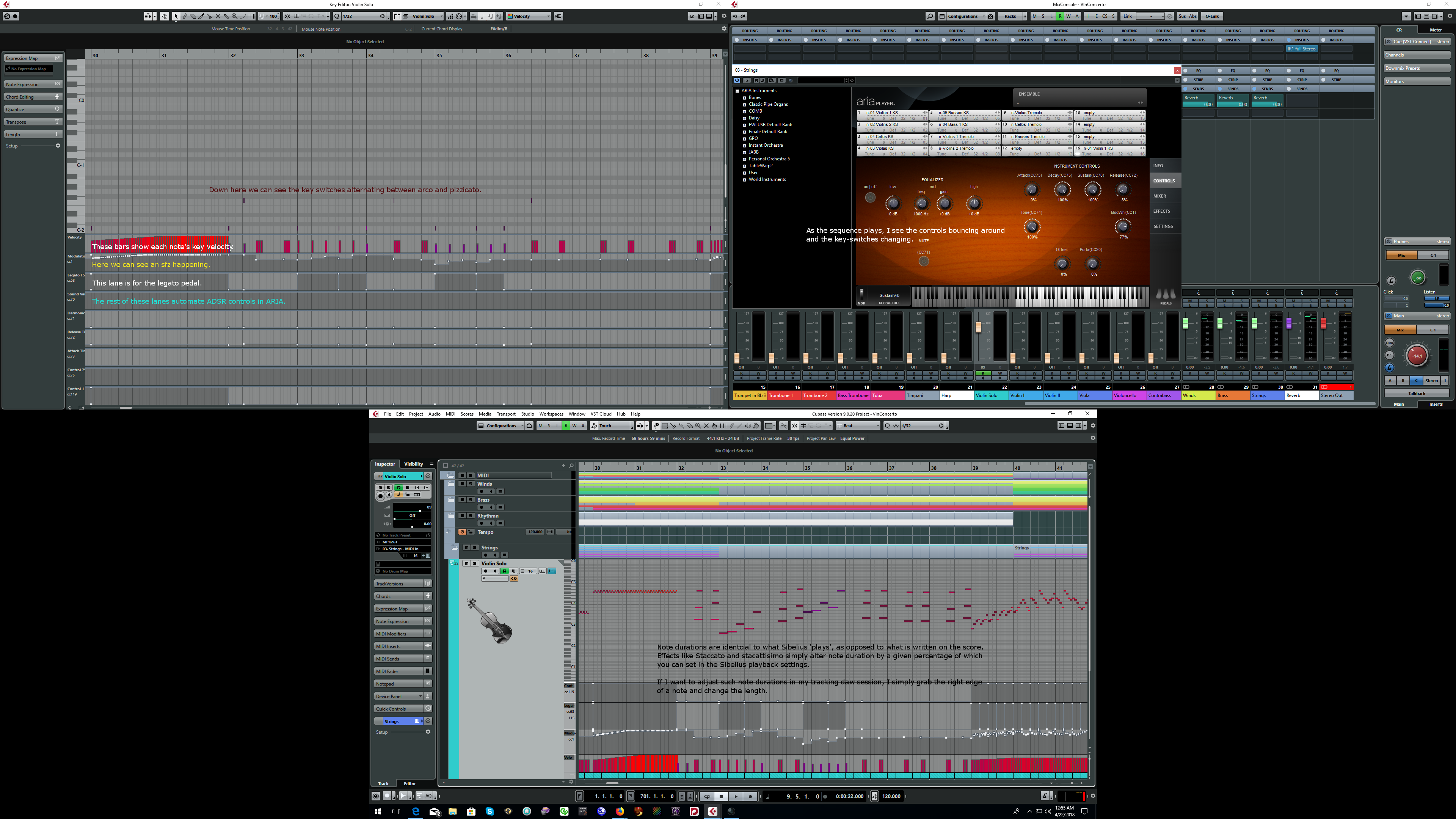
Here is a screen shot focusing on the Solo Violin part of a String Concerto.  I've just exported it as MIDI from Sibelius, and imported into CuBase showing that it is an exact 1:1 rendering of what Sibelius plays on its own.  It is going through the same plugins (ARIA), so it's going to sound very close to the same (albeit through Steinberg's sound matrix instead of the Plogue one included with Sibelius).


Zoom in to see the notes I've made.  Not sure about your browser, but with Firefox I can right click and choose view image, then zoom.


The benefit of working in the tracking DAW is that one can open up specialized MIDI editors and edit the very fine details on the scale of milliseconds.


I look at the score and use my ears......when I want something to sound different from what Sibelius had interpreted, I can easily do it here.  I can more easily clone things and layer/double up different sample libraries.  I can use the time scaling features of my DAW to sync with video, automatically adjust tempos, and hit cues on the money.  And so much more....

Comment actions Permalink
Avatar
0

So, how did I get this one to one rendering?


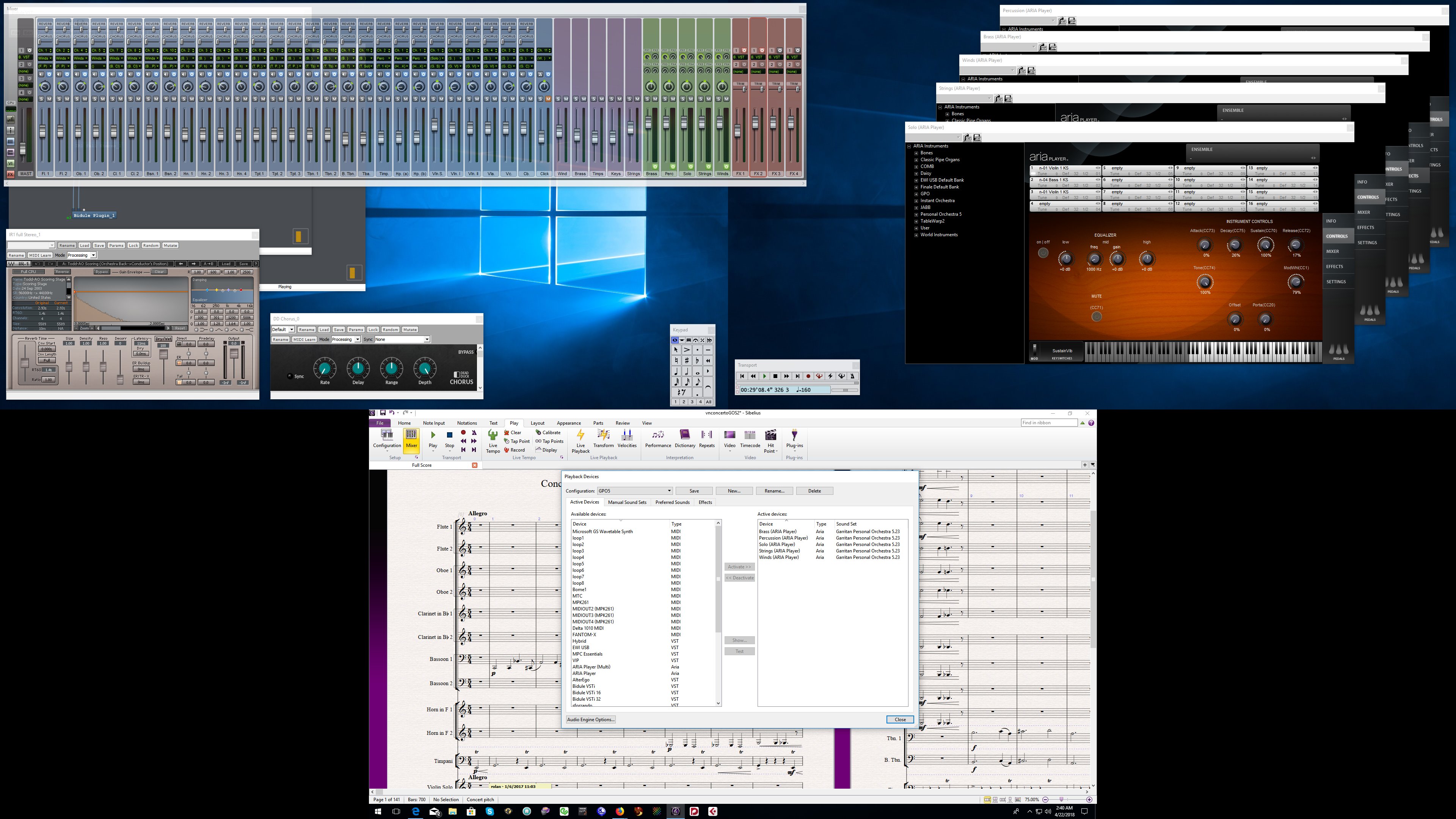
First I loaded the score into Sibelius.  I made sure it was playing back through GPO5, using my GPO5 soundsets.  In this case I'm using 5 instances of ARIA.


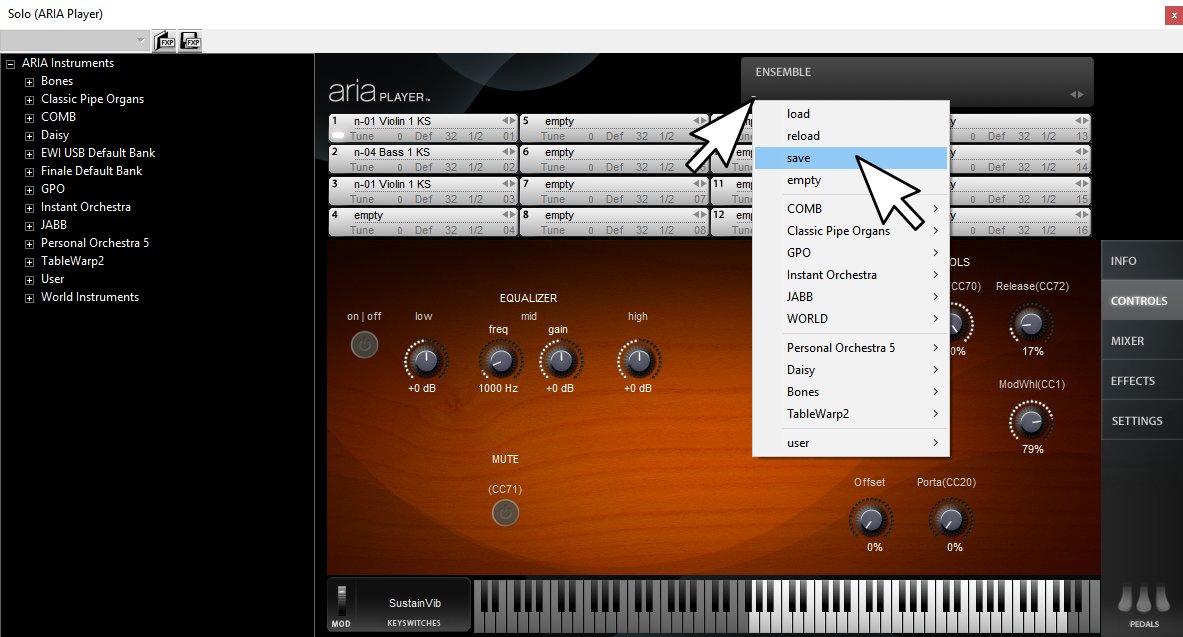
Next, I made presets in ARIA of each instance's setup.  This is to save me a ton of time setting up all these instruments in my Tracking DAW.  Upon saving an ensemble, it takes a snap-shot of the entire ARIA instance...including any effect and mixer settings.  Now I can call it up again later when I'm working in my tracking DAW, and things will be exactly the same as they are in Sibelius.


Now that I have a preset of each instance, I can quickly call them back up when I start working my tracking DAW.  They will be waiting for me in the 'user' area of the Ensemble preset menu.


I gave the score a play to make sure it's working as intended.  What I'm hearing right now is almost exactly exactly what I'll hear when I play it in my Tracking DAW.  In my case, you can see in the first screen shot that I happen run a couple of external plugins on the Sibelius Mixer for reverb and chorus....these effects will be different in CuBase unless I happen to clone and set them up there as well.


After my test run, I'm fairly happy with what Sibelius is playing back for me, so I am going to export it.

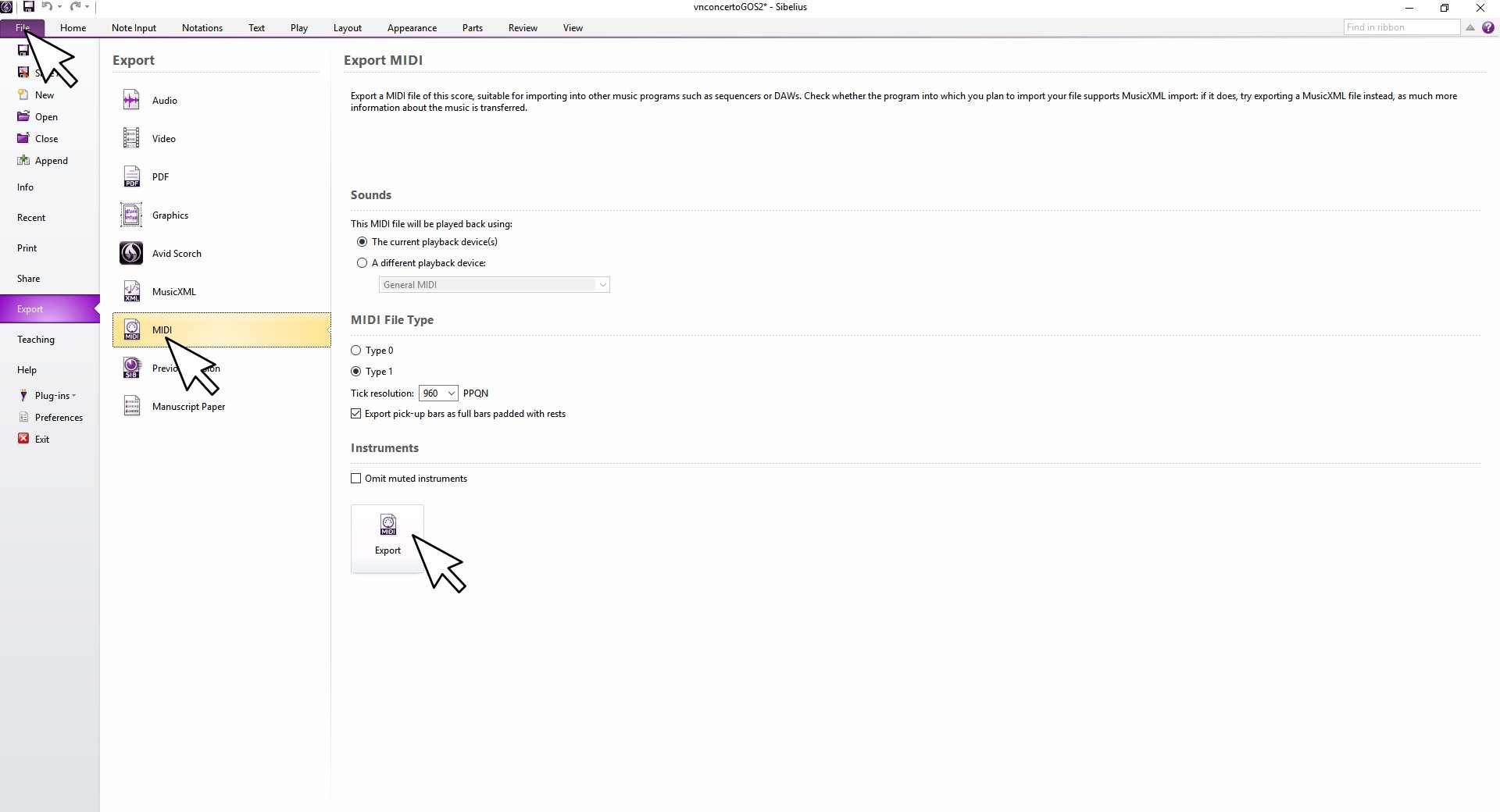
First I'll click the "File" tab.

Then I'll click the "Export" option in the far left of the window.

I want to use "The Current playback device(s)".

I want a Type 1 MIDI file.

Once it's all set, I'll click export, give it a name, and I'm done.


When I Import this into CuBase, there are a number of things I must do to get it playing back.


1.  Spawn 5 instances of ARIA in my DAW's multi-timberal VSTi 'rack mode', and load up the Ensemble Presets we saved before we left Sibelius.  Various DAWs can handle this in different ways.  You'll want to find the mode that lets you share a common VSTi plugin with many independent MIDI tracks.


2.  Make sure my imported MIDI tracks are connected to the proper instance of ARIA.  Again, each DAW has its own way of connecting a MIDI track to a plugin/instrument.


3.  Insure my tracks are set to send over the proper native MIDI channels in the MIDI file, as opposed to rerouting them to a given channel.  This is important because sometimes Sibelius uses a 'channel bouncing' technique to swap between instruments or articulations living on a single stave.


Some DAWS will automatically separate any tracks that have data for more than one channel on them into multiple tracks.  Some will have nice drop down 'channel lanes or folder' that help sort it out.  Some will not offer much obvious help at all for realizing and managing different channel data.  Fortunately, most all DAWs have an option to redirect all output of a given track to one specific channel, as well as an 'any or raw' mode which does NOT attempt to reroute anything according to MIDI channel. 


In my case with Cubase, I notice the tutti string sections need to channel bounce to get the tremolo effect, but since it was all on the same stave on my score it's all living in this one track.  I'm going to leave them all on the same track, but set the output to 'any', and make sure it is pointing to the correct ARIA instance that I cloned from Sibelius.  This way everything plays back on the exact same channels the file was created with.  As long as I have it connected to the right ARIA instance, it's going to play back properly.


If your DAW does not have a non-redirected channel output mode for each track, then you might need to somehow extract multi-channel staves so everything playing back over different channels gets its own track (if it didn't do it automatically upon importing the MIDI file).


4.  Once I've got everything connected properly, I bring down the volume, hit play, then pull the volume up to a comfortable level.  Yay, it is playing back exactly as it did in Sibellius.  It sounds almost identical, except for my effects rack (at this point it's all dry...no effects).  Now I'm ready to organize (set the track order I want, put things in section folder folders, etc.) set up any visual enhancements CuBase offers (colors, track icons/images, etc.), make effect chains as I like, perform edits, sync with video, whatever.......


Comment actions Permalink

Please sign in to leave a comment.