New post
Avatar
0

Hello,

I'm having trouble changing single note velocities in a piano reduction from an orchestral score that I'm thinning out. I'm using Windows 10 with the most recent update of Finale, I've tried advanced tools pallet to midi tool to edit key velocities and I get the scale above the notes, but I can't find a way to edit individual notes. Is there a pen or tool or pop-up velocity menu somewhere?


Sincerely,


Andy

2 comments

Date Votes
Avatar
1

Correct me if I'm wrong, but, doesn't MIDI velocity refer to volume? Are you trying to change the volume of individual notes?

Comment actions Permalink
Avatar
0

I don't really use the MIDI tool for anything so I may not know what I am talking about, but I just tried a couple things that seemed to work.


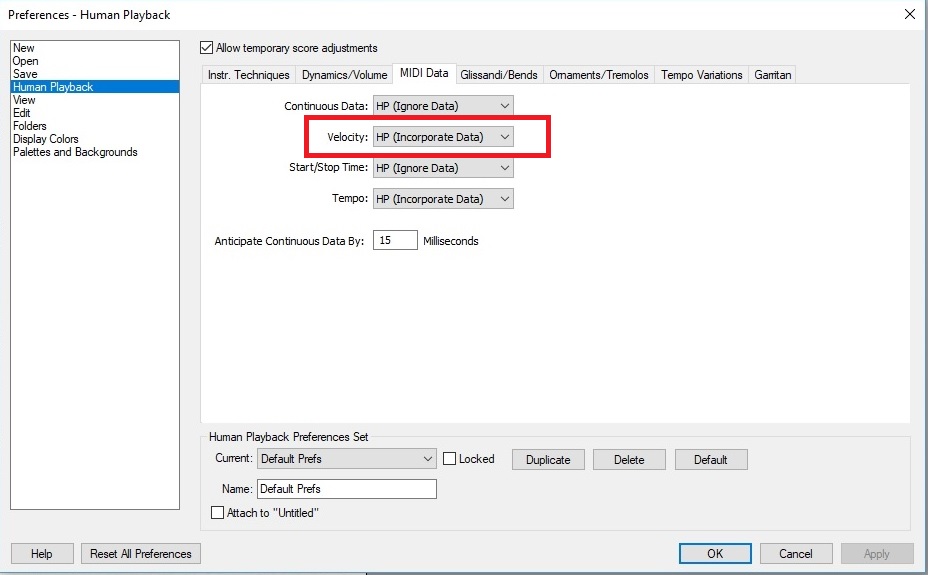
If you are going to edit velocities using the MIDI tool you need to tell Finale to "incorporate" that MIDI data.


When using the MIDI tool, double-click on a measure then double-click the handle for the note you want to edit. I don't know how this will affect other areas of your score, though.


Another way to edit key velocities on individual notes without using the MIDI tool is to create "Articulations." You can choose that these display on screen only and not print.

Comment actions Permalink

Please sign in to leave a comment.