New post
Avatar
0

When in score view, finale is making the staves that come later in the song, appear MUCH smaller than the rest.  To combat this problem, I have used the resize tool, but I end up having to magnify each staff to at least 165% to make them appear just as big as the previous staves.  I am on a 15" 2017 MacBook pro 2.9 intel core i7 running High Sierra 10.13.4.  Finale Version 25.5.0.259.


2 comments

Date Votes
Avatar
0

Try this (on a copy of your file, just to be safe):

  1. Choose the Resize (percent) Tool.
  2. Right-click (or the Mac equivalent) on the first measure (which you say is the desired size)
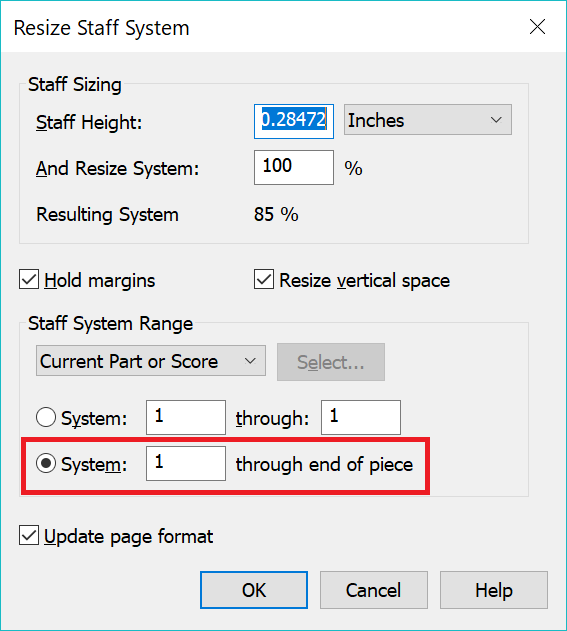
  3. Choose Resize Systems from the drop-down menu
  4. Apply the size pre-loaded into the pop-up window (which ought to represent the size of your first system)
  5. Select the radio button to apply this size from this system Through the End of the Piece.
  6. Click Okay.


Mike or Peter can probably tell you how to set the page/system sizes to prevent htis in the future, but for now I offer this quick and dirty solution.

Comment actions Permalink
Avatar
0

Right on!  Thank you so much!  Man, that was annoying.  I feel like that has happened ever since I used a template for a FULL score (which this isn't).  It's very perplexing as to why it would manifest itself in a completely different file too!  Thanks again for the help.


Comment actions Permalink

Please sign in to leave a comment.