New post
Avatar
0

I cannot get the multiple ending should playback as it supposed to. I have ending 1,3 are the same, then ending 2, is different. Ending 4 is also different. After the third ending it goes back to ending 2. I can't make it go to ending 4. What do I need to do? From the tutorials I don't find instructions for this specific situation.
Windows 10
Finale 25.5

2 comments

Date Votes
Avatar
0

When you are in the Repeat Tool, you have the Repeat menu.

In the Repeat menu there is a utility for creating First and Second Ending.

* Did you use that utility?


Also beware that each ending (except the last ending = Ending 4) has two components:

1) In the first measure of the ending there is a so called Ending (with a half-Bracket forward).

2) In the last measure of the ending there is a so called Back Ending (with a Backward Repeat Bar, and a half-Bracket backward).


Ending 4 only has the first component = 1)


For the first Ending (= 1,3) the Target should be set to the Next Ending:

Also, for the second Ending the Target should be set to the Next Ending, but the Ending Number in the top field should be ‘2’.


Both the two Back Endings should have the Target set to Nearest Forward Repeat:


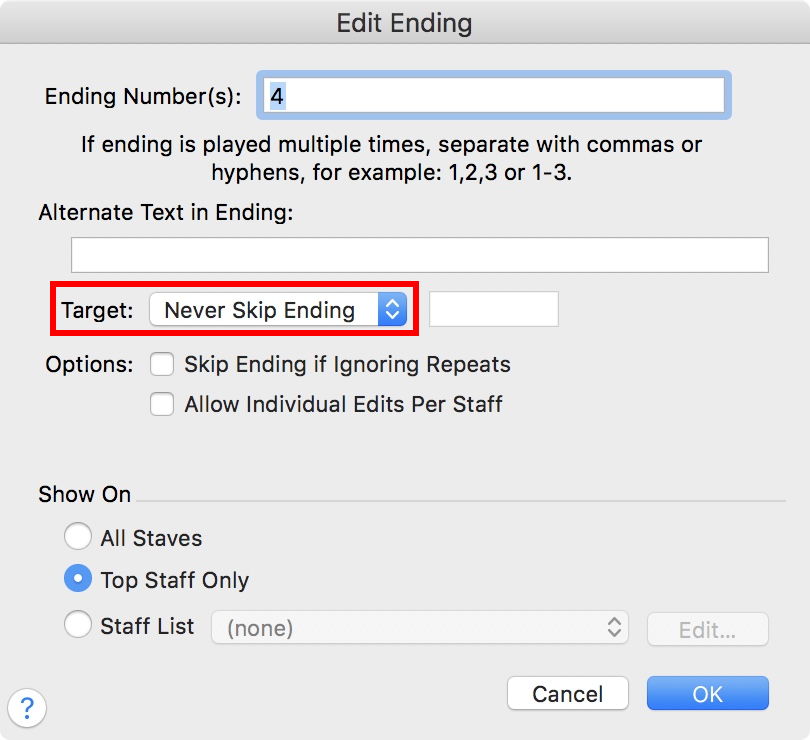
For the last Ending (= 4) the Target should be set to Never Skip Ending:

Comment actions Permalink
Avatar
0

Thank you Peter for enlightening me. It works. I have it hard with tutorial sometimes I just don't get it.

Comment actions Permalink

Please sign in to leave a comment.