

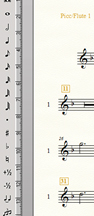
I'm using Win 10 and Fin 25. As an example I have Fl 1 and Fl 2 parts. How do you only display main name but not the alt name? I delete the part name in score manager but it still shows a number like 1 or 2 along the left side in page view.
Shouldn't there be a setting to only display the main name and not the alternate name?
Thanks in advance

1 comment
Date Votes