New post
Avatar
0


Dear Community,

new to Finale and teaching guitar sometimes it is helpful to write tone names or numbers into a guitar´s fretboard for my students. I would be glad if you could give me a clue if there are chances to do this in Finale´s fretboards.

THX so much

Best regards

Tim

17 comments

Date Votes
Avatar
0

… write tone names or numbers into a guitar´s fretboard …


I could be wrong here, but I do not see any options to do so in the Fretboard Editor, sorry.


You could use the Expression Tool to add tone names or numbers.

With a new, custom expression category you can set useful defaults for positioning and font, so that you can experiment with the settings:

Just edit the category, and the change will immediately affect all the expressions from that category.

Comment actions Permalink
Avatar
0

Alright. Thx Peter.

Maybe there is a way to fix expressions and write symbols and number over an empty fretboard in a way that fretboard position and expressions are locked or grouped. How can I resize the fretboard, a bit bigger would be ideal.

THX

Tim

Comment actions Permalink
Avatar
0

… How can I resize the fretboard, a bit bigger would be ideal …


We need more info:

Does the Finale document display both chord symbols and fretboards?

Would you like to resize both chord symbols and fretboards to a bigger size?


The better we understand, the better we can help.


Could you perhaps explain why you need the fretboards “a bit bigger”?

In Other Words:

What is the problem you are trying to solve?


Also, an attached graphic of the layout you are trying to create, might help.

Comment actions Permalink
Avatar
0

Sure. When I add numbers and note names as expressions, say Ab or D# on an empty fretboard in the default size it is barely readable in a teaching situation in relation to the given score size. Just think of adding note names instead of dots on the fretboard with the ability to scale up 30%. If I would need 100s of those, importing graphics gets annoying. It would be an option. I would rather write everything in one program if possible

 It would be cool to have more options character wise in the fretboard dialog. Just add letters a...z(or restrict to note names only), numbrs 0...9 and accidentals. It would be a dream with the autolayout of finale, as I create those in a graphic program and so on. It could be implemented as custom design option in the dialog.

If you look at Ted Greene' notation, one of the greats in fretboard notation, sometimes he writes intervals below a fretboard diagram, in some cases even right onto the strings in the diagram. Also he uses graphical shapes, too.


Www.tedgreene.com


Another update feature could be Roman numeral writing of fret positions. The 11fr layout is maybe used but uncommon in classical guitar conventions. If I had the chance to dig in deeper for updating fretboard design, please let me know. I know it's a notation program in first place and the option of adding automated fretboards is great, of course.


Thanks very much

Best regards 

Tim

Comment actions Permalink
Avatar
0

Tim Büchsenschütz,


If I understand you correctly, you are trying to create Tim Greene' notation - with all its features, right?

The consequence of Tim Greene' notation is that you for a single chord symbol (e. g. Fm7) need many different fretboard diagrams, right?


For that type of fretboard notation I would use the Expression Tool instead of the Chord Tool.

I would create a new expression category specifically for fretboard diagrams.


Generally, in the Chord Tool it is easier if each chord symbol (e. g. Fm7) only has a single fretboard diagram.

To get several different fretboard diagrams for the same chord symbol you would have to duplicate the chord suffix, and edit the duplicate (= not practical).


In Other Words:

Use the Chord Tool for the chord symbols.

Use the Expression Tool for the (many different) fretboard diagrams.


In the Shape Designer, create an empty fretboard diagram - in the size you prefer.

To create a new fretboard diagram, duplicate the empty diagram, and edit the duplicate.

You can place the fretboard diagrams in the score as shape expressions.

You can save your shape expressions as a library so that you do not have to do the same diagram more than once.


If you have questions about the Shape Designer, let me know.

Comment actions Permalink
Avatar
0

Yes, many diagrams to one chord, regarding position and arrangement of the piece. There are many ways to express fm7.
I try to check out. Thnx for your quick help in my 30day trial.

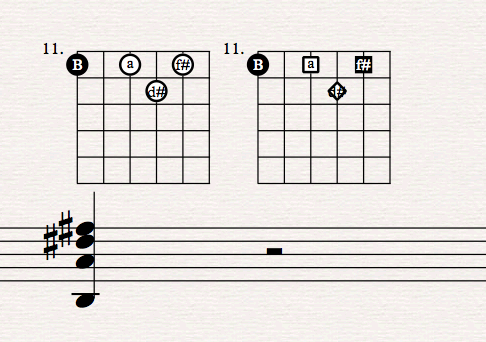
This is one possible result, where I don´t need the circled dots urgently, but nice option to add shapes as well in regards to Ted Greene´s Concept


If there are some templates out there, let me know ;-)) THX


Comment actions Permalink
Avatar
0

… This is one possible result, where I don´t need the circled dots urgently …


Did you create the attached result in the Shape Designer?

I think it looks fine, except that the circle looks rather “crammed” with d# or f# inside it.

To fix, I would

- use a slightly bigger circle

- use a smaller line thickness for the circle


By The Way:

In the note names d# and f# you are using the symbol # instead of the true music accidental ♯.

I personally think that the true music accidental ♯ looks better here, because it has perpendicular lines.

Generally, music notation uses perpendicular lines - rather than slanted lines.

Think about it:

Barlines are perpendicular.

Stems are perpendicular.

Tuplet bracket hooks are perpendicular.

&c.

Comment actions Permalink
Avatar
0

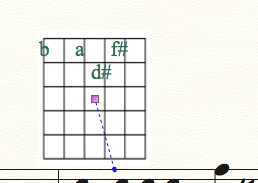
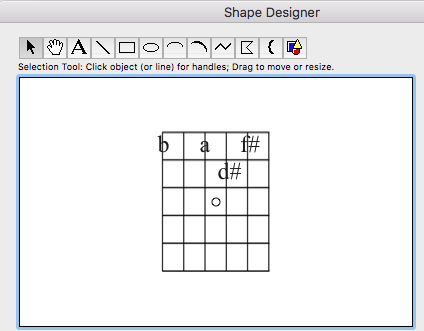
After some experimenting in the shape designer, the layout in the editor is not represented in the created expression shape. Characters and the fretboard grid don´t fit here anymore.


The result in the score is not representing edit and preview scaling of text and fretboard:


It looks good in the preview:


Editing stage:


The good thing about having implemented these options maybe in a future fretboard creator is the automated layout and resizing in the score if needed. Also the connection to one Version of a chord to a chord symbol is a restriction and unpractical. Maybe the solution could be making up a custom library where you add fretboards to a given chord. The arranger then can choose between those newly created ones and build up a full library. Even Scales should be an option, too.


THX

Best regards

Tim

Comment actions Permalink
Avatar
0

Tim,


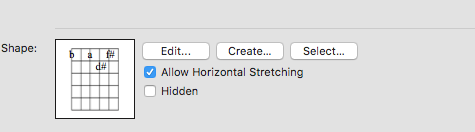
In your screen shot from the Expression Designer the option “Allow Horizontal Stretching” is selected.

By default Finale selects “Allow Horizontal Stretching”, a fact many users overlook.


Try de-selecting “Allow Horizontal Stretching”, and see whether that solves the problem.

Comment actions Permalink
Avatar
0

Yeah that was it. Stretching off works!!

Okay, maybe a bit of layouting text wise- Is it possible to change the text font in the editor, too. Jazz font etc would be nice, of course


THX Peter!!

Comment actions Permalink
Avatar
0

… Is it possible to change the text font in the editor, too …


I suppose that you by your word “editor” mean the Shape Designer, right?


The Shape Designer’s sub-tool Text Tool allows you to change font (Shape Designer menu > Select Font…).

You can even change font, and use multiple fonts in the same text block.

Comment actions Permalink
Avatar
0

Yes, the Shape Designer. Sounds good. WIll try, get´s going. Thanks very much, Peter!

Cheers

Tim

Comment actions Permalink
Avatar
0

A problem that I see:

If there are hundreds of customized fretboards in the expression tool library as shapes, how can I save them. I see no point where Finale saves the customized fretboards in the document itself but instead relys on the library, right?

So if I send one of those finale files to another person, who does not have the fretboard library (the customized expression shapes), he or she is not able to see them?


Also I found that when I create a new document the Custom Library in the expression dialog is not found, also I cannot copy and paste those customized fretboards into another document, as far as I tried it out yet.


Is it possible to export a custom expression Library?

Comment actions Permalink
Avatar
0

To save a library:

File menu > Save Library…


To load a saved library into a document:

File menu > Load Library…

Comment actions Permalink
Avatar
0

Cool!! THX for your tuting me far too much, Peter!

 But every custom shape is never disconnected from the library, right. Think about creating a shape and make it independent from the library once designed.

When arranging for guitar there will be 100s or thousens of different shapes in the future. If you alter one (accidently) every single shape in any document will be altered, too. So it is necessary to forever store all of them and not to loose a single one.

So reusage would be pretty impossible when glued to a certain position in a particular song with fret numbers. Changing a fret number in a certain shape will alter any shape in other songs, too, so...Phew!

Again, have a look at Ted Greenes Oevre. Every tune or exercise has different shapes.

Just thinking about a way to handle the data when starting Ted Greene like arrangements and exercises in Finale...

Maybe each song a library?


Have merci and Mercy!

Best regards

Tim

Comment actions Permalink
Avatar
0

… every custom shape is never disconnected from the library, right. Think about creating a shape and make it independent from the library once designed.

When arranging for guitar there will be 100s or thousands of different shapes in the future. If you alter one (accidently) every single shape in any document will be altered, too …


1) This is a misunderstanding.

Libraries are not program specific.

The phrase “Load Library” is short (and nice because of the L’s), but it is also a little misleading.

A more correct wording could be “Import Library”, or “Paste Library”.

When you edit a document, your document changes will not affect any other file.

There is no “linking” between files.

An example:

Create a new “Document Without Libraries” (= an empty document).

Load a library into that empty document.

When you do so, the contents of the library is copied into the document (and will from now on be saved with the document).

In the document, make as many edits as you like.

The original library will not be affected.

Other Finale documents will not be affected.


2) Quoting myself:

… To create a new fretboard diagram, duplicate the empty diagram, and edit the duplicate …

This {duplicate & edit} thingy not only applies to shapes, but also to expressions (and articulations, chord suffixes, &c.).

When you edit the duplicate, the original item is not affected.

There is no “linking” between them.

Comment actions Permalink
Avatar
0

Alright. Understood. Thx again, Peter!!

Makes live easy for creating individual scores with varying fretboards. Cool!

Comment actions Permalink

Please sign in to leave a comment.