New post
Avatar
0

I've received an instrumental part from a composer that I'm trying to resize to 100% (poor eyesight). I've done the resize steps with the % tool, and yet his copy is coming out smaller than parts and scores that I've made at 100% (this is evident both on screen and on printout - printing is also set to 100%). Is there a setting somewhere that fiddles with the % tool output, or is there another size setting option at play?

Oh, and the % tool also indicates 100% on staff sizes as well as the page size.

Finale 25.5

Mac Pro (mid-2010)

OSX 10.12.6

3 comments

Date Votes
Avatar
0

Just to be sure, which setting did you check for the size of the staff? There are two.


1) Resize System (all staves) - sets the staff height for the piece based on a system by system basis (Finale default is 82 EVPUs).

2) Staff Size (individual staff) - sets the size of the staff relative to the parameters set in "Resize System".


By default, this is what you should have in the "Resize System" edit box:


Staff Height: 82 EVPUs

Resize System: 100%

Resulting System Scaling: 85%

Comment actions Permalink
Avatar
0

Go to

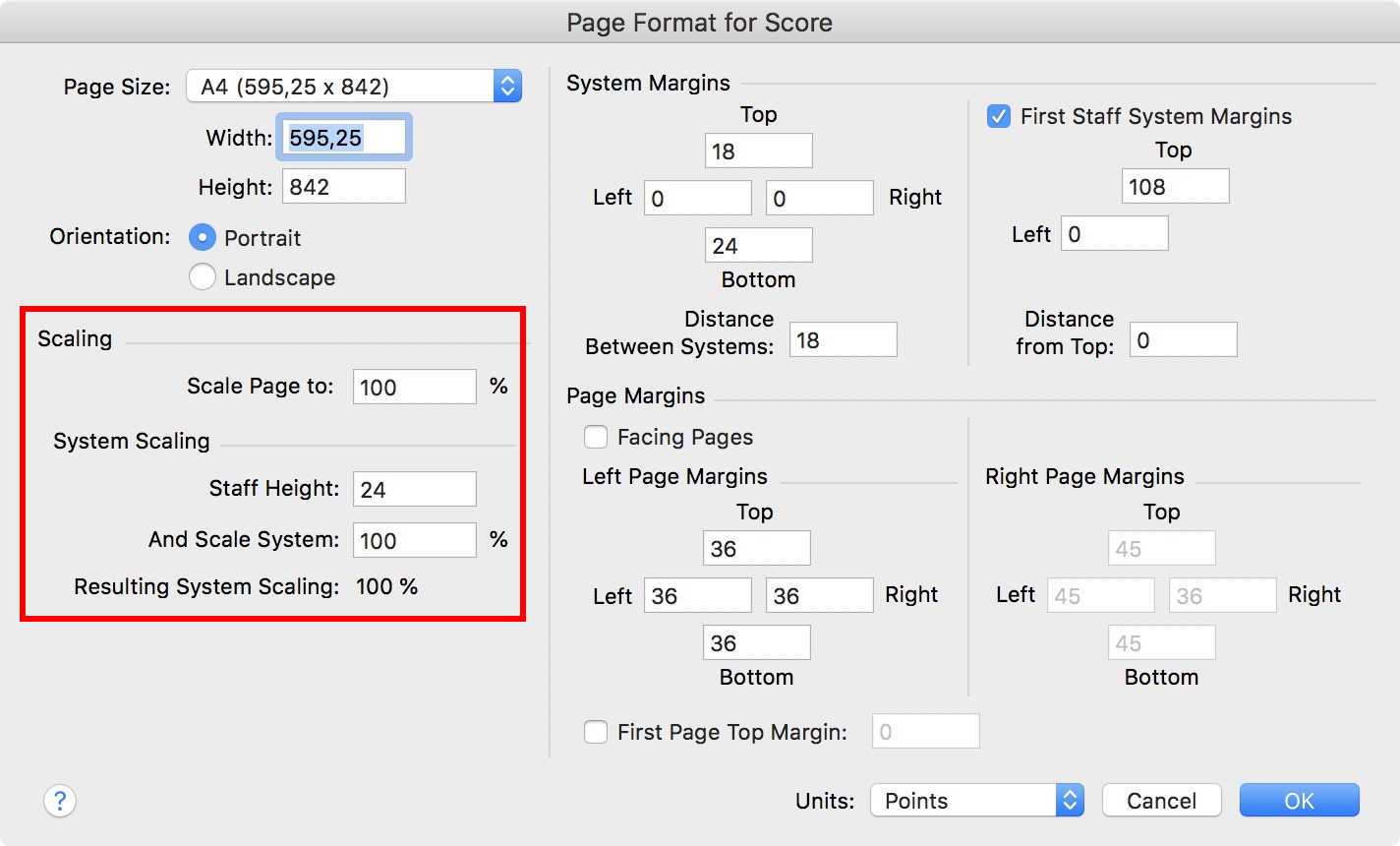
Document menu > Page Format > Score… *)

and enter the following settings:


Next, switch to the Page Layout Tool, and use the command

Page Layout menu > Redefine Pages > All Pages of Current Part/Score


*) Yes it sounds crazy that you should go to the settings for the score, but since this document is an extracted part, the part is the score (and in this document there are no parts).

Comment actions Permalink
Avatar
0

Thank you Peter. That solved the mystery for me and enabled me to reformat that hard to read part. I had no idea that that percentages in the sizing tool could be calibrated elsewhere. George, the prior poster, has a slightly smaller calibration for staff hight (20.5 pts or 82 EVPU's), which renders a system scaling of 85%. I think I remembered reading in Finale's help, that this is their default sizing calibration for the % tool. I think a 100% system scaling option comes out too large with that setting


Thank you again,

Michael

Comment actions Permalink

Please sign in to leave a comment.