New post
Avatar
0


Recently, I accidentally updated the Aria engine which caused Finale to stop recognizing the player. I uninstalled and reinstalled Aria player back to v 1.872 and Finale was able to recognize Aria again. However, now when I open a score, Finale has been going directly to the "Preprocessing file for Human Playback" loading dialog instead of loading the Aria GIFF sounds denoted in Score Manager first. This leads to the standard playback procedure without any sound because the Aria sounds weren't loaded in the first place.

The only fix I've found for this is using the "Reassign Playback Sounds" feature which loads the sounds and resets the score to soundmap defaults, but this is annoying because I have to then go back into Score Manager and manually change the default sounds to the ones I want. What could be causing this? I've tried a reinstall of the program, as well as updating it from version 25.0 to 25.5, but the results are still the same.

Interestingly, I was able to load the sounds in a couple of older scores which I believe were created in Finale 2014.5, but I'm not sure. The perfect playback in this case makes this even more baffling. Additionally, any new scores created don't have automatically loading sounds, regardless of how they are set up.

Windows 10 - Finale 25.5.0.290

18 comments

Date Votes
Avatar
0

Have you tried trashing the preferences?

Comment actions Permalink
Avatar
0

Win 10, Fin 2012, Lenovo laptop

Mike, since I've had a similar issue, I tried to figure out what you mean by "trashing the preferences," but couldn't.

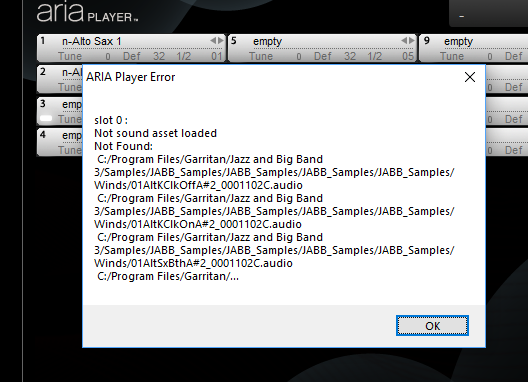
I'll probably have to start a new post with this, but this is what I keep getting when I bring up the Aria Player onscreen.  It also appears when I load an instrument.  (I just followed their suggestion to update to engine 1.933, but it hasn't helped.)


I also did the "ritual" prescribed on Garritan's Knowledge base, with all the Windows key, Run, type, to place all the paths in folders.

Jabb appears on the list of instruments in Score Manager, and in the Sound Map Priority.

Suggestions?

Comment actions Permalink
Avatar
0

The XML (support) files that allow JABB to be listed as an option in the Sound Map Priorities is separate from whatever tells Aria where your sound files are located. What I would try (if you have not already) is to re-install the JABB package to make sure the Aria Player can find the sound files.


But that's just me thinking what I would try.

Comment actions Permalink
Avatar
0

When I "reinstall" it, do I have to re-download it, or just extract the files (assuming the install will automatically start afterward)?

Comment actions Permalink
Avatar
0

If you still have the (most recent) JABB installer, I'd just run it.

Comment actions Permalink
Avatar
0

That's what I figured, but I went ahead and downloaded it anyway.  It didn't work.

Comment actions Permalink
Avatar
0

Win 10, Fin 2012, Lenovo laptop

While watching some Finale tutorials on YouTube, I realized that the ARIA Player has "Preferences."  Who knew?  I looked at it and thought I remembered mine being on Direct Sound, though it loaded as MME.  There's a WASAPI available, too.  I've checked through all of them, but they haven't done anything to produce sound, and I'm still getting the message "Not sound asset loaded.  Not found.  C:/Program Files/Garritan Jazz and Big Band3/Samples...Samples,..Samples…audio"


Does this just mean that "my computer doesn't know where to look"?  Because it loads the Finale default instruments just fine, every time.

Comment actions Permalink
Avatar
0

>> Does this just mean that "my computer doesn't know where to look"? 


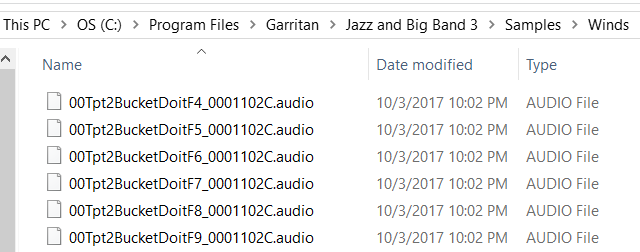
This appears to be the case. It is looking for files like these:


Comment actions Permalink
Avatar
0

That's kind of what I thought.

Since I already followed the "Setting up Garritan Jazz and Big Band 3" steps at the Knowledge Base, and it shows JABB3 "available" at the Score Manager Device column, and in the Sound Map Priority, there must be something else I have left undone, for it still doesn't produce any sound on scores that I've used for a long time. 


Is JABB3 a plug in?  It isn't shown on the "Manage VST Plug-ins" list.


At first, I tried this kind of thing years ago with the Pipe Organ sounds only to find that it was no longer part of the fine family of Finale products...  I'm assuming JABB3 hasn't been sold off...


I'll try setting them up again.  Maybe I typed something weird...


Speaking of weird, I have two ARIA Players in the Score Manager Device column.


Comment actions Permalink
Avatar
0

MakeMusic still sells Garritan Sounds. They even did an article of Gary Garritan in this week's Garritan Blog and talked about the Garritan Collection selling at a discount.


I am stumped as to what is causing your difficulty. I suggest you use the "Submit a request" link above (or on the Garritan Forum) to request support directly from MakeMusic to solve your problem.


If that solves your problem, please let us know back here what worked so we can help others in the future.

Comment actions Permalink
Avatar
0

I'll try sending in a request.  Even though 2012 is outdated, they have occasionally been able to provide help when all else fails.


When I tried following the "Setting Up Garritan Libraries" steps, I realized that there is no JABB3 folder; only three files.  Well, maybe I'm mis-reading that, so I'll try their suggestion.

Comment actions Permalink
Avatar
0

When you re-installed JABB, I am guessing you know that the audio sample files are loaded separately as part of the install process.

Comment actions Permalink
Avatar
0

I was looking at their directions for moving the samples, but it looked a little technical to me.

Comment actions Permalink
Avatar
0

It looks like I inadvertently hit a key.  They were going somewhere weird.


YouTube has some nice tutorials, but they're often very basic--the same stuff covered in the help videos or user manual.  It would be nice to have some stuff on file placement and storage.

Comment actions Permalink
Avatar
0

The problem is that the Finale sounds are going to a non-existent location.  They are in a folder call App Data, which my laptop's search function can't find.  But they play sounds.


The JABB files are going right where they're supposed to, but they don't play sounds.


I'll just contact support and see what they say.

Comment actions Permalink
Avatar
0

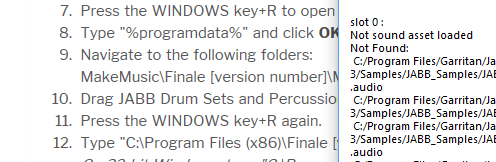
Furthermore, I've just noticed this:


I've never delved too deeply into programming, and didn't notice that some are backslashes, while others are forward.  I may have simply typed the wrong address.  So I'll look into that, too.

But there seems to be a problem in the filepath:  C, Users, J, AppData is a folder that doesn't exist in the main dropdown menu in File Explorer.  It only shows up when I type it into the search box, and then it still doesn't show in the dropdown.

Is that normal? 

Comment actions Permalink
Avatar
0

Hi Jon,


What you are encountering is typically caused by incorrect information written to the support files for the ARIA Engine, it's not related to the sample installation for JABB3. Most likely something has become corrupt with the Engine and this can affect all the installed Garritan libraries since they all need the ARIA player and Engine. If you open a ticket with us we should able to help you sort this out quickly.

Comment actions Permalink
Avatar
0

Thanks, David, I just did and got ticket 178068.

Looking forward to getting this resolved!

Comment actions Permalink

Please sign in to leave a comment.