New post
Avatar
0

In Windows 7 Finale 2014.5, the default for a text box is "document."   99 times out of 100, i want text boxes to be attached to specific measures.  Is there a way to make that the default?   

Also, new documents appear with the instrument specified for each staff (at the beginning and on each succeeding system.)   Is there a way to make the default "DO NOT SHOW INSTRUMENTS"?

Thanks for your assistance.

5 comments

Date Votes
Avatar
0

The better we understand, the better we can help.


… In Windows 7 Finale 2014.5, the default for a text box is "document." …

I am afraid I do not understand.

Where do you see the word “document”? (for a text block)

Could you provide exact steps to the word “document”?

Something like: “Switch to the Text Tool …”


… 99 times out of 100, i want text boxes to be attached to specific measures.  Is there a way to make that the default? …

What text are you writing?

Please explain.

I suspect that you in many cases could do things smarter by using another tool than the Text Tool, e. g. the Expression Tool.


… new documents appear with the instrument specified for each staff (at the beginning and on each succeeding system.) Is there a way to make the default "DO NOT SHOW INSTRUMENTS"? …

In what way are you creating new documents?

- Default Document?

- Document without Libraries?

- via Document Setup Wizard?


Why do you need staves without Staff Name?

Comment actions Permalink
Avatar
0

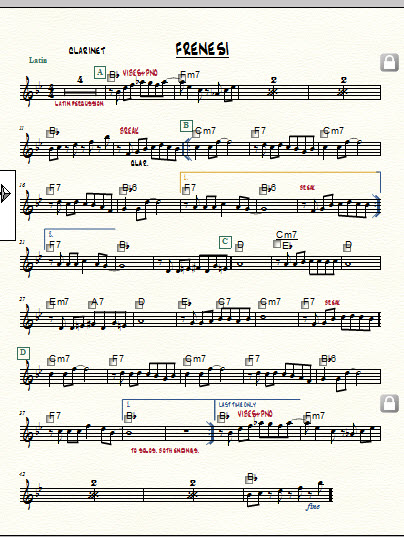
Above is a screen shot of the file.   I tried to attach the actual Finale file here for you, but can find no way to do that within this dialog box.  

As you can see, this is a lead sheet, as many of my charts are.   There is no need for a staff name to the left of the clef, so i would prefer that the default be "DO NOT SHOW STAFF NAME ON SCORE."

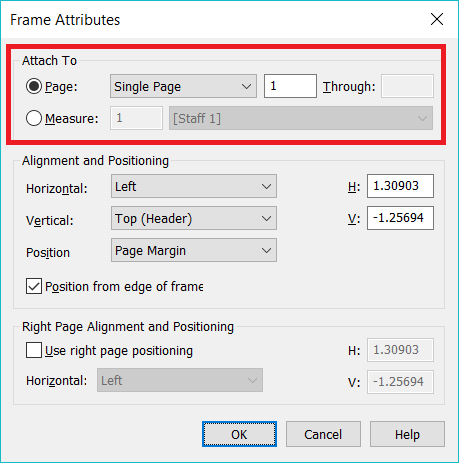
The texts shown here in red are created by clicking on the text tool and then double-clicking at the spot where the text is to be inserted.  Right-clicking on the text brings up "EDIT FRAME ATTRIBUTES."   The default is "ATTACH TO SINGLE PAGE."   If the document is later reformatted, the text ends up in the wrong place.   By contrast, "ATTACH TO MEASURE #___" guarantees the text will remain with the proper measure.

As you point out, the EXPRESSION TOOL can also be used.  However, i hate to clutter up the list of expressions with text which will only be used once.

Comment actions Permalink
Avatar
0

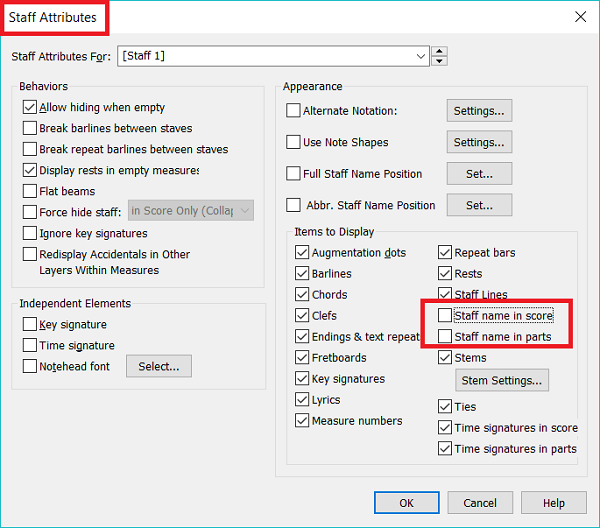
If you do not want to see a staff's name, turn it off (uncheck it) in Staff Attributes.


Text Frames automatically attach to Pages in Page View and automatically attach to measures in Scroll View. You can alter this on any errant Text Frame by right-clicking the frame handle and selecting Edit Frame Attributes.


I suppose to make the Staff Name situation a default you could make a file with the appropriate settings and save it as a custom template.

Comment actions Permalink
Avatar
0

Craig,


I'd suggest that you create a blank leadsheet template laid out with your preferences and start projects from this template. You'll never have to delete a staff name again. Regarding text, if you switch to scroll view, then enter your text, it will stay locked to that measure, rather than a page. But as Adrian suggested, you're better off using text expressions for this. That's the tool that was designed for this.

Comment actions Permalink
Avatar
0

Thank you so much, J ADRIAN VERKOUTEREN and Jeffrey Turner .    Yes, i have created a template for lead sheets.  It was used to prepare the chart shown above.  One of its features is what you suggest;   "STAFF NAME IN SCORE / PARTS" is unchecked.   

The problem with unwanted staff names crops up when opening files not covered by my template.  In particular, when opening an old file from a previous version of Finale, the staff name (which was NOT there in the old Finale version) now clutters up the page.  Also, in generating other types of files not covered by my template, the unwanted staff names remain, until those boxes are unchecked.  I was searching for a way to change the default.

Obviously, in an orchestral, choral, or big band chart, the staff names must be there.

Thank you SO MUCH for the hint about text boxes in scroll view attaching to the appropriate measure.  That will be a HUGE help.  

And i will attempt - as you both suggest - to get in the habit of using the "EXPRESSION TOOL" more often for local text.

Comment actions Permalink

Please sign in to leave a comment.