Is it possible to print chord symbols in different colors? I'm spinning my wheels trying to search in the forums and the interface. I'm using Finale 25.5.0.290 on a Windows 10 machine.
TIA


If you mean print each chord in a different color, I suspect you will have to do that in a vector graphics program, like Inkscape or Illustrator. But if you just want something like red chords, you can do it within Finale.
(I'm on a Mac, so your tools may be in different places than mine.)
In your program options, there should be a pane for Display Colors. Change the one for Chords to whatever color you want. You will also need to change things like layers, smart shapes, etc. to Black.
When you print, your print dialogue box should contain a checkbox for Print Display Colors. Check that, and you should be good. Remember to change them back for normal Finale work!
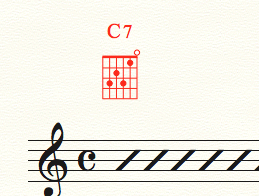
Thanks so much for your quick response, Mike! Your advice is correct. In the Windows version it's Edit->Preferences->Display Colors. In the Print Dialogue, the Display Colors check box is in the group Items to Print.
Since I'm just printing a sheet of chord symbols in red, I didn't have to change anything else to Black.
And they are Global changes for all documents, so I can't just save this one sheet to have red chords. So, must remember to set chords back to black!
Please sign in to leave a comment.
2 comments
Date Votes