

Windows 10 Pro 64 v 1803
Finale 25.5.0.290
I have a barbershop file in which Tenor is staff 1, layer 1; Lead is staff 1, layer 2; Bari is staff 2, layer 1; Bass is staff 2, layer 2. I'm trying to set the volume and pan for each voice for playback.
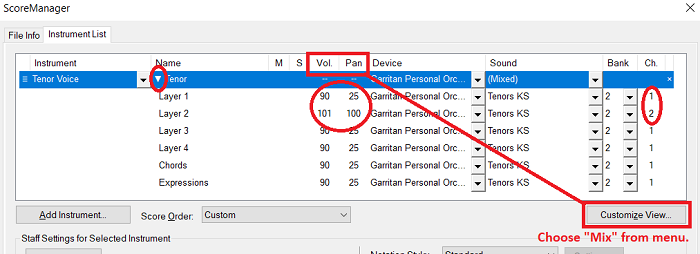
I've selected play Finale through VST. In VST Banks and Effects, I've set Bank 1 to ARIA Player. I've set up the Score Manager Instrument List to:
Tenor Voice Layer 1 ARIA Player Bank 1 Channel 1
Tenor Voice Layer 2 ARIA Player Bank 1 Channel 2
Baritone Voice Layer 1 ARIA Player Bank 1 Channel 3
Baritone Voice Layer 2 ARIA Player Bank 1 Channel 4
In the ARIA Player control panel I've set up instruments for channels 1 - 4, pans for each channel, and volumes for each channel. I then saved this Ensemble. I got to the panel by clicking on Edit Player in the Score Manager.
The problem I'm having is that each time I start playback, the pans and volume sliders reset to some other settings. I can reload the Ensemble while playing back and things are then set correctly, but the next time I start playback, it gets reset again.
How can I set my file up so that I can start playback with the correct pan and volume for each voice?

2 comments
Date Votes