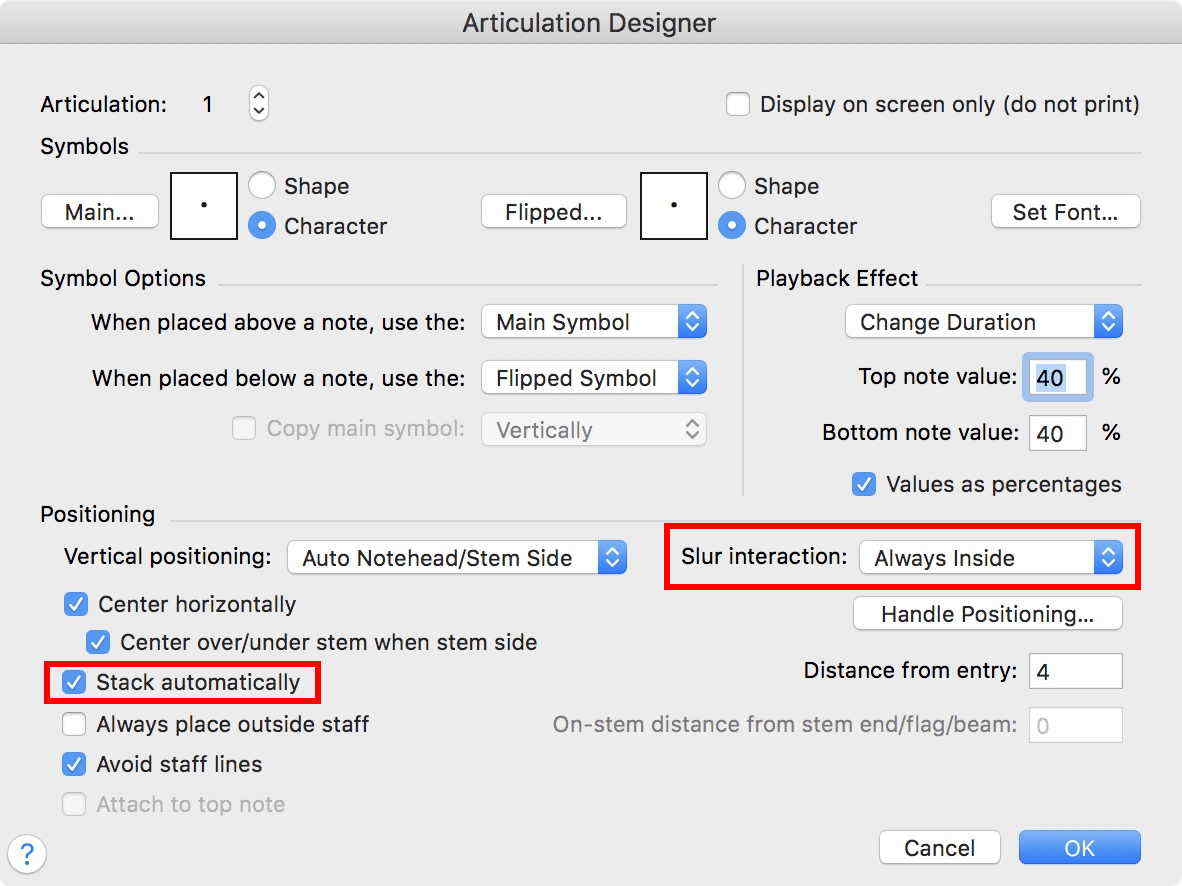
Is there a way to control which articulations are clicked on for automatic stacking and slur interaction when opening Fin25 files. I am really hoping this is something they can turn on easily...
Dejan


I wasn't clear. I need this OFF not ON when I open old files. Why isn't there an option in preferences or document options to control this when opening the old files. The fact that it asks to update articulation positioning before opening the file is not enough for my workflow. It choses to turn the stacking ON for articulations it shouldn't stack.
Thanks,

After spending few hours with the new version, I see there are two "levels" of stacking control over each articulation. One is in the articulation definitions of each articulation and the other is in the articulation menu where you can select "never" for stacking individual INSTANCES but not globally. It's like turning OFF magnetic layout for single item in Sibelius. Finale 26 turns on the stacking and slur interaction and cancels it for all existing articulations that are already in the document. From what I can see, it puts the existing articulations at the manual position. This is why you cannot go back to Finale 25 after saving the file in Finale 26. All articulations are OFF from automatic position. There is also no control over stacking positioning. No way to change the articulation definitions for more than one at the time. Since not all have the "stack automatically" ON, I cannot figure out how Finale decides which ones to turn OFF. :)
Please sign in to leave a comment.
4 comments
Date Votes