Mac OS Sierra, Finale 26.01....
(Or wrong settings somewhere?)
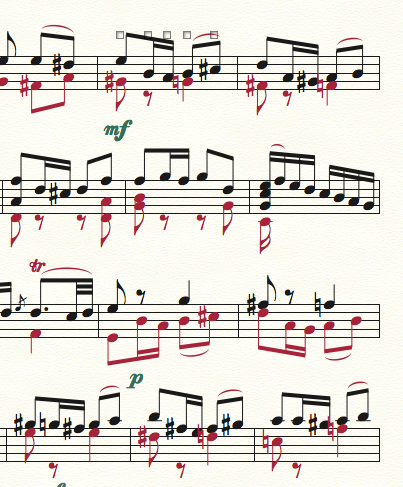


I'd agree with Mike R. that you could probably fit less measures per system. However, you can get the accidentals spaced by putting those notes in the same layer as the preceding note. For example:
In the selected measure in your picture, put the G-natural in layer 1 and the B, C-sharp in layer 2. You'll need to flip the stems accordingly, of course.
Thanks for the quick responses. Parallel to Finale I also use Sibelius and lately Dorico. Both (and especially Dorico) have their own areas that sometimes drive me up the wall. But they imported the music in the example from XML and there were no spacing issues.
As a Finale user since 1988 I know many workarounds to the spacing problem, but for specific reasons I need to keep the voices in the layers they're in. And forcing fewer measures per staff line still requires some manual spacing.
I was just hoping that there has been "some new improved feature" in the last versions that I overlooked or haven't turned on. I don't run into the spacing on every project but when it shows I am always surprised.

I use the full version of TGTools for this very reason (among many others). You can set one of his spacing plugins (add or remove space in measure) to add a certain amount of space after the selected area using a simple macro. This saves me a lot of time. Another possibility is that you add a certain amount of space at the end of the measure (in Measure Attributes) and then shift the beat chart all in one go (with shift) to take the accidental into account. But you're right, though, it shouldn't be necessary.
Please sign in to leave a comment.
4 comments
Date Votes