

I have upgraded to v26 on Windows 10 and have a question about extracting parts.
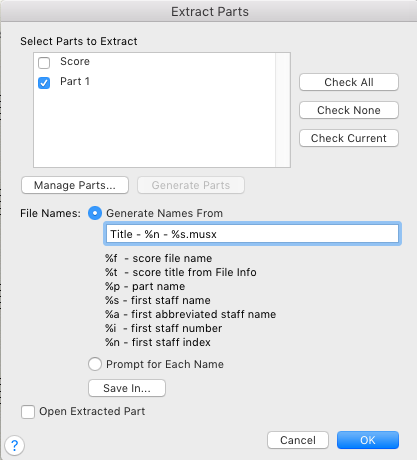
On an older version when I extracted parts from my Brass Band Score it numbered them i.e. Title - 001 - Soprano Cornet / Title - 002 - Solo Cornet / Title - 003 - Repiano Cornet etc. This was ideal as everything was in score order so made printing sets easy as they we in the correct order.
Can I do this with v26? at the moment I have to go in and manually number each part which is very time consuming. It would be very useful to have the parts numbered on extraction as a default setting.
Can someone help me so that I can set it up on my Brass Band Template as a default way of extracting parts?
Thank you

1 comment
Date Votes