New post
Avatar
0

Hello All,


I'm running Finale 26 (on Mac OS High Sierra), and have a quick question regarding using JW Pattern with Keyboard Maestro.
The JW Pattern dialog box opens in a slightly different location on the screen each time I access it. This prevents me from recording mouse movements to access the secondary pulldown menu and select diminuendo
I can use key commands select Dynamics/Hairpins, but can't find a way to move over and open "Select Shape" without the mouse. Is there a way to either:
1. force the JW Pattern dialog box to open in the same location relative to the left corner of the screen each time.
2. use a key command to pulldown the secondary menu in the dialog box.

Any insights will be greatly appreciated!

5 comments

Date Votes
Avatar
0

W88:

You can avoid the need to do this within Keyboard Maestro (which is possible - but needs some programming) by creating multiple instances of the JW Pattern plug-in in the Finale plug-ins folder.  Create 4-5 folders in the Finale Plug-ins folder and name them JW Pattern 1, JW Pattern 2,.... etc.  Then, put a copy of the actual plug-in inside each of these folders.

Then - for "diminuendo", aim keyboard maestro at JW Pattern 1 - and open the plug-in within "JW Pattern 1". The first time you initiate this plug-in you will need to manually select "diminuendo" and click "Apply".

Each subsequent opening of that specific copy of the plug-in will always be set for "diminuendo" - so you can just quickly click "apply" without needing to make adjustments. You can do this for any number of different JW Pattern... set-ups. Each instance of the plug-in retains it's "last used" setting as long as Finale is open.

So you can set them all the first time for each specific adjustment and go on from there. Just have a separate macro for each instance to call whichever specific adjustment you might need. Now - if you want to get really into Keyboard Maestro... you could create an additional macro that would set up all of your JW pattern instances one after the other when you start-up Finale... (still on my TO-DO list...) so you wouldn't need to set them completely manually.

This works reliably for me daily.  The one caveat is that if/when you quit Finale, these settings are lost and the next time you re-start Finale, you need to go through the initial setup again. This is why I rarely quit Finale... I've gone weeks without restarting Finale and/or the mac... seems to work for me.

Also - This idea was shared with me by another Finale user... but I can't remember who shared it... so the credit goes to him for the idea.

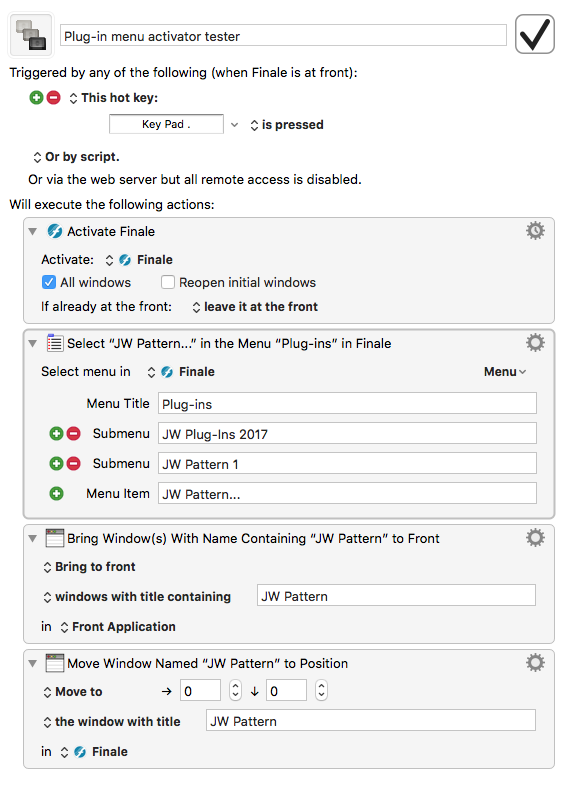
Regarding invoking specific menu items within KM - look at this example.  It is not finished, but as a start, these first commands in Keyboard Maestro will put the JW Plugin window in the exact same place every time you need to change the settings... so using mouse click/action commands would then work reliably.

From there, you can simply record yourself selecting the "diminuendo" setup you need and add it to the bottom of this macro:


If you use this second method (repositioning the JW Pattern window), you would still need separate macros for each edit type - but you wouldn't need the multiple JW Pattern folders in the plug-in folder. Your individual macros (one for dim., one for cresc., etc...) will work within the original instance of the JW Pattern plug-in. You are simply changing the settings on the fly for each use.

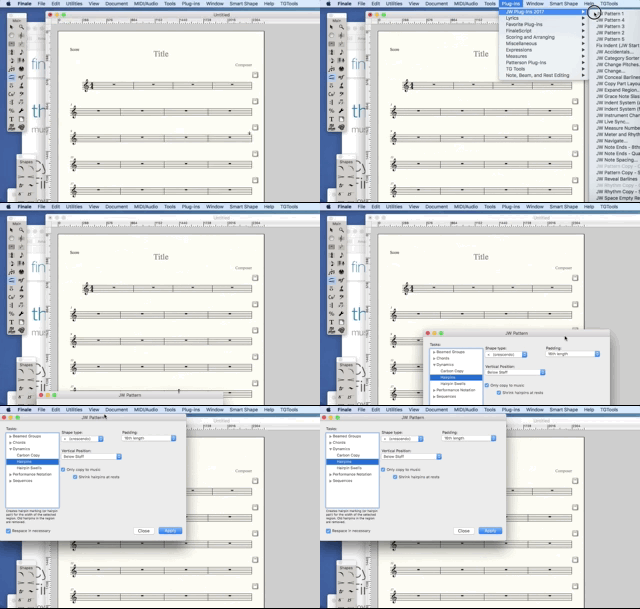
Here is a quick video of KM repositioning the plug-in window:


Comment actions Permalink
Avatar
0

Hello,  I am on Mac 27.3 and a recent uploader of KM,  however since I have it seems that my undo (comm + Z) does not want to work.  I have to do it by hand with the mouse.  I checked the 'allow undo box' and still it doesn't want to work. Any suggestions?  I am also going to contact Nick M. at Super Users to see what he says.

Any help/suggestions would be appreciated.

Andrew in Lakeland, Florida

Comment actions Permalink
Avatar
0

It doesn't work in Finale, or KM? Does it work in other apps?

Comment actions Permalink
Avatar
0

Mike,

Thanks, I was actually able to program a metatool for undo with KM.  Works great.  If I need anymore help, I will contact you.  I'm still getting my feet wet with KM, but it already has saved me time with opening folders, charts and templates!!

Andrew

Comment actions Permalink
Avatar
0

Great. I’m a beginner with KM myself, but I’ve programmed a bunch of F key shortcuts and a couple of macros. Peter from KM is fantastic about helping.

Comment actions Permalink

Please sign in to leave a comment.