New post
Avatar
0

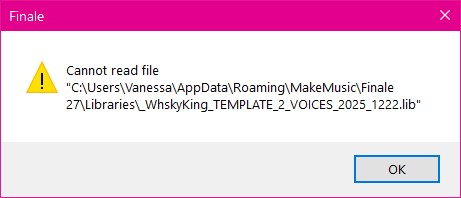
Whenever I try to load a library in Finale 26 I get an error saying: "Cannot read file" followed by the path of the library I am trying to load. Sometimes, things still appear to "work", like when I load the Handwritten Default library, the time signature font changes, for example, but I still get the error. But when I try to load the Virtual Drumline library to get the appropriate Percussion MIDI Maps, I get the error and then nothing shows up in the Percussion MIDI Map dropdown in the Score Manager (although the Percussion Layouts DO get loaded, it seems). 


This all worked fine in Finale 25.

10 comments

Date Votes
Avatar
0

This is not typical. Is your installation standard, or did you customize the location of some files and folders on your hard drives?

Comment actions Permalink
Avatar
0

Standard installation. Library files are located at C:\Users\Username\AppData\Roaming\MakeMusic\Finale 26\Libraries and I am attempting to load them the same way I always have. I have also tried running the program as Administrator with no change in results.

Comment actions Permalink
Avatar
0

… Whenever I try to load a library in Finale 26 …

This is a misunderstanding. You do not load any libraries into the Finale v26 program.

Libraries are document specific - i. e. libraries are loaded into a Finale document (not into the Finale program).


… when I try to load the Virtual Drumline library to get the appropriate Percussion MIDI Maps, I get the error and then nothing shows up in the Percussion MIDI Map dropdown in the Score Manager (although the Percussion Layouts DO get loaded, it seems …

Percussion MIDI Maps are a different story.

Percussion MIDI Maps are never, ever, “loaded” into anything.

They are not loaded into any Finale documents (and they are not loaded into the Finale program).

And they are not saved inside a Finale document.

Instead, Percussion MIDI Maps are located in a special file in a special folder where they are available to all Finale documents on your computer.

This means that if you send someone else a Finale document (or if someone else sends you a Finale document) that uses a custom Percussion MIDI Map (= not one of the default Percussion MIDI Maps), then the Percussion MIDI Map must be sent along with the Finale document.

From your description it sounds like the needed Percussion MIDI Map is missing.


… This all worked fine in Finale 25 …

Then, probably the missing Percussion MIDI Map is available in your Finale v25 folder hierarchy.

If you copy the missing Percussion MIDI Map to the Finale v26 folder hierarchy, then - probably - you are “back in business”.

Look in a folder called “MIDI Device Annotation”.

The file is called something like “Tapspace Drumline for Finale.xml”.

Comment actions Permalink
Avatar
0

>This is a misunderstanding. You do not load any libraries into the Finale v26 program.


Not at all, I understand this. By "load a library in Finale 26" I simply meant "load a library while using the program" (an implied "while" is prior the "in"). I can understand the confusion, seeing as the word "in" is similar to "into".


It seems that I forgot that Libraries don't contain the Percussion MIDI Maps, only the Percussion Layouts. Since I saw the error when loading the library, I incorrectly assumed that the absence of the Percussion MIDI Maps was due to the error. I have found the maps and moved them to the appropriate folder for Finale 26 to find them. As to the nature of the error message itself, I have a support ticket open with MM and will report back if I learn anything useful.


Comment actions Permalink
Avatar
0

I am having the same problem: In my case I can't load "handwritten default.lib" the program says  "cannot read [path] Handwritten Default.lib"

for instance. it's the same with all the libraries.


The thing is they do seem to load after all but i consistently get the "cannot read.." message so i'm wondering if the libraries are only partially loading.

Comment actions Permalink
Avatar
0

I'm having the same problem with some of the libraries. For me, this just started happening a week ago.

Comment actions Permalink
Avatar
0

I have the same problem.  Is there a fix?

Comment actions Permalink
Avatar
0

Alexander Yoder,

Were you able to resolve this issue?  I just upgraded to V27 and I am having the same issue with Virtual Drumline and getting the same error message that you got when trying to load the library.  Virtual Drumline support and Finale support has not been able to help me so far.  

Comment actions Permalink
Avatar
0

BRUCE SCHNEIDER I'm sorry to say that I've long since moved on to the much greener pastures of Dorico. I simply moved the maps to appropriate folder, from what I can remember.

Comment actions Permalink
Avatar
0

Hmmm.

Well, I hope this is not another "after the fact, and better start Dorico..."

I created some special "Expressions/Miscellaneous" in a document, then "Saved library"

Then I opened a new document and "Load library" that I just saved.
As mentioned in previous comments, I get the error message:
However, a library does load, but another one I had created earlier but had since deleted.

Help? :-)

BTW--I have purchased the Dorico upgrade and have experimented with it.
As a notation program it does have some nice features, but I don't like the interface, and it seems "juvenile" compared to the "mature" Finale. 
My main dissatisfaction lay with composing live via mouse--one click, one mouse; essentially as I did with pencil and paper.
It seems to me to be counter-intuitive and awkward.
:-)
Vanessa


Comment actions Permalink

Please sign in to leave a comment.