New post
Avatar
0

This is for Win 10, V25. Here' s something I just cannot figure out. I've been working on a score. For the first 19 pages, the score name at the top of the page looks like this:

Suddenly on page 20, and all subsequent pages, it changes to:
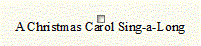
When I Edit Text on each (it shouldn't make a difference) the font in Times New Roman and 10 pt. The page numbers are similar. I don't understand what's going on here. Grrrrrrr...Any ideas?

5 comments

Date Votes
Avatar
0

I can't make out exactly what you mean in your last two sentences, but it sounds like you have two (or more) different text blocks with title text inserts for pages 1-19 and 20-end.

Comment actions Permalink
Avatar
0

It sounds like page 20 has a smaller page reduction than the previous pages.

Comment actions Permalink
Avatar
0

Martin Haub,


Go to

Document menu > Page Format > Score…

and make sure that all the settings are, as you need them.

These settings are used when Finale creates new pages/systems.

Already existing pages/systems are not affected.


When the settings in Page Format for Score have been corrected, it is time to update the already existing pages/systems.

To do so:

Page Layout Tool.

Page Layout menu > Redefine Pages > …

Comment actions Permalink
Avatar
0

Jeffrey nailed it - For some reason, the early pages are at 130%, then starting on 20 they're at 45% I have NO idea how that happened. When I try the corrections, it just goes crazy. Think I'll leave it the way it is for now until I understand how Finale works. Thanks everyone!

Comment actions Permalink
Avatar
0

I followed Peter's directions and lo and behold - it's almost back to normal! Had to adjust some text sizes and redo some slurs, but it sure looks better! This is one of those reasons I wish there was a definitive printed book explaining everything about Fin 25/26! Thank you for the directions.

Comment actions Permalink

Please sign in to leave a comment.