New post
Avatar
0

This happens in both Finale 2014.5 and Finale 26. Windows 7.

I'm using loopbe30 to route finale midi data into reaper. It works very well except for one thing: for some reason some instruments seem to be linked when editing in score manager. For example, when i change Tpt 1 Midi device to "output number 4, channel 1" Vln 1 also changes to "output number 4, channel 1."  I started with a blank full orchestral template. 

Am i doing something wrong? suggestions?


thanks!

8 comments

Date Votes
Avatar
0

Could it be loopbe30 (whatever that is)?


You may have to give us far more information on how the whole process works.

Comment actions Permalink
Avatar
0


I shall try to explain as best i can.


loopbe30 it creates virtual midi in/out ports (each with 16 channels of midi). in a DAW (i use reaper), it can be used as an input or output to route midi to and from other programs with MIDI capabilities (where you alse use a loopbe30 port). The thing is, it works almost perfectly. just this one weird error.


so for my setup, because of loopbe30, when i go to finale there are new MIDI devices to send MIDI out of. The score manager has each instrument listed, for each you can choose a "Device", I choose a loopbe30 out. you also choose a channel. so let's say Violin 1, loopbe30 output 1, channel 1.  In Reaper I make a track with the violin samples i want loaded into a set of patches on MIDI channel 1. I set the Input to loopbbe30 input 1. press play in finale, the MIDI flows to Reaper and plays the samples. and then i make articulations with patch changes to use all the articulations i want.


The actual problem is when I try playback and the horn part is being played by violins! I check and see in the score manager that yes, indeed, both instruments are set to the same channel. did i do that? better fix it! and then when i change the horn to use the proper device which routes to the proper track in Reaper, I notice that the Violins have now changed to the same channel as the horns instead of the violin channel. they are somehow tied in the score manager, they cannot be set different, even the channel. besides one other pair (timpani and tuba, who knows why), everything else works great with the whole orchestra.


it might be loopbe30 but it really seems like it is the program manager that is acting strange. or that instruments can somehow be paired in Finale and I am not aware that i have done this? i started with a regular orchestral template and not much else, i'm trying to build a template of sorts so i can start each project all hooked up.

Comment actions Permalink
Avatar
0

Can you print an image/(edited screenshot) of your Score Manager (at least the part containing the Violin and Horn rows) so we can see how you set those up across the board?

Comment actions Permalink
Avatar
0

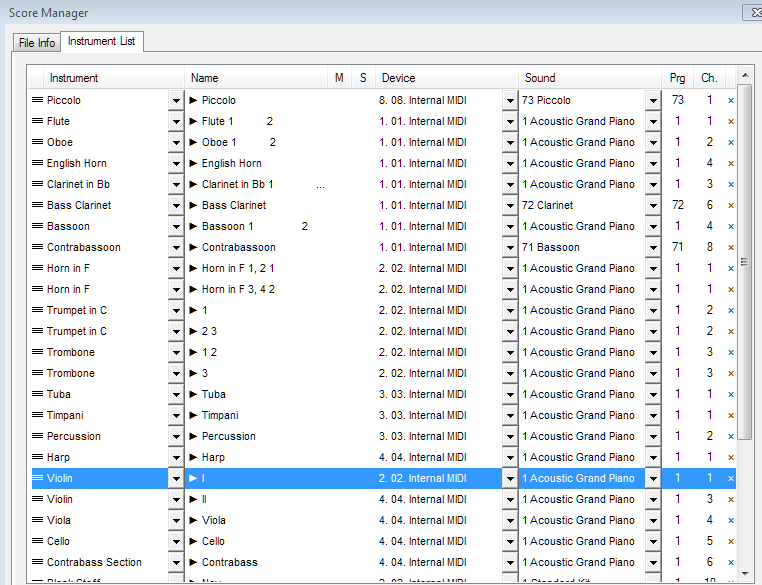
the "internal midi" devices are the loopbe30 devices.  so far i have made one for each instrument group and each instrument is on its own channel. as you can see not all of the instruments are assigned properly yet, pic, bas clar, contrabsn have yet to be assigned.

Comment actions Permalink
Avatar
0

What would happen if you changed the instruments in the Sound column. Although sometimes you can force Acoustic Piano into different MIDI channels, there seems no doubt that when you ID different instruments in the sound column (Picc., Cl., Bsn.) you are able to force separate MIDI channels.


Have you tried asking this question on a LoopBe help board?

Comment actions Permalink
Avatar
0

if i change the sound column, the program column changes with it. it is simply the patch choice which i do use, for articulations.


I ended up "solving" the problem last night by removing the Horn staff and adding a new Horn staff. the horns and violins are no longer tied together! maybe there is something set up in the orchestral template?


Comment actions Permalink
Avatar
0

Glad you found a solution.

Comment actions Permalink
Avatar
0

me too :)

Comment actions Permalink

Please sign in to leave a comment.