New post
Avatar
1

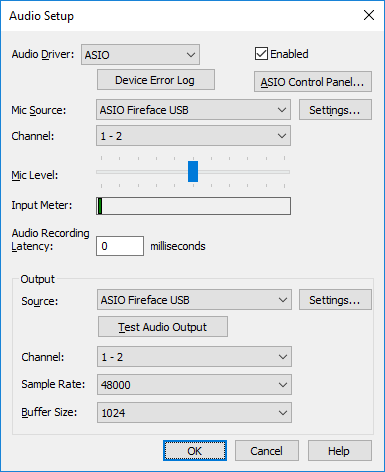
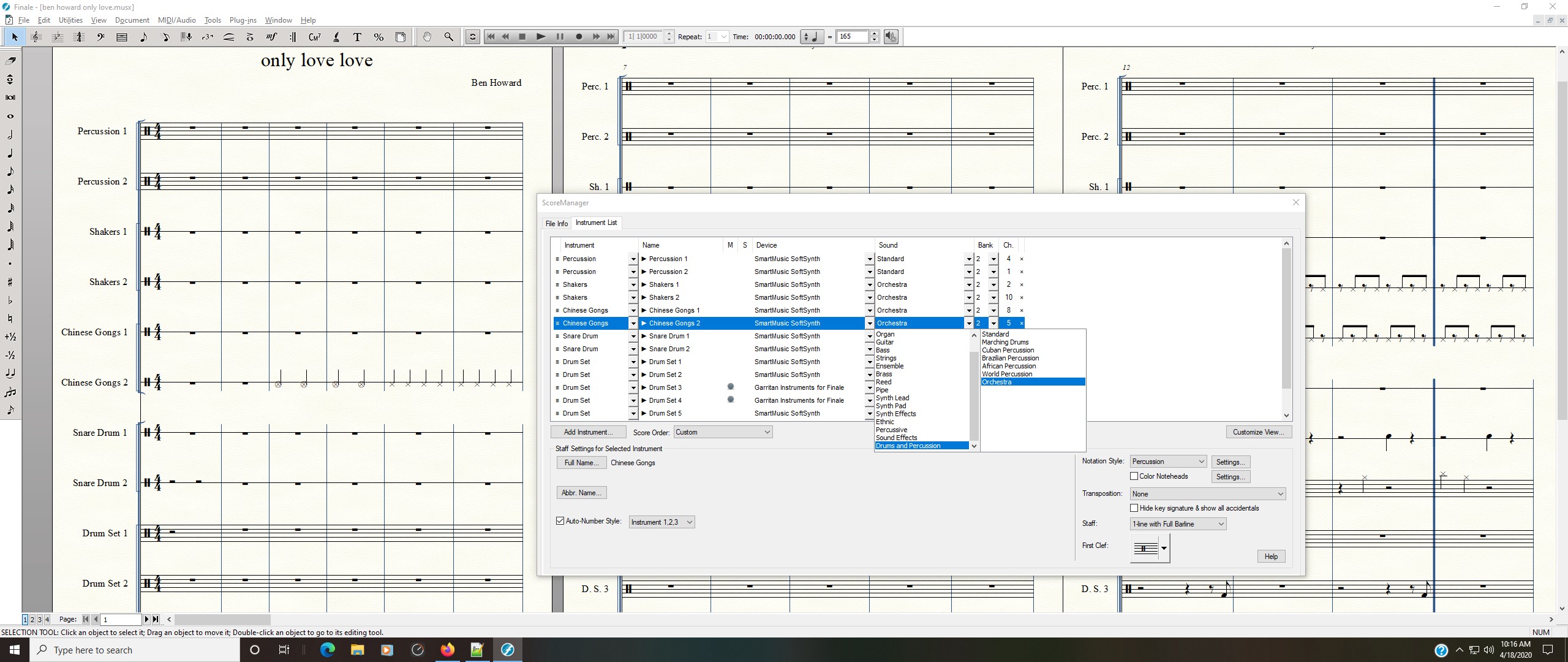
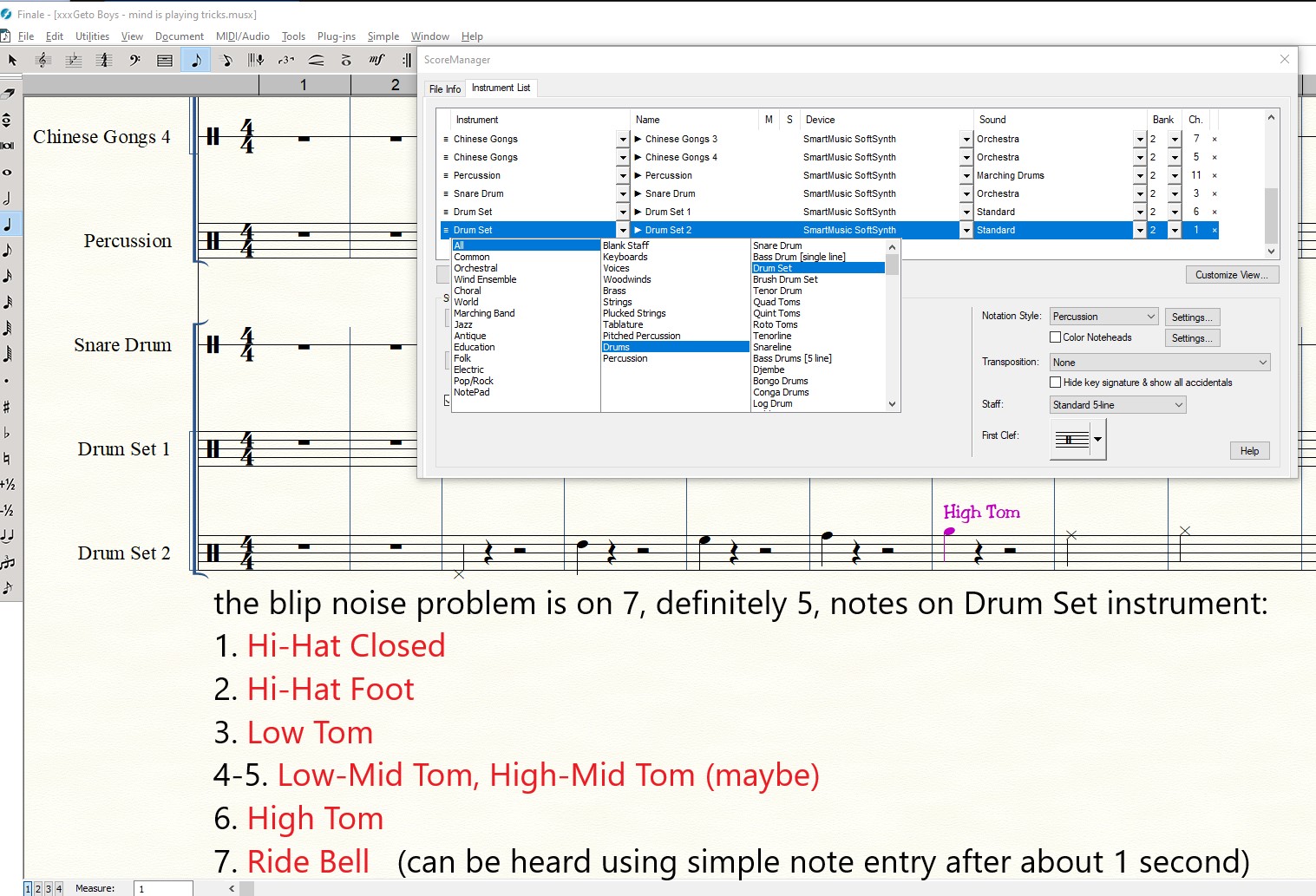
Hi, I keep hearing a pop sound, or like snip sound when I use the drum set instrument, particularly the hi-hat. Do you hear this pop/snip sound if you play this file? It's most easily heard when the hi-hat does quarter notes in the 3rd and 4th bar of music. I'm also sending screen shots of my settings and a screen shot of how perhaps the wav files when adjacent to each other, sometimes I've heard this same snip sound. The last screen shot has nothing to do with this file, it's just me trying to show readers here where the problem perhaps exists, when snippets of files are sequenced together, particularly a hi-hat. It's important to me because I also hear this in the Finale WAV File menu, export Audio to WAV, which is the actual media file I use for performance.

I've replicated this on two different windows laptops. So I don't think it's my audio. I've also tired using a different ASIO driver, but still the same snipping sound. I've tried changing to 16-bit 44.1Khz.

Do you hear it also?

Can it be fixed?

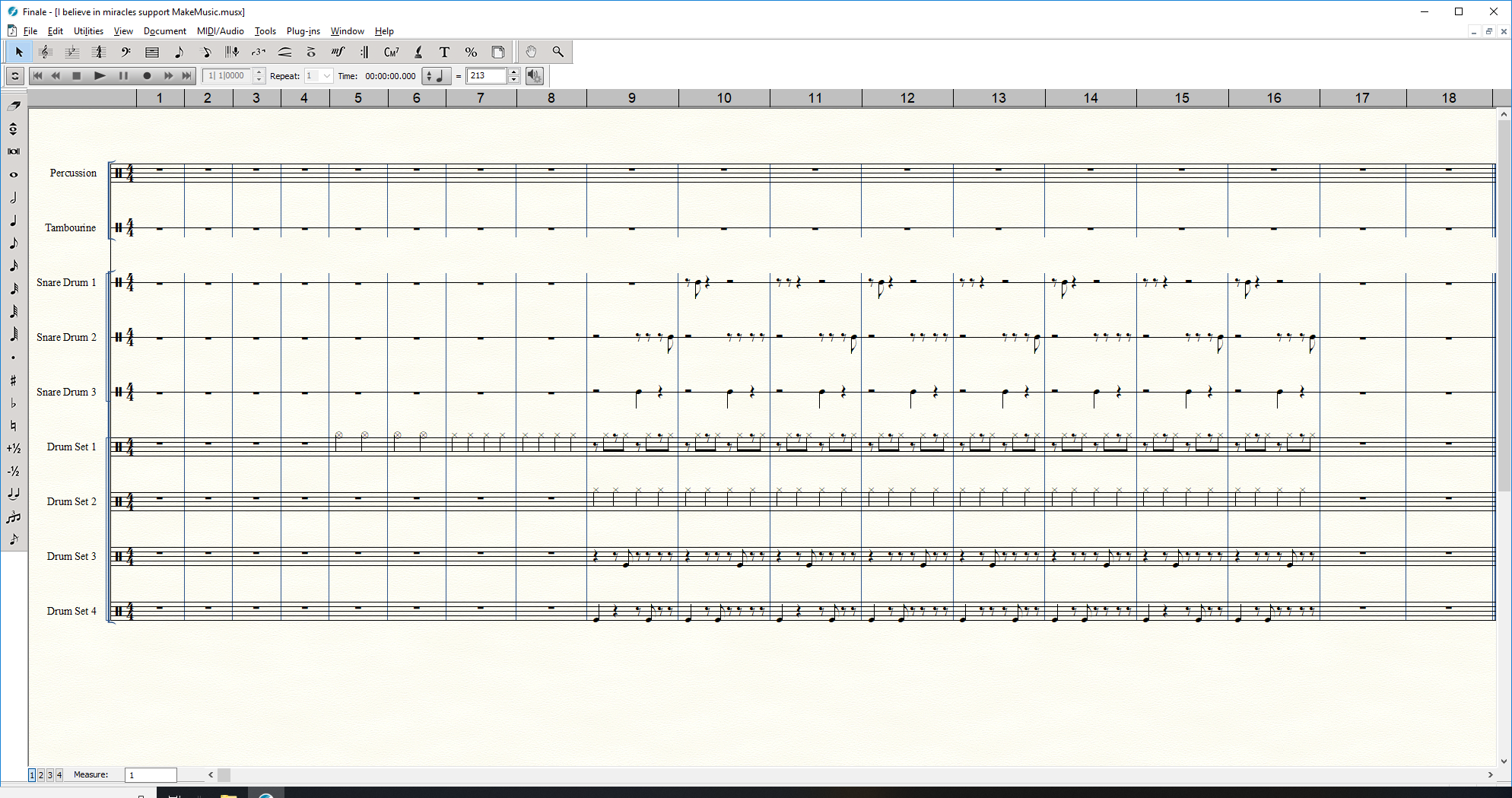
picture of what the file looks like when opened in Finale.
13 comments

Date Votes
Avatar
1

woops, I forgot, how to attach the musx file in this thread? I only see insert Link and insert image.

Comment actions Permalink
Avatar
1

You cannot attach a link to a musx file here. You would have to use Dropbox or some similar location and post the link here.

Comment actions Permalink
Avatar
1

ok, thanks. Here is a Microsoft Onedrive link, but will use Drop Box if this fails.

https://1drv.ms/f/s!AjrYDhnb0kqcgyB10PVzbc_eYU-1

https://1drv.ms/f/s!AjrYDhnb0kqcgyB10PVzbc_eYU-1 

And let me add new insights:

1. the snip sounds also seems to "trail" into my speakers 1 or 2 snips immediately after stopping Finale.  (to me the word latency comes to mind, which I know a little bit about, from overdub recording using a computer, but....perhaps I'm confusing too entirely different mechanisms). And I don't really think it's latency. To me, it's the end of hit-hat wav or midi file, that ...seems to have a little blip or noise at the end of the file and the BPM of the file perhaps overlaps the wav hi-hat sounds, and then I can guess about crossfades.

2. this "trailing" does not happen playing the WAV file using Media player, but snips however, are still there, so long as the file is being played.

Comment actions Permalink
Avatar
1

Was this ever solved?  I can replicate the effect by changing the buffer size from 1024 or above (which you can demonstrate by clicking 'dmonstrate audio output) and setting it to 512,  However, the effect still happens on playback.  On a complex drum pattern you get a sequence of clicks like an echo when stopping playback.  THis happens on WAV exports as well and is ruining my recording mixes.

Comment actions Permalink
Avatar
1

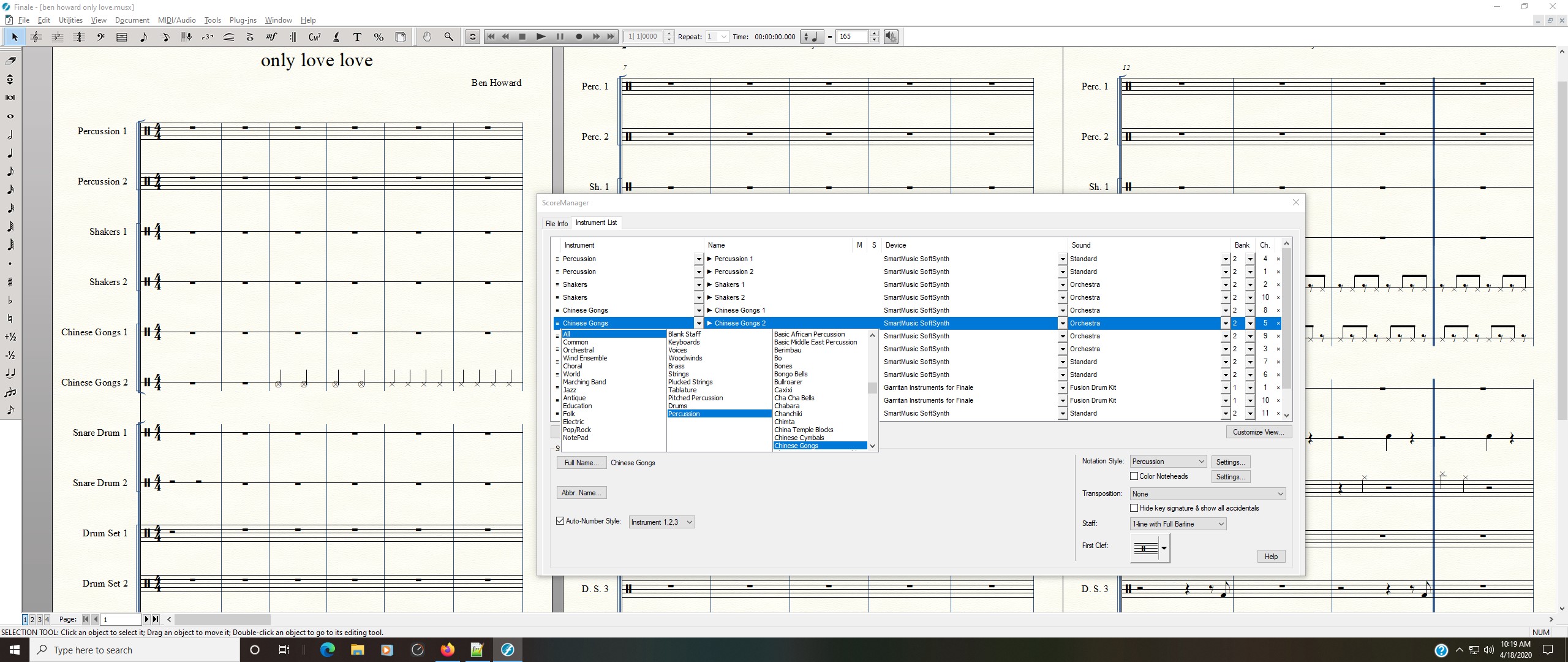
I still have the problem. I tested this again, using same file. I have Finale. version 25.5.0.290 as of today. Perhaps this was the same version I had originally, 1 year ago. It's ruining my music as well. I toggled buffer size to various settings, 512, 1024, 2048, same problem for all sizes. When setting buffer to 8192, the maximum, I hear automatic repetitive clips from my computer immediately. This happens without playing the music file, so maybe it is related some weird way. I have 16GB RAM. I'm not sure what buffer size does or if it's related, but thanks for pointing it out. Have you had the same problem using Instrument, ALL, Percussion, Chinese Gongs? This hi-hat does Not have the clipping. screen shots attached.

Comment actions Permalink
Avatar
0

I think, if we keep clicking the up arrows, this post will get higher ranks for review. the little up and down to the left of each post.

Comment actions Permalink
Avatar
1

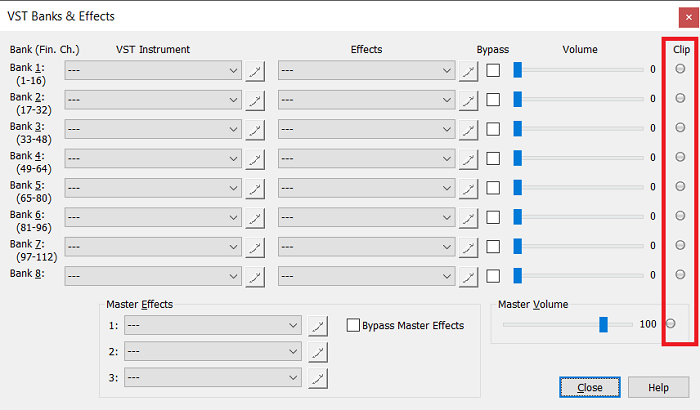
Have you tried checking Banks & Effects to see if your volume settings are causing clipping by being set too high (loud)? No amount of buffer will fix a clipping problem caused by volume settings that are too high or which become too high once reverb processing and the like are added.


Comment actions Permalink
Avatar
1

I tried this just now. Thanks for sending the screen shot. The clip light does not come on. Not sure if it is supposed to blink if clipping. I always have this max to 200 so I can hear subtle instruments more easily, like some percussion, but it appears to not clip. Actually I cannot remember which instruments have a really quiet playback, relatively. If I turn it down to around 56, from originally 200, I still get the popping/snap.

Comment actions Permalink
Avatar
1

Great to have such quick responses guys and I'm reassured that it is not just me.  I have just loaded Finale onto a new laptop and hoped the problem would 'go away'.  Being an IT professional I doubted this would happen and it didn't.  I still have the problem.  I also saw Adrian's suggestion in another post: https://makemusic.zendesk.com/hc/en-us/community/posts/218078627-Playback-Audio-Clipping

I don't go in this screen very often and was quite excited to see the clip light on so reset it and set channel bank and master volumes to low, lower, high, higher and max but could not get the clip lights to come on and at all times.

I've even been into softsynth setting an MIDI setup and reduced the volume there but it doesn't have any effect.  I think the problem only occurs on Softsynth and only on drums though I can't be sure.

I suspect the problem isn't clipping but delay caused by buffering.  I have attached a 1 bar example so you can hear what I mean and hopefully it will be the same problem.

Mike, have you logged this as a case with Makemusic?

Here's my file - https://www.dropbox.com/sh/zb8nv9lzjs8hfbh/AAC-8YG1zlmMq5j6UtWtj7vpa?dl=0

Comment actions Permalink
Avatar
0

Yes. I cannot find the email that I remember getting, saying this was an issue logged as a case, 1 year ago. So I asked them a few days ago, and when I get an update, I should have confirmation, that it is logged as a case.

Happy. That is the exact noise I'm hearing in your file! To digress, perhaps we can share notes or drum track files. This audio clip sounds like it's for rock drums, which is what I mostly do. I've attached a drum cover of the Song, I believe in Miracles, by Jackson Sisters. The sniping residue noise is heard right after the drums start quarter notes. What music do you make using these hi-hats or in this case, toms? Do you make similar tracks? https://www.dropbox.com/sh/x239whuv6ej7kvn/AACEmHqjND0QKIlT3yUHCYu6a?dl=0  link to Drop Box

Extra reading....I mean, analysis: I agree it's not clipping. I ....90% ....disagree that it is Buffering. If it were buffering then it would have the problem with every instrument. and it would happen during playback only. This alos happens when I enter in the following notes using my mouse. Using Drum Set instrument, I create "low tom" note, (note D on staff). can hear it when finale inserts a this drum tom immediately through my speakers. It happens with high tom too (note high F). Is this still buffering? Next, it does not happen with chinese gongs hit-hat sound. And I've tried about 30 different percussion instruments and rock drums hi-hat and toms seem to be the only instruments and notes. Unless somehow these notes trigger a sample audio of hi-hat and tom using buffering improperly AND different than other instruments. Buffering is memory? I think it is NOT buffering. I think it's the way the sample was created for this hi-hat and tom sound. It's inside the actual recording of the wav file. It happens every time I use this instrument editing, or playback, every time. Finale does use .wav files to trigger these sample sounds right? Third, it also sounds like a clip-pop noise, like the .wav file wasn't trimmed and cut, or crossfaded (as well as all the other drum notes). I am unsure what buffering is, exactly. I did take computer architecture and assembly language programming. On the bright side, If it's what I say it is, Can I fix it myself, be editing the .wav sample, trimming the end of it, (or zooming into find where this amplitude increase is visualizing the waveform in some other tool) and replace it? It doesn't have to do with BPM, like I thought when hi-hat notes were overlapping. But because the clip-pop noise is heard trailing after we stop play of the finale drum instrument, we think it's buffering.

Do you know where these samples are saved? I searched .WAV files can cannot find them on my local C drive.

Adrian's post, thanks. It sounds like it was actual clipping and he said it's random. This issue is not clipping. Happy writing and editing.

Comment actions Permalink
Avatar
1

Hi MIke.

Yes indeed it is the same problem.  I think you are right that it is the sound font recording and it only seems to happen on Smartsynth Drums (standard).  I think all smartsynth sounds are contained in a single file called synthcms.sf2 which is held in C:\Program Files\Finale\Audio Support by default so cannot be edited. 

Now I have determined something quite simple in that the sound is not tempo dependendant and happens like an echo almost exactly 1 second after the notes starts so it is clearly sample related.  It could simply be bad trimming when it was produced or caused by some sort of echo but I'm beggining to think it is the font / sample itself and this hasn't changed for years so I suspect it won't now.

My work is usually jazz but not for playback, for live performance although I have noticed this problem in the past in big band charts and largely ignored it.  I am currently writing a lot of soft pop/rock/middl-of-the road stuff which I want to use the drum track for.  The Softsynth drums are pretty good and IMHO much better that the Garritan (there isn't a comparable kit and Fusion kit doesn't cut it) athough it doesn't have this nasty clicking.  Much of the Garittan stuff is better though such as brush kit which isn't available on Smartsynth.

I am working around this now by learning to use Protools but it's a steep learning curve and consuming more time than I'd care for.


Please do let me know if you get a response from the case.


Comment actions Permalink
Avatar
0

My Request #172668, playback making clip sound..., has been documented in March 2019.  Similar to when this post was first posted. It hasn't been fixed, but it is documented.

Comment actions Permalink
Avatar
0

Finale, please fix it about 7 times for these Drum Set notes: Hi-Hat closed, Low tom, Low-mid tom, High-mid tom, High Tom and Hi-Hat Foot, and Ride Bell. ....and Floor Tom 1 and 2.


Comment actions Permalink

Please sign in to leave a comment.