New post
Avatar
0

I have been here in a really long time, but downloaded Finale 26 today to give it a shot.

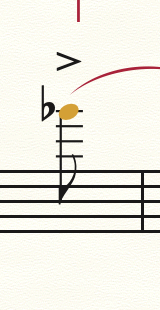
How does one move an accent closer to a slur so it is not floating in the sky?  See the attached.  Arrow down and the accent then hits the note.


Thanks for any help!
 

2 comments

Date Votes
Avatar
0

In Finale 26, in the articulation designer window are some new options dealing with articulations and slurs.  If you change the "Distance from entry" value, you can move the articulation closer or further from the slur.

Comment actions Permalink
Avatar
0

No luck.  I just want to arrow down a few clicks.  To solve, I created a new > and set "slur interaction" to" ignore".

Comment actions Permalink

Please sign in to leave a comment.