New post
Avatar
0

Windows 7, Finale 26

It would appear there is no "Find" command to find "Expressions" in a score.

For example, I have a reasonably long piece (250 bars) in which I use "pres de la table" only once.

Tonight, I was looking for that Expression but as I was scrolling back and forth I kept scrolling too quickly and missed it, even though I knew about where it was (who's counting bar numbers.. ;-)  )

It would be nice to have something similar to the finding Text option, but for Expressions.
I did read "Find" Command for Expressions and MIDI Tool Changes but I have no idea what "FIN-4319 is the story for searchable expressions" means.

Thank you,
:-)
Vanessa

3 comments

Date Votes
Avatar
0

Two solutions :

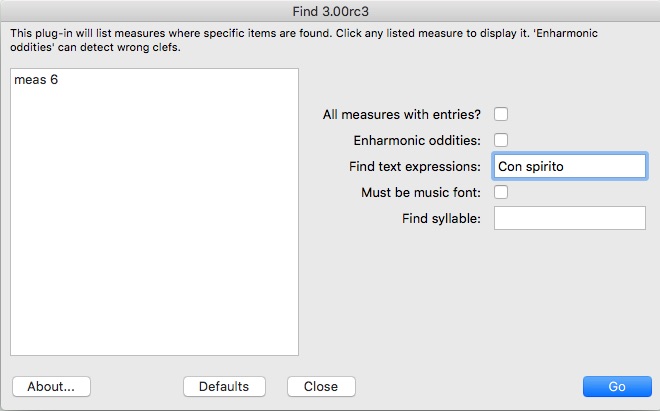
1) In the full (paid) version of TGTools, there is a tool that does what you want.

First select the whole document (Selection tool) and apply the plug-in (Miscellaneous -> Find). It will tell you in which measure(s) the expression was found. Click on one of the results to jump to the measure.


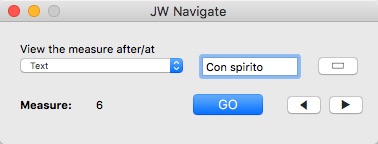
2) The plug-in JW Navigate (to be installed) :


Comment actions Permalink
Avatar
0

Thank you, Michel,

The TG Tools that come with Finale (26) seem to work well. I have been considering getting the full (paid) version.

Would you happen to know if the full version does natural harmonics for strings?
In other words, create the natural harmonic and have it playback correctly, which would be one octave higher.
(The artificial harmonics do work, which can be a 12th or two octaves higher.)

As it is, using Articulations are easy, but no playback--it does, however, work with the harp.

The JW Navigate looks promising!

:-)
Vanessa

Comment actions Permalink
Avatar
0

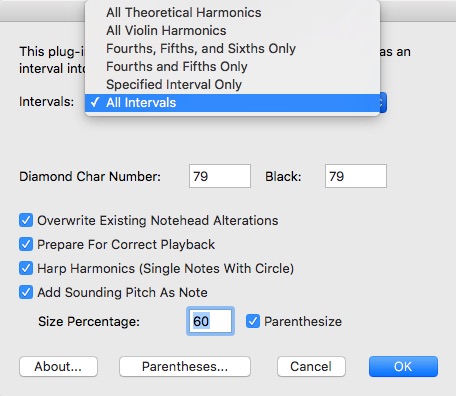
I didn't have the opportunity to look into TGTools (Pro)  -> Harmonics, but in this paid version, there are obviously more functions available, including correct playback. The screenshot will give you an idea.

TGTools (paid version) is anyway worth the money.


Comment actions Permalink

Please sign in to leave a comment.