New post
Avatar
0

Finale 2014.5 running on Mac OS 10.12.6 (Sierra)

I have a whole stack of short pieces that will need to have the same copyright notice. They fall into 12 groups, each of which also has the same key signature, time signature and number of bars. Ideally, I would like to make and save 12 templates.

However, while I can make the template and it holds Composer, Arranger, the position of the copyright notice and some standard chords, as well as the system margins I want for the number of bars I want, when I set up the template with the copyright data, tell it I want this template to be, for example, 12 bars in F, 3/4 time, and save in the templates folder, that data is lost (reverts to C, 4/4, 31 bars and just the © symbol). When I open the template, all data is empty, but I can just press return and it remembers the Composer etc, but not copyright data etc.

I can force the copyright issue by removing the preset text for that field, then manually insert a separate text at the deleted position, but of course this is not editable through score manager. No idea how to keep the other issues constant. Alternative is to not open them as templates and try to remember not to overwrite them - again unsatisfactory. Any help would be appreciated.

6 comments

Date Votes
Avatar
0

When you open the template, just delete the placeholder copyright symbol from the setup wizard. This should retain the one you've already created.


Another way to not have to worry about the copyright text insert is to enter your copyright notice as a regular text block.

Comment actions Permalink
Avatar
0

Thanks for the reply, George.

Option one was what I tried originally, and doesn't work when I try that (multiple times - brick wall.) When the template opens, none of my information is there, but when I go through to the final accept page, it has remembered Composer and Arranger, but not the modified copyright details, just puts that damned © again.

Option two I mentioned above - wipe out the text box that holds the © and replace it with a text box with the material I want. works fine, but is not editable in score manager. I have used a variant of this by opening the preset box that holds the ©, putting some data after it on the next line (like contact name and address,) and saving that to the template, which holds, but I still need to add the copyright details every time.


Hopefully someone else knows a magic spell. otherwise it will probably be option 2, and manually edit if I need to change (like if this project takes me more than 6 months (when the copyright date becomes 2020.)


Comment actions Permalink
Avatar
0

… when I set up the template with the copyright data, tell it I want this template to be, for example, 12 bars in F, 3/4 time, and save in the templates folder, that data is lost (reverts to C, 4/4, 31 bars and just the © symbol). When I open the template, all data is empty, but I can just press return and it remembers the Composer etc, but not copyright data etc …


From your description it sounds like you have placed the template in the Templates folder, right?


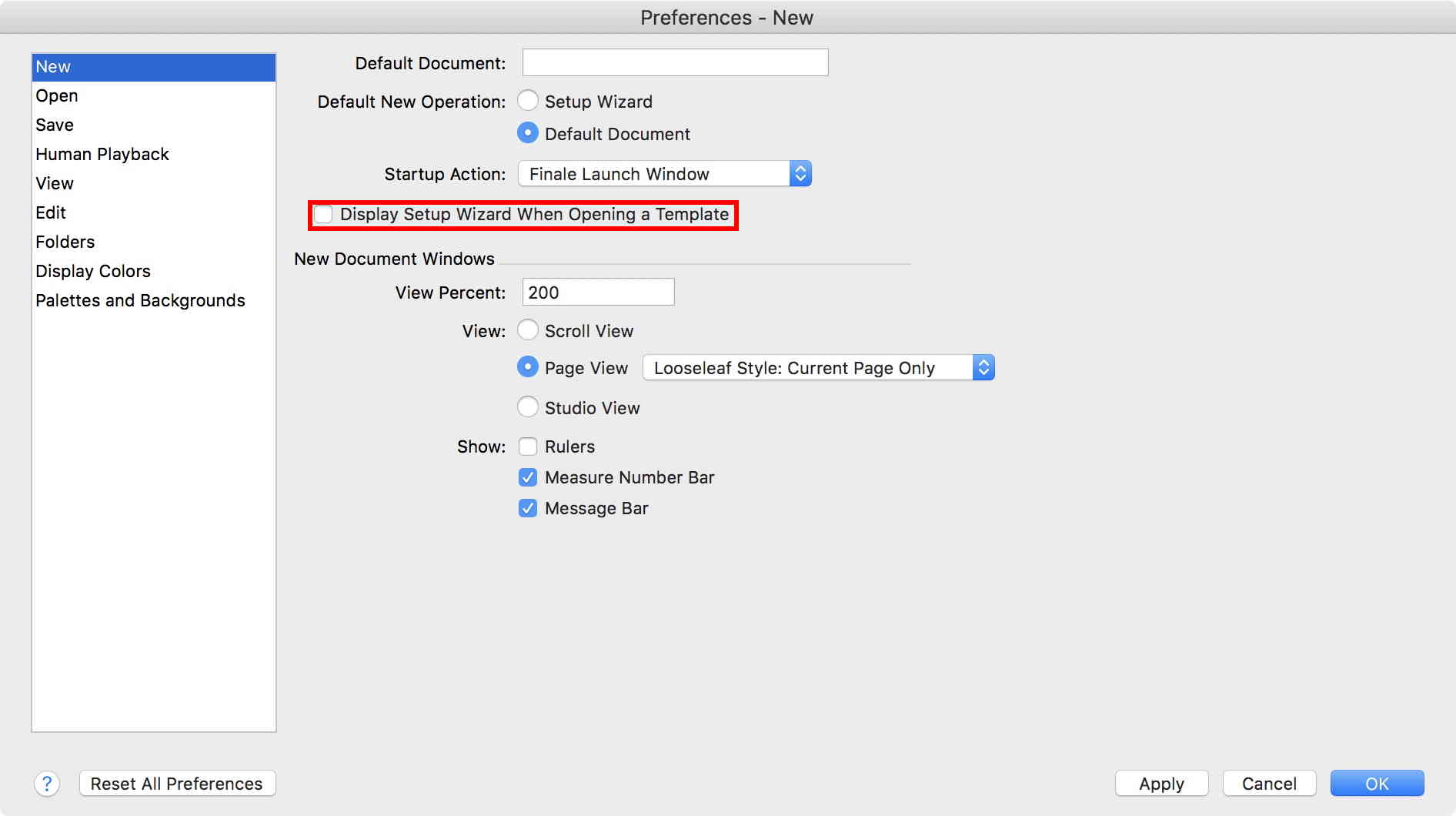
When opening the template you are using the Setup Wizard, right?


But in this case there is no reason to use the Setup Wizard, right?


I would just de-select the Setup Wizard:


Comment actions Permalink
Avatar
0

Hi Peter,

Thank you, that has solved the problem.

I didn't even know that there was a preference that controlled using the wizard when you opened a template, just assumed that's the way it came. I think I need to have a long hard look at those preferences. I wonder what else I have been missing?


Best wishes

Peter B.

Comment actions Permalink
Avatar
0

… I think I need to have a long hard look at those preferences. I wonder what else I have been missing? …


I can not tell what else you have been missing.

Generally you should be careful with “automatic” options that let Finale do “stuff” for you, without asking for your permission.


Take a look at

Preferences - Edit


Is the option {Respect Instrument Ranges when Copying or Changing Instruments} selected or de-selected?

To play it safe, de-select.

You can always, manually, octave-transpose a selected region with the number 8 key (octave down) and the number 9 key (octave up).


Is the option {Automatic Music Spacing} selected or de-selected?

To play it safe, de-select.

You can always, manually, apply Music Spacing to a selected region with the number 4 key.


Is the option {Automatic Instrument Family Group Brackets} selected or de-selected?

To play it safe, de-select.

You can always, manually, create staff groups as needed.


Is the option {Automatic Instrument Family Measure Numbers end Endings & Text Repeats} selected or de-selected?

To play it safe, de-select.

You can always, manually, customize measure numbers and repeat display as needed.

Comment actions Permalink
Avatar
0

Thanks again, Peter. I was being rhetorical but help is always good. I always liked a good solid hard copy manual - I find it less easy to browse an electronic version, and in the "old"days, professional editors seemed to do a far better job of creating indexes. Cross-linking has its good points, but sticky page markers work well for me. Plus friends or helpful strangers who know way more than I'll ever know.

...Instruments is largely beyond what I need at present, so will file away for when I pretend to compose for other than guitar & piano.

...Music spacing I'm comfortable with auto (mostly gets it right) and know how to do it manually, so I'll experiment and see what I like best.

The other two - see my first comment. And your general theme is to make an active choice rather than what is offered, so I will look at all the preferences over time and try and understand why the presets are what they are and what might do better for me.

Best wishes

Peter


Comment actions Permalink

Please sign in to leave a comment.