New post
Avatar
0

Hi there!

I'm on Finale 26.1 running on MacOS Mojave.

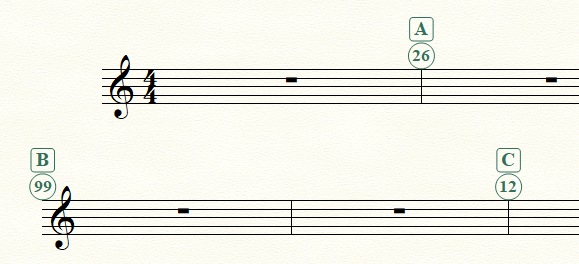
The issue I'm running into is that I would like to have two sets of rehearsal marks in my marching band score in parts.  We use letters to delineate musical sections, but I would also like to be able to note each individual set change in the music.

This worked just fine in our first movement, where the set numbers and rehearsal letters both started at 1/A.  But in our second movement, I'm running into a problem.  I need to start at letter H, and Set 20.  When I attempt to change the rehearsal number sequence so that I start at number 23, my rehearsal letters jump from H to T.


Is there a way to independently restart the sequence for each type of rehearsal mark?  I.e., I'd like my letters to continue H-I-J-etc. and my numbers to start at 20.


Thank you in advance!

-John

8 comments

Date Votes
Avatar
0

Are your movements in the same Finale document or separate documents?

Comment actions Permalink
Avatar
0

Separate documents, so I restarted the letter and number sequence for each one.

Comment actions Permalink
Avatar
0

… Is there a way to independently restart the sequence for each type of rehearsal mark? …


Yes, there is a way.

The following works for me:

Expression Tool.

Context-click the handle on the rehearsal mark.

In the context menu, choose “Edit Rehearsal Mark Sequence…”.

Comment actions Permalink
Avatar
0

Hey Peter,

That's the problem I'm running into.  When I do that, both the letter and the rehearsal number update together.  So when I click the letter and edit the rehearsal mark sequence to start at letter "H," the number below it jumps to 8.  But if I click the number and do the same so that it starts at "20," the letter jumps to "T."  I'm looking for a way to edit them independently, so that I can have Letter H but rehearsal number 20.

Comment actions Permalink
Avatar
0

I thought I might be able to duplicate the Reh Marks category and assign different iterations of each, but I found that changing the sequence start on either category changed both. (Bummer!)


All I can suggest is to create a category that allows you to enter one set of Reh Marks at the proper vertical offset, score list, and enclosure but with numbers entered manually. (I used a clone of Tempo Marks for the Score List and adjusted the offsets and font size but had to add the circle enclosure to each mark manually.)


Not ideal, I know; but it lets me do what you seem to need.


Comment actions Permalink
Avatar
0

I think I've found what the issue is. If both Rehearsal Marks begin together or coincide with either being the first occurrence, then they are linked (for whatever reason). To avoid this:


Start the second rehearsal mark at the second measure (or some place before where there is not another rehearsal mark) and start the sequence at 19. Hide the rehearsal mark. I guess that's a lot easier than what I was thinking before ....


Comment actions Permalink
Avatar
0

OK, now I am able to duplicate the problem:

Start both Rehearsal Marks at the same measure, and they both get set to the option {Restart Sequence At} - even if the other Rehearsal Mark instead should be set to the option {Continue Sequence}.


I also found a workaround that seems to solve the problem:

At first attach one of the Rehearsal Marks to the following measure, and set one to {Restart Sequence At}, and the other to {Continue Sequence}.

Then, move the later Rehearsal Mark back to the previous measure.

As the Rehearsal Mark gets past the half of the measure, it will switch its Attachment Point to the previous measure.

You can then set the precise positioning by selecting the Rehearsal Mark’s handle, and hitting Shift-Return.

Comment actions Permalink
Avatar
0

Magic!  Thank you!

Comment actions Permalink

Please sign in to leave a comment.