

Finale 26/Win10
Beam 4 eights in common time: Unchecked
A)
Ex.1: Upper layer/Layer 1: Using HyperScribe - Finale give me what You can see in bar 1. I want the result You can see in bar 2. To achieve this, I set time signature to 2/2, but asks Finale to display 4/4. So far so good. Maybe there is a better way.

B)
Ex 2: The challenge really starts when I am about to put music in layer 2. When using HyperScribe here I get the following result (Bar 2 here, is the same as the previous example):
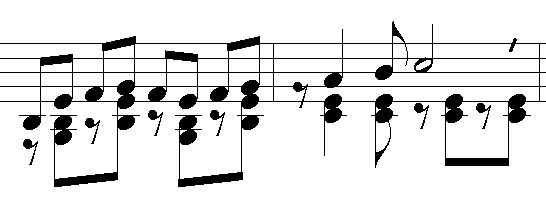
But I want to break the beams. In other words - I want the result as follows:
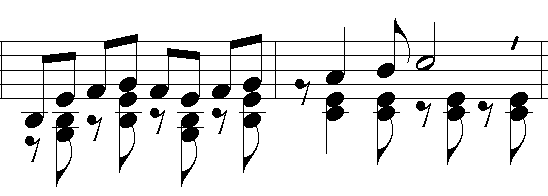
If we are talking about only e few bars, I would normally cycle through the docoment using the numpad slash key. But here we are talking about each bar, more or less, through the whole piece.
Is there any way to make Finale break these beams automatcally, or break them globally afterwards?
Anyone out there with suggestions? Someone will ask why I need this particular combination of A) & B). I will comment this later if nessesary.
Hoping for some help here.
Børge

2 comments
Date Votes