Windows 10
When using the drum groove setting on scores the tempo that is originally entered will double after about 16 bars. This is done without my input. Anybody else had this happen? Is there a fix?


Nekogash tempoto e potrebno da se menuva .. Na primer ... Od 1 tak pa do 30 ili bilo koj .. edna chetvrtina nota = 45 .. A od 41 takt e potrebno chetvrtinata nota = 96 ili bilo kolku .. Jas ne mozev da go storam toa .. Bilo kako da smenev .. ostanuva na edna ili druga brzina ( 45 ili 96 ) Od prv takt pa se do kraj ..

from Google Translate, Lazo says:
Sometimes the tempo needs to be changed .. For example ... From 1 beat to 30 or any .. one quarter note = 45 .. And from 41 bars it takes one quarter note = 96 or whatever .. I can't to do it .. No matter how I change .. stays at one or another speed (45 or 96) From the first bar to the end ..
Lazo,
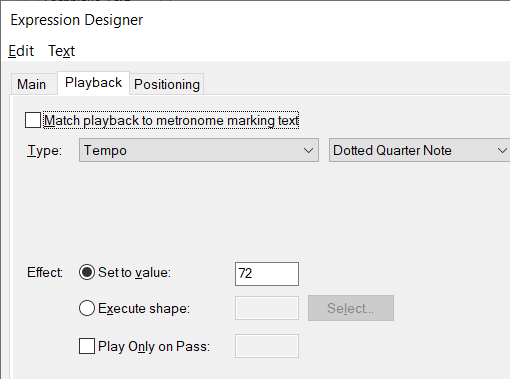
If you are trying to change tempo via the small tempo box at the top right of your screen, that is not designed to do what you want: you should try to use the Playback tab of the Expression Tool to create your various tempo settings.
Again, via Google Translate:
Ako pokušavate promijeniti tempo kroz mali tempo okvir u gornjem desnom kutu zaslona, koji nije dizajniran za ono što želite: pokušajte koristiti karticu Reprodukcija na Alatu za izradu da biste stvorili različite tempo postavke.

There are always little things that individuals feel would make life easier for them. Finale cannot add every one of them, but you can post a request for the option on the Feature Request Forum
and see if the idea has any support.
Could you possibly help me with another problem?
When I'm finished working with Finale and shut it down, none of my other music files and videos will play. The only solution I have found is to restart my PC. Then the files will play. I have a PC i7 with windows 10. Hopefully there is a better solution than having to restart the computer every time I use Finale.
Regards,
Boris
Please sign in to leave a comment.
11 comments
Date Votes