New post
Avatar
0

My computer is Microsoft Surface Pro 6, 8th Gen Intel Core i5 Processor 128 GB Go, 8GB. Go RAM  with Windows 10. I bought finale v.26 again instead of upgrading from Finale 2008 (was not told at the store of purchase). However, I have not been able to make use of keyboard when I connect it to my computer via the USB, no sound is produced from the keyboard nor computer. I am wondering if should buy a MIDI controller  cord because MIDI output on the keyboard is not attached to the computer ( there is no cord included with Keystation keyboard). Please help!! I bought finale and the Keystation 61 MK3 (61-key semi-weighted USB-MIDI controller almost two months ago, but I have not been able to use it because I cannot get the sound from keyboard when connected to my computer. Could someone please enlighten me? I am classical music composer trying to make my life easier by recording my compositions using finale.

Sincerely,

Dapo

2 comments

Date Votes
Avatar
0

From what I can determine, the Keystation 61 MK3 has no sound output of its own, so you will want Finale to feed its sounds through whatever speakers you have attached to your computer. If the keyboard has a USB connector, that should be able to plug into your computer to provide a signal to Finale.


Are you able to use the Keyboard to enter notes via Speedy Entry? If so, then your connection between Keyboard and computer is working.


To get sounds out of the combination...

If you can enter notes with the Keyboard, will they play back?

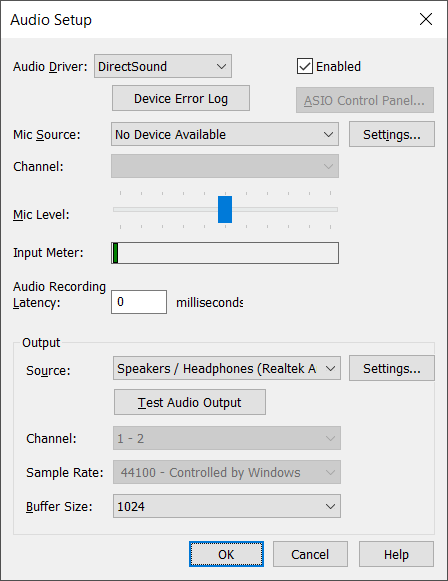
If not, start by checking your audio driver: MIDI/Audio > Device Setup > Audio Setup


I find DirectSound works best for me. See if that is the setting you have and if it works.


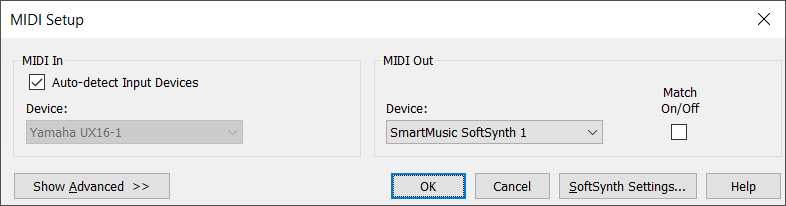
You may also need to activate MIDI Thru (in the Device Setup panel) and Select how your Keyboard communicates with the computer in MIDI Setup.


In most cases these have automatically been configured correctly. I sometimes have to fiddle to keep DirectSound as my driver of choice, but Finale Support was very responsive when I needed help with this. You can contact them via the "Submit a request" link at the top of the page.


Comment actions Permalink
Avatar
0

Thank you very much Adrian! The Keyboard was not showing on the device drop down menu. I connected USB and disconnected it again. After re-connection it now shows on the device drop down menu and it is producing sounds. Thanks to you!

Sincerely,

Dapo

Comment actions Permalink

Please sign in to leave a comment.