New post
Avatar
0

I'm using Finale 26.2.2.493 on a Macbook Pro running Catalina 10.15.4.

I imploded Clarinet 2 and 3 parts to reduce number of lines on the score.  In three measures, these two parts alternate the same pitches, which is unclear on the imploded part.  Cl 2 is up-stems in Layer 1; Cl 3 is down-stems in Layer 2.  I adjusted the left/right spacing of individual notes using Speedy Entry to separate the note heads/stems; this yielded poor results.  How can I make the notation of these measures clear/clean in the score?
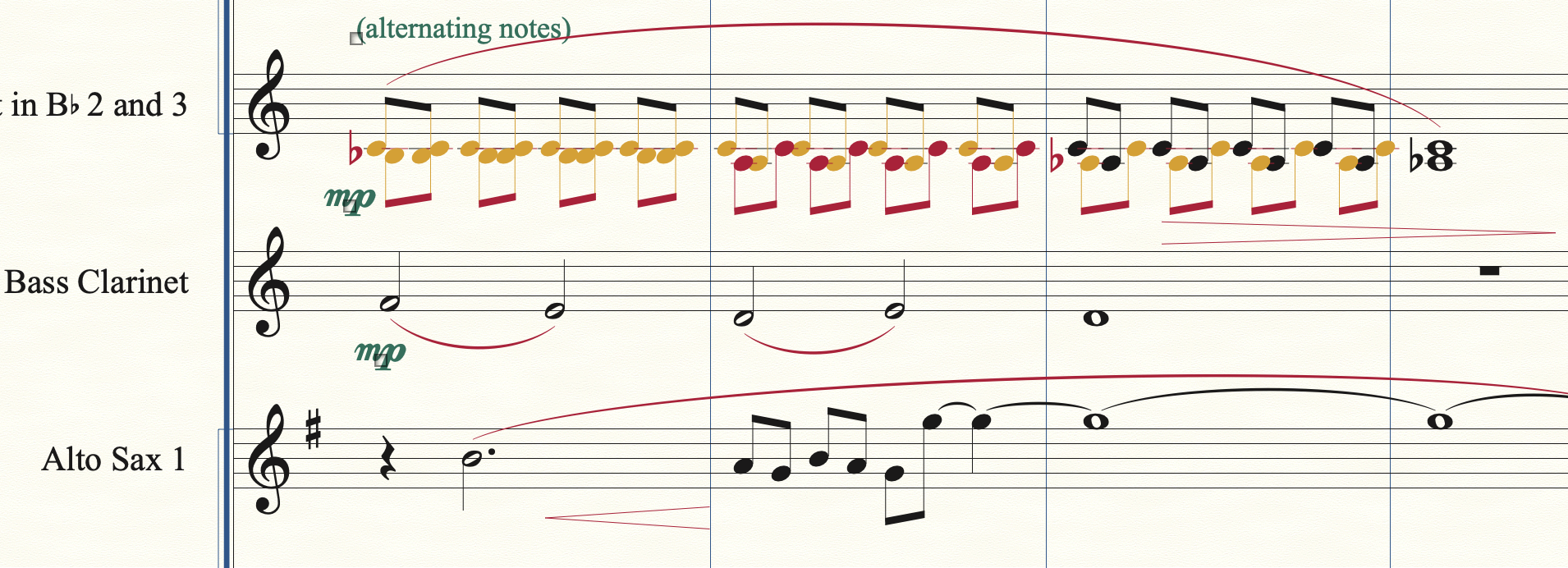
 

Thanks in advance for Finale Community assistance!

--Jeff Traster, Tampa

2 comments

Date Votes
Avatar
0

1) I would use TG Tools to create tremolo notation.


2) In the Staff Attributes I would select the option {Redisplay Accidentals in Other Layers Within Measures}.


3) A few “ending notes” should be moved a little to the right, for the sake of clarity.


Comment actions Permalink
Avatar
0

In addition (for future reference) I would not have used Implode to combine the two parts. I would have...


  1. Changed the lower part to Layer 2 and copied it
  2. With Layer 2 selected, choose View Selected (Layer)
  3. Paste the Layer 2 notes onto the Layer 1 staff
  4. Turn off View Selected


You should then see what you have on your combined staff above. You can the follow Peter's suggestion to turn the eighth-notes into tremolos (tremoli?).

Comment actions Permalink

Please sign in to leave a comment.