New post
Avatar
0

Windows 10 V1909 Finale V26

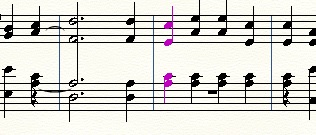
I am trying to correct a file where the highlighted notes cannot be edited. I want to remove the bass clef C. I tried double clicking on the note and it brings up the simple entry as expected but delete does not delete.
The same goes for the rests you can see.
Also how do you add both up and down stems. I have read the one line advice but just cannot get it to work.
Your advice would be appreciated. Thanks
6 comments

Date Votes
Avatar
0

Was this from a scan? I don’t know how you would have gotten the incorrect rests and ties.


If you want up and down stems, enter your notes in layers one (up) and two (down)


To delete only one note of a chord, select the chord, and CTRL-up or down arrow to move the selection to a single note. (Or possibly CMD with the arrows. I don’t know Windows.)

Send me the file at wawoodman at aol dot com, and I’ll have a look.

Comment actions Permalink
Avatar
0

Some of these look as if they might be cross-staff notes rather than notes native to the bass clef--or perhaps it's a layers problem.

Comment actions Permalink
Avatar
0

Which is why I want to see and know the source of the doc.

Again, I will say how utterly moronic it is, that this forum does not accept Finale documents.

Comment actions Permalink
Avatar
0

Imported from a MIDI file and yes the bass clef is all cross stave.

i will email file. Many thanks

Richard  

Comment actions Permalink
Avatar
0

I'm sorry, Richard, but this a real dog's breakfast. No reflection on you! It seems to be how the MIDI was interpreted. There are measures where everything appears to be in layer one. But if I select a measure in the bass staff, and Move Layer 1 to Layer 2, half the notes change and half, don't. Sometimes, none do. Then, if I go to the same measure in the treble staff, and do the same thing, not only do all the notes in the treble move, but the layer 1 note in the bass staff does, as well.


Changing whole rests to real whole rests works sometimes, but they still can't be deleted.


JW Staff Polyphony > split from layers sometimes works, often, doesn't. Neither does Delete Chord lines.


You would have to go through this measure by measure, trying different plugins and layer changes, and it would often be more efficient to delete a measure and re-enter it. In all honesty, for a simple piece like this, it will take less time to enter this in Simple, using QWERTY keyboard, than fixing this score.


Again, sorry!


Comment actions Permalink
Avatar
0

Just as a follow up: The original was a blurry scan of a hymnal page, so it wouldn't work through SmartScore. It was a simple, 20 measure, 4 part hymn. It took me about 20 minutes to key it in.

Comment actions Permalink

Please sign in to leave a comment.