New post
Avatar
0

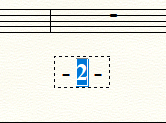
I"m having an issue with the Page Number Offset.  I was able to successfully execute the offset following the user manual's instructions.  I've now realized that I'd like to revert back to the original page numbers prior to me offsetting them.  However, now, when I highlight the page number to use that tool again, the Page Number Offset under the Text menu remains grayed out, and I cannot utilize it.  What am I missing?

6 comments

Date Votes
Avatar
0

To change the page number back, you need to choose to Edit one of the page text fields and need to highlight the page number insert field. Then the offset will not be grayed out and you can reset it.

Comment actions Permalink
Avatar
0

Thanks for the reply!  Unfortunately, that's exactly what I'm trying... and it's not working.  Other troubleshooting suggestions?

Comment actions Permalink
Avatar
0

Be sure to highlight the page insert, not just select it.


Comment actions Permalink
Avatar
0

Thank you again for your help... yes, I am selecting the handle, and then highlighting the number... and still nothing.


Other suggestions?

Comment actions Permalink
Avatar
0

You could use the "Submit a request" link at the top of the page to send your file directly to MakeMusic support to see what they can do with it.

Comment actions Permalink
Avatar
1

How about deleting the page number insert, and start over again?

Comment actions Permalink

Please sign in to leave a comment.