New post
Avatar
0

I am trying to enter a litany into Finale. There are 12 verses, each with a, b, and c parts. The a and b parts have one ending and the c parts have another that then goes back to the refrain/chorus (which has a final ending as well as the ending leading to the next verse). I'm not concerned about Finale playback. I have entered all the lyrics successfully, except I can't get the verses in. Finale will only put one verse under another, not a section under a verse. Is there a way to enter the lyrics without assigning them to verses 1-36 and manually entering the correct verse numbers?

I'm on Mac OS Sierra and Finale 25.5

9 comments

Date Votes
Avatar
0

Sounds like the blues format, and I know what a litany is, but I am having difficulty visualizing what you are after.

Comment actions Permalink
Avatar
0

Can you post a screenshot? Like JAV, I’m having trouble visualizing what you want.

Comment actions Permalink
Avatar
0

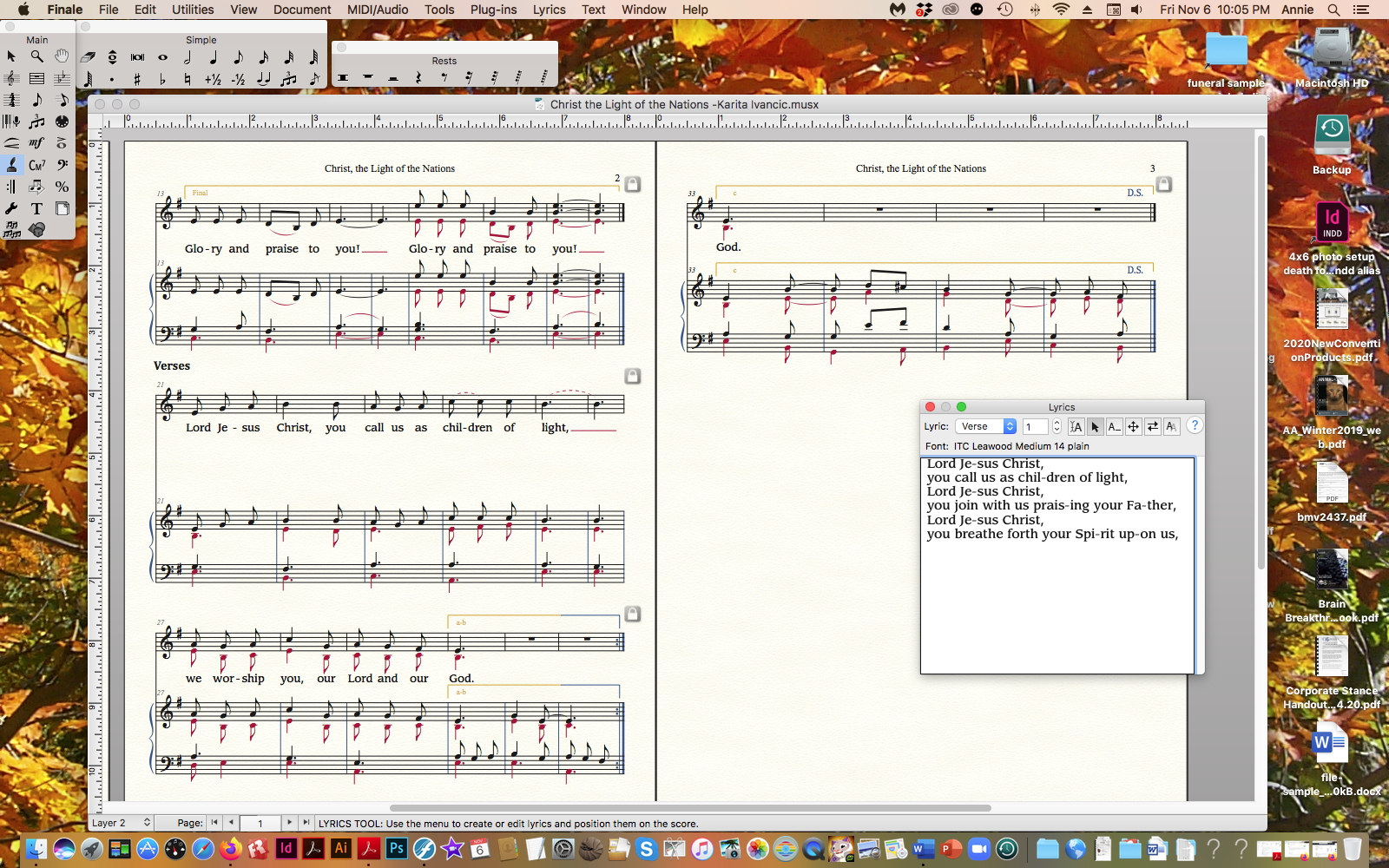
Here is the portion of the litany with the first verse showing in the Lyrics window so you can see what I mean. Verse 1a has been inserted under the notes (but I've not tried to manually put the numbering in yet). 1b is the next two lines in the lyric window. 1c is the final two lines in the lyric window. Both of those (1b and 1c) should go under the same notes as 1a. Finale will not let me do that. I tried putting 1b as a section, but it will not let me put that under the same notes as 1a either. I tried changing Click Assignment to Type into Score and typing into the score but that didn't work either.

My question is: using click assignment, do I have to put 1b in the lyrics window as verse 2 and 1c as verse 3 etc. for the 12 verses (making 36 total) to get it to work or is there a better way?

Comment actions Permalink
Avatar
0

Comment actions Permalink
Avatar
0

If you want to move to the next line of lyrics, it has to be in a different lyric window. I don’t think you can stack them from the same window. You have verse, chorus, and sections, so you can go from 1-12 in each category. You will have to handle the numbering scheme manually at the beginning of each line.


Does that mean you will have 36 lines of text under measures 21-26?

Comment actions Permalink
Avatar
0

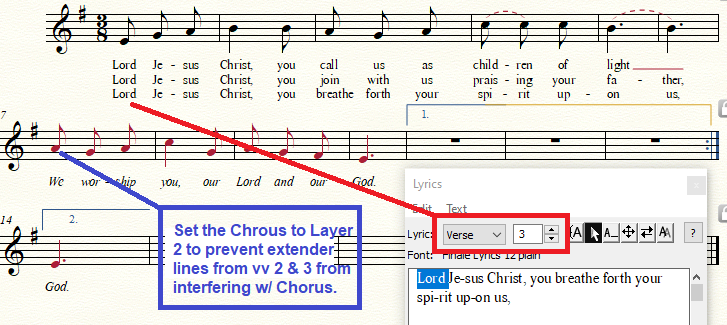
As Mike suggests, put each line of your first verse (a, b, and c) into separate verses in the Lyrics Window. (I even put the refrain into the Chrus pull-down and made it italic. Sorry, just getting artsy.) I hope I understood what you were after. Thank you for the image.


I would add the remaining triple-line verses as pure text beneath the music  area, much as hymnals often add extra stanzas to their hymns, perhaps with the first words of the refrain in italics followed by an ellipsis....


Comment actions Permalink
Avatar
0

i would duplicate the systems as needed, and write the a and b sections straight across.


Instead of going to layer two in m. 7, I would use a hidden grace rest at the end of m. 6, to stop the word extensions. (If you take my suggestion to writer the stanza straight out, that hidden grace rest would go at the end of that, of course!)

Comment actions Permalink
Avatar
0

Thanks to both of you for your suggestions.

Mike, I don't think I understand about writing the a and b sections straight across. Measure 7 in J. Adrian's example above is sung after each line of a, b, and c as a congregational response, not a refrain. (I didn't submit a screen shot of page 1 that has the refrain that comes before Verse 1 and after the response to c in each verse.) I've never used a hidden grace rest—sounds good, though. Is there a reference you can point me to?

In regard to your previous question: To avoid 36 lines of text under measures 21-26 in my screen shot, I think I will put 4 verses under those measures and add text for the other 8 (for liturgical seasons and feasts) under a heading of Additional Verses, using J. Adrian's suggestion of adding text for those.

Comment actions Permalink
Avatar
0

I’m not familiar with the structure, so you and Adrian can work that out!


No reference. I learned that trick from a forum participant many years ago. When you want to stop a word extension from running on, click an eighth grace note in at the stopping point. The pitch doesn’t matter, just be sure it’s in the correct layer. Then tap the R key to turn it into a rest, and the H key to hide it. I use it a lot with “echo” lyrics in barbershop.

Comment actions Permalink

Please sign in to leave a comment.